
ChatGPT for Google CSE
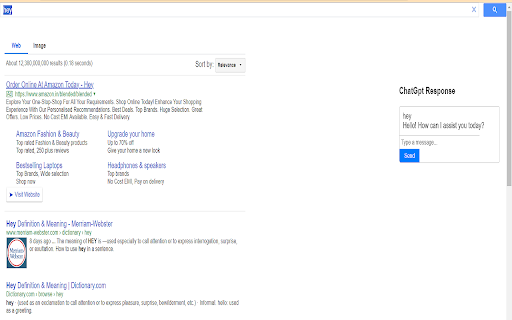
Shows ChatGPT Response on every Google Powered CSE. Power of ChatGPT with Google Search.
As of May 2026, ChatGPT for Google CSE has 65 users in the Workflow & Planning category.
Usersdown 4.4 percent−4.4%
65
65
Ratingno change0%
—
— reviews
Reviewsno change0%
—
Version
1.0
Manifest V3
History
2 snapshotsTracking since Apr 25, 2026.
View as table
| Date | Users | Rating | Reviews | Version |
|---|---|---|---|---|
| Apr 25, 2026 | 68 | — | — | 1.0 |
| May 22, 2026 | 64 | — | — | 1.0 |
| Now | 65 | — | — | 1.0 |
Permissions & access
- Permissions
- None declared
- Host access
- None declared
Screenshots
About
ChatGPT for Google CSE is an extension that changes your search engine to our Google Powered Custom search engine that displays responses from ChatGPT along with search results.

You can also start a chat with AI as soon as you get a response.

Feature:
* Supported by Google Custom Search technology which is the most advanced search engine technology available right now.
* Chat with AI about questions and answers.
* Support official OpenAI API (Both GPT-3.5-Turbo and GPT-3)
* Supports ChatGPT Plus and GPT-4 (GPT-4 requires manual enable in options)
* Feedback for improving AI
* Custom trigger mode
* Copy to clipboard

-----FAQ:-----

1. What is ChatGPT?
It is a language model developed by OpenAI, it is a type of AI capable of understanding and generating human-like text. Having been trained on large amounts of text data from the internet, so has a good understanding of various topics and can perform various natural language processing tasks such as language translation, text summary, and text completion. Basically, it's a computer program that can communicate with people in a way that feels natural and human-like.

2. What is ChatGPT for Google?
It is a browser extension that enhances search engines with the power of AI. It works by showing AI responses along with normal search engine results.

3. Is it  free to use?
Yes, this extension is free to use.

4. What search engines are supported?
Currently, ChatGPT for Google supports Google CSE search engine.

5. Do I need a OpenAI account?
No, you Don't need to have a account to use this extension.

How to Use ChatGPT for Google CSE
1. Install the extension.
2. Accept our search engine my giving approval to change your default search engine whenever asked.
3. Enjoy chatgpt for Google everytime you search using default search.
Technical
- Version
- 1.0
- Manifest
- V3
- Size
- 13.92KiB
- Min Chrome
- 88
- Languages
- 1
- Featured
- No
Metadata
- ID
- flpilgddmpnebaiedbkofhofmplgiiil
- Developer ID
- u7004851574b23b9d7d18c32bb0f91c04
- Developer Email
- [email protected]
- Created
- Aug 21, 2023
- Last Updated (Store)
- Aug 21, 2023
- Last Scraped
- May 22, 2026
- Website
- https://chromeapps.site/
- Support URL
- —
- Privacy Policy
- https://chromeapps.site/privacypolicy.html
Similar extensions
Alternatives to ChatGPT for Google CSE, ranked by description similarity.

ChatGPT For Chrome - ChatGPT assistant
Display ChatGPT response alongside search engine results
20.0K
★ 4.1

ChatGPT for Chrome
Display ChatGPT (or Bard) response alongside search engine results
351
★ 4.3

ChatGPT Assistant - GPT Search
Enhanced OpenAI ChatGPT directly Google search response. Get access to ChatGPT on any website. Chat GPT everywhere.
423
★ 5.0

chatgpt for google: search gpt
Integrate ChatGPT into your search engine! Access ChatGPT on any website.
9.0K
★ 4.6

ChatGPT search
Change default search engine to ChatGPT search.
4.0M
★ 3.3
Workmind - Search & Prompt Assistant
Workmind supercharges your AI experience by providing a suite of features that save you time and increase productivity.
20.0K
★ 4.7

ChatGPT as Search Engine Everywhere
ChatGPT search assistant in a new tab, top popup icon, right click, and share the search result with others. Dark theme supported.
1.0K
★ 4.6

ChatGPT in Google Search
Display ChatGPT answer in Google Search
49
★ 5.0
Data sourced from the Chrome Web Store · last verified May 22, 2026.