
MovieScripter Docs Fountain to PDF
Reads Fountain mark-down from Google Docs and formats it as a PDF screenplay.
As of June 2026, MovieScripter Docs Fountain to PDF has 26 users and a 5.00/5 rating from 1 reviews in the Productivity category.
Usersup 1200.0 percent+1200.0%
26
26
Ratingno change0%
5.00
1 reviews
Reviewsno change0%
1
Version
1.4
Manifest V3
90-day change · In the last 90 days this extension 2 version updates.
History
10 snapshotsTracking since Apr 1, 2026.
View as table
| Date | Users | Rating | Reviews | Version |
|---|---|---|---|---|
| Apr 1, 2026 | 2 | — | — | 1.2 |
| Apr 17, 2026 | 2 | — | — | 1.2 |
| Apr 22, 2026 | 7 | — | — | 1.2 |
| Apr 27, 2026 | 12 | — | — | 1.2 |
| May 5, 2026 | 14 | — | — | 1.2 |
| May 10, 2026 | 19 | — | — | 1.2 |
| May 16, 2026 | 23 | — | — | 1.2 |
| May 22, 2026 | 20 | — | — | 1.2 |
| May 28, 2026 | 24 | — | — | 1.2 |
| Jun 4, 2026 | 23 | — | — | 1.3 |
| Now | 26 | 5.00 | 1 | 1.4 |
Changelog
- Jun 4, 2026description
A free movie screenwriting extension for any chromium-based browser that reads a screenplay written in Fountain mark-down from Google Docs and converts it to a formatted screenplay PDF that can be saved to disk.  The extension does not need Google account access and only requires that the Fountain text is open in Google Docs.

The default Courier Prime font files are included inside the extension so this font does not need to be installed on the system beforehand. This default can be changed to any left-to-right TTF font installed in the underlying operating system.

The extension is self-contained and does not use a backend server. All processing is performed locally in the browser, assuring privacy for all screenplay data. Hovering over the interface options will present tooltips which explain what the options do. Side-by-side dual dialogue formatting is supported.

Notes on loading custom fonts:
Courier Prime is the default PDF font and this will be embedded into generated PDFs. However, this cannot render non-Latin alphabets such as Devanagari, Greek, Chinese or Japanese in a PDF reader so a custom font must be selected for this by clicking the 'Custom font' button and then choosing one of the system fonts from the drop-down box before pressing the button to generate the PDF.

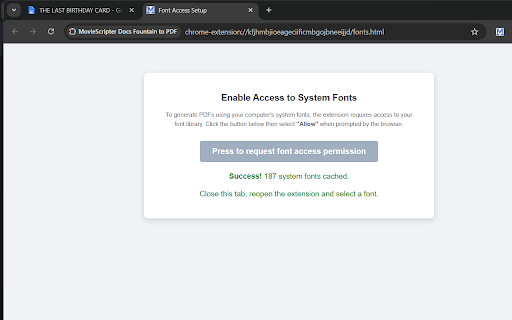
After pressing the custom font button for the first time, a new tab will open for giving the browser access permission to the system fonts but this only needs to be done once. Removing font access permission can be done by opening the page: 'chrome://settings/content/localFonts'

The 'Clear font' button will always return the PDF font to the default of Courier Prime.

Note that any font chosen from the system font list must be stored on the system in TTF format. The OTF and TTC formats will terminate PDF generation with an error message.

If upgrading from extension version 1.2 to 1.3, any custom font that was set in the older version must be selected again from the list of installed system fonts.
A free movie screenwriting extension for any chromium-based browser that reads a screenplay written in Fountain mark-down from Google Docs and converts it to a formatted screenplay PDF that can be saved to disk.  The extension does not need Google account access and only requires that the Fountain text is open in Google Docs.

The default Courier Prime font files are included inside the extension so this font does not need to be installed on the system beforehand. This default can be changed to any left-to-right TTF font installed in the underlying operating system.

The extension is self-contained and does not use a backend server. All processing is performed locally in the browser, assuring privacy for all screenplay data. Hovering over the interface options will present tooltips which explain what the options do. Side-by-side dual dialogue formatting is supported.

Notes on loading custom fonts:
Courier Prime is the default PDF font and this will be embedded into generated PDFs. However, this cannot render non-Latin alphabets such as Devanagari, Greek, Chinese or Japanese in a PDF reader so a custom font must be selected for this by clicking the 'Custom font' button and then choosing one of the system fonts from the drop-down box before pressing the button to generate the PDF.

After pressing the custom font button for the first time, a new tab will open for giving the browser access permission to the system fonts but this only needs to be done once. Removing font access permission can be done by opening the page: 'chrome://settings/content/localFonts'

The 'Clear font' button will always return the PDF font to the default of Courier Prime.

Note that any font chosen from the system font list must be stored on the system in TTF format. The OTF and TTC formats will terminate PDF generation with an error message.

when upgraded from version 1.2 to a higher version, any custom font that was set in the older version must be selected again from the list of installed system fonts.

1.4 is a patch release. Previous versions were failing to parse Fountain scripts if they contained a [[...]] comment.
- May 28, 2026description
A free movie screenwriting extension that reads a screenplay written in Fountain mark-down from Google Docs and converts it to a formatted screenplay PDF that can be saved to disk.

Courier Prime is the default PDF font but this can be changed to any left-to-right language font including non-Latin alphabets such as Devanagari, Greek, Cyrillic, Chinese, Japanese, Thai etc. The extension does not need Google account access and only requires that the Fountain text is open in Google Docs.

The extension is self-contained and does not use a backend server. All processing is performed locally in the browser, assuring complete privacy for screenplay data. Mousing over the interface options will present tooltips which explain what the options do. Side-by-side dual dialogue formatting is supported.

Notes on loading a custom font:
Courier Prime is the default PDF font and this will be embedded into generated PDFs. However, this cannot render non-Latin alphabets like Devanagari or Chinese in a PDF reader so a custom font must be loaded for this by clicking the 'Custom font' button. This opens the browser's chooser and a folder must be selected (not files). The folder selected must contain from one to four .ttf font files (.otf is not supported). For an alphabet like English, there will typically be four .ttf files in the folder; one for regular, one for bold, one for italic and one for bold-italic. For a non-Latin alphabet, one or two files are typically enough; one for regular and one for bold text.

The free Google Fonts Noto Sans family is a good choice for non-Latin alphabets. For example, the font files used for Devanagari could be 'NotoSansDevanagari-Regular.ttf' and 'NotoSansDevanagari-Bold.ttf'. Also note that font setup needs to be done only once since all settings are remembered between extension and browser sessions.
A free movie screenwriting extension for any chromium-based browser that reads a screenplay written in Fountain mark-down from Google Docs and converts it to a formatted screenplay PDF that can be saved to disk.  The extension does not need Google account access and only requires that the Fountain text is open in Google Docs.

The default Courier Prime font files are included inside the extension so this font does not need to be installed on the system beforehand. This default can be changed to any left-to-right TTF font installed in the underlying operating system.

The extension is self-contained and does not use a backend server. All processing is performed locally in the browser, assuring privacy for all screenplay data. Hovering over the interface options will present tooltips which explain what the options do. Side-by-side dual dialogue formatting is supported.

Notes on loading custom fonts:
Courier Prime is the default PDF font and this will be embedded into generated PDFs. However, this cannot render non-Latin alphabets such as Devanagari, Greek, Chinese or Japanese in a PDF reader so a custom font must be selected for this by clicking the 'Custom font' button and then choosing one of the system fonts from the drop-down box before pressing the button to generate the PDF.

After pressing the custom font button for the first time, a new tab will open for giving the browser access permission to the system fonts but this only needs to be done once. Removing font access permission can be done by opening the page: 'chrome://settings/content/localFonts'

The 'Clear font' button will always return the PDF font to the default of Courier Prime.

Note that any font chosen from the system font list must be stored on the system in TTF format. The OTF and TTC formats will terminate PDF generation with an error message.

If upgrading from extension version 1.2 to 1.3, any custom font that was set in the older version must be selected again from the list of installed system fonts.
Permissions & access
- Permissions
- activeTab
- Host access
- None declared
Screenshots



About
A free movie screenwriting extension for any chromium-based browser that reads a screenplay written in Fountain mark-down from Google Docs and converts it to a formatted screenplay PDF that can be saved to disk.  The extension does not need Google account access and only requires that the Fountain text is open in Google Docs.

The default Courier Prime font files are included inside the extension so this font does not need to be installed on the system beforehand. This default can be changed to any left-to-right TTF font installed in the underlying operating system.

The extension is self-contained and does not use a backend server. All processing is performed locally in the browser, assuring privacy for all screenplay data. Hovering over the interface options will present tooltips which explain what the options do. Side-by-side dual dialogue formatting is supported.

Notes on loading custom fonts:
Courier Prime is the default PDF font and this will be embedded into generated PDFs. However, this cannot render non-Latin alphabets such as Devanagari, Greek, Chinese or Japanese in a PDF reader so a custom font must be selected for this by clicking the 'Custom font' button and then choosing one of the system fonts from the drop-down box before pressing the button to generate the PDF.

After pressing the custom font button for the first time, a new tab will open for giving the browser access permission to the system fonts but this only needs to be done once. Removing font access permission can be done by opening the page: 'chrome://settings/content/localFonts'

The 'Clear font' button will always return the PDF font to the default of Courier Prime.

Note that any font chosen from the system font list must be stored on the system in TTF format. The OTF and TTC formats will terminate PDF generation with an error message.

when upgraded from version 1.2 to a higher version, any custom font that was set in the older version must be selected again from the list of installed system fonts.

1.4 is a patch release. Previous versions were failing to parse Fountain scripts if they contained a [[...]] comment.
Technical
- Version
- 1.4
- Manifest
- V3
- Size
- 324KiB
- Min Chrome
- 88
- Languages
- 1
- Featured
- No
Metadata
- ID
- flmkbphhcfkmpofcgnbcndldfpcgbhen
- Developer ID
- u1b6ea70a6cba7b2c30d0f2c19573bebf
- Developer Email
- [email protected]
- Created
- Mar 22, 2026
- Last Updated (Store)
- May 31, 2026
- Last Scraped
- Jun 10, 2026
- Website
- moviescripter.org
- Support URL
- —
Data sourced from the Chrome Web Store · last verified Jun 10, 2026.