
Keyboard Typing Simulator
Intelligent typing simulator extension for web developers with adjustable speed controls
As of June 2026, Keyboard Typing Simulator has 967 users and a 3.57/5 rating from 7 reviews in the Productivity category.
Usersup 29.8 percent+29.8%
967
967
Ratingup 7.2 percent+7.2%
3.57
7 reviews
Reviewsup 16.7 percent+16.7%
7
Version
2.3.0
Manifest V3
History
5 snapshotsTracking since Apr 19, 2026.
View as table
| Date | Users | Rating | Reviews | Version |
|---|---|---|---|---|
| Apr 19, 2026 | 745 | 3.33 | 6 | 2.3.0 |
| May 4, 2026 | 815 | 3.57 | 7 | 2.3.0 |
| May 13, 2026 | 888 | 3.57 | 7 | 2.3.0 |
| May 25, 2026 | 924 | 3.57 | 7 | 2.3.0 |
| Jun 7, 2026 | 951 | 3.57 | 7 | 2.3.0 |
| Now | 967 | 3.57 | 7 | 2.3.0 |
Permissions & access
- Permissions
- scriptingactiveTab
- Host access
- None declared
Screenshots

About
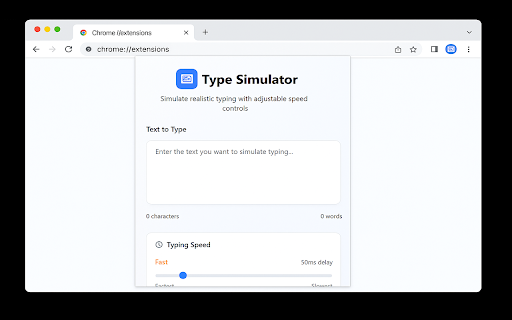
Transform any clipboard text into lifelike, human-style typing across websites. Control speed, timing, sounds, and field detection—no more robotic pastes.

✨ What’s New in v2.3.0

Smart Field Detection – Automatically find and prioritize all input fields on the page

Batch Typing – Fill multiple forms in one click with custom ordering

Recording Mode – Hide the extension UI for seamless video demos

⚠️ Note on Compatibility
Works with input fields, textareas, and most editable areas (like Google Docs or text boxes in Google Slides).
Not supported in canvas-based editors (e.g., main Google Slides canvas outside text boxes).

🚀 Core Features

Authentic Human Typing – Realistic speed variation, natural mistakes, and auto-corrections

Precision Speed Control – Adjustable from ultra-slow to lightning fast with per-character delays

Full Playback Control – Start, pause, resume, or stop typing anytime

Typing Sounds – Optional keystroke audio for immersive demos

Two Powerful Modes:
– Basic Typing – Single-field focus with classic controls
– Advanced Typing – Auto-detect and batch fill multiple fields with timing and delays

🎯 Perfect For

Content creators – Tutorial and demo recordings

Developers – Form testing and automation

Presenters – Polished, paste-free video walkthroughs

Repetitive Data Entry – Speed up workflows on paste-blocked sites

💼 Why You’ll Love It
Type Simulator elevates form-filling from mechanical to organic, delivering professional-grade demos and efficient automation. Whether you need realistic typing for user guides or rapid batch entry for testing, this extension adapts to your workflow.

Install now and leverage v2.3.0’s Smart Field Detection and Recording Mode to streamline your demos and automation—experience precision typing anywhere it’s supported!
Technical
- Version
- 2.3.0
- Manifest
- V3
- Size
- 350KiB
- Min Chrome
- 88
- Languages
- 1
- Featured
- No
Metadata
- ID
- flieihjecdghlbgbmjbilfcabbdplanh
- Developer ID
- ub10481d5cfa248dc3853eacccaca035b
- Developer Email
- [email protected]
- Created
- Apr 17, 2025
- Last Updated (Store)
- Sep 9, 2025
- Last Scraped
- Jun 7, 2026
- Website
- —
- Support URL
- —
Similar extensions
Alternatives to Keyboard Typing Simulator, ranked by description similarity.

Paste2Type
Simulate human typing
4.0K
★ 2.1

Human Paste
Paste text like a human typing with adjustable speed.
565
★ 3.5

Human Typing Simulator
Simulate realistic human typing on any website. Configurable WPM, natural timing, QWERTY typo simulation, and keyboard shortcuts.
278
★ 5.0

KeyStrokes - Realistic Typing Simulation
Fill out forms with a realistic typing animation for demos, tutorials, and presentations
83
★ 4.5

Typing Simulator
Simulates human typing from clipboard content
242
★ 5.0

DocTyper: Most Advanced Human Typer for Google Docs & Slides
Simulates insanely realistic human-like typing in Google Docs and Slides.
1.0K
★ 4.6

HumanTyper: Realistic Auto Typing
Paste text like a human! HumanTyper simulates natural keystrokes with speed control, random delays, and smart typing patterns.
3.0K
★ 3.8

EchoType Human Keystroke Typer
Lets you type text into any focused textbox inputs, textareas, rich editors, even Google Docs using realistic human keystrokes.
595
Data sourced from the Chrome Web Store · last verified Jun 7, 2026.