
ADMScroll — Shorts Auto Scroll & Player
Hands-free YouTube Shorts: auto-advances only at a Short's real end, smart skip filters, plus Explore tools — PiP, player, insights.
As of June 2026, ADMScroll — Shorts Auto Scroll & Player has 5 users in the Entertainment category.
Usersno change0%
5
5
Ratingno change0%
—
— reviews
Reviewsno change0%
—
Version
2.1.7
Manifest V3
90-day change · In the last 90 days this extension 1 version update.
History
2 snapshotsTracking since Jun 2, 2026.
Not enough history yet for this metric — the chart fills in as we collect more snapshots.
View as table
| Date | Users | Rating | Reviews | Version |
|---|---|---|---|---|
| Jun 2, 2026 | — | — | — | 2.0.1 |
| Jun 8, 2026 | — | — | — | 2.0.1 |
| Now | 5 | — | — | 2.1.7 |
Permissions & access
- Permissions
- storageactiveTab
- Host access
- https://www.youtube.com/*, https://m.youtube.com/*
Screenshots


About
ADMScroll makes watching YouTube Shorts comfortable and under your control.

Free (Start):
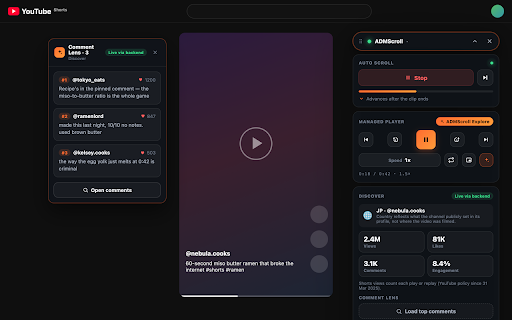
• Auto Scroll — the next Short starts by itself, but only after the current one truly ends (no blind timer).
• Start/Stop and "Next" from the popup and the on-page widget, plus a hotkey.
• Smart filters: skip Shorts by channel, keyword or hashtag (up to 5 rules).
• Pause when comments open. Multilingual UI. Works without an account.

Explore (free 2-hour trial):
• Picture-in-Picture — watch over your other windows.
• Managed player: speed, ±5s seek, loop.
• Video Insights: views, likes, comments, engagement (via the official YouTube Data API on our server).
• Comment Lens — top comments of the current Short.
• Unlimited smart filters.

ADMScroll does not download videos, does not circumvent YouTube restrictions, and uses only standard browser APIs. Free-tier settings are stored locally.

Privacy policy: https://scrollshorts.ru/privacy
Technical
- Version
- 2.1.7
- Manifest
- V3
- Size
- 101KiB
- Min Chrome
- 88
- Languages
- 1
- Featured
- No
Metadata
- ID
- flffjdmebnnafohlfonifkfccjkaomjm
- Developer ID
- u0daf69186aacb36dfe0da780105d916b
- Developer Email
- [email protected]
- Created
- Jun 1, 2026
- Last Updated (Store)
- Jun 5, 2026
- Last Scraped
- Jun 8, 2026
- Website
- —
- Support URL
- https://scrollshorts.ru/
- Privacy Policy
- https://scrollshorts.ru/privacy
Data sourced from the Chrome Web Store · last verified Jun 8, 2026.