
FocusGuard - Pomodoro Timer & Break Reminder
Stay productive with smart Pomodoro sessions, break reminders, and focus tracking. 8 free sessions/day.
As of June 2026, FocusGuard - Pomodoro Timer & Break Reminder has 2 users in the Productivity category.
Usersno change0%
2
2
Ratingno change0%
—
— reviews
Reviewsno change0%
—
Version
1.0.0
Manifest V3
History
5 snapshotsTracking since Apr 29, 2026.
View as table
| Date | Users | Rating | Reviews | Version |
|---|---|---|---|---|
| Apr 29, 2026 | — | — | — | 1.0.0 |
| May 8, 2026 | 2 | — | — | 1.0.0 |
| May 16, 2026 | 1 | — | — | 1.0.0 |
| May 25, 2026 | — | — | — | 1.0.0 |
| Jun 4, 2026 | 3 | — | — | 1.0.0 |
| Now | 2 | — | — | 1.0.0 |
Permissions & access
- Permissions
- storagealarmsnotifications
- Host access
- None declared
Screenshots



About
FocusGuard - Your Personal Focus & Productivity Timer

Stop losing hours to distractions. FocusGuard uses the proven Pomodoro Technique to help you work in focused bursts with strategic breaks. Perfect for developers, students, writers, and anyone who wants to get more done.

HOW IT WORKS
1. Click the FocusGuard icon to open the timer
2. Press Start to begin a 25-minute focus session
3. Work without distractions until the timer ends
4. Take a 5-minute break (or 15 minutes after 4 sessions)
5. Repeat and watch your productivity soar

SMART TIMER FEATURES
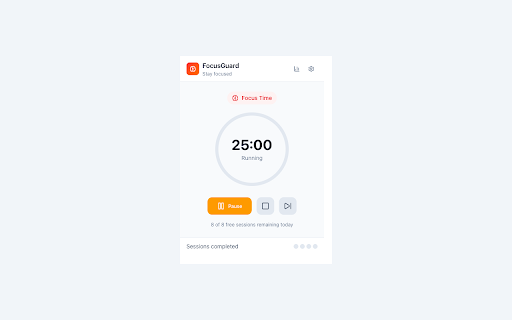
• Clean, minimalist circular timer display
• Visual progress ring shows session progress
• Badge counter shows remaining minutes
• Desktop notifications when sessions complete
• Pause and resume anytime

TRACK YOUR PROGRESS
• See today's completed focus sessions
• View total focus time
• Track breaks taken
• Weekly statistics with visual charts
• Session dots show progress toward long break

FULLY CUSTOMIZABLE
• Focus duration: 1-120 minutes (default 25)
• Short break: 1-30 minutes (default 5)
• Long break: 1-60 minutes (default 15)
• Sessions before long break: 1-10 (default 4)
• Auto-start breaks or focus sessions
• Sound and notification controls

BEAUTIFUL DESIGN
• Clean, modern interface
• Light, dark, and system themes
• Red accent for focus, green for breaks
• Responsive and smooth animations
• Professional minimalist aesthetic

PRIVACY FIRST
• All data stored locally in your browser
• No account required
• No data sent to external servers
• No tracking or analytics

FREE TIER
• 8 focus sessions per day
• All features included
• Unlimited breaks
• No time limit

PRO VERSION ($9.99 one-time)
• Unlimited focus sessions
• Detailed weekly statistics
• Priority support
• One-time purchase - no subscription

PERFECT FOR
• Software developers (deep work coding sessions)
• Students (studying and exam prep)
• Writers and content creators
• Remote workers
• Anyone fighting procrastination
• Freelancers managing their time

THE POMODORO TECHNIQUE
Developed by Francesco Cirillo, this time management method uses a timer to break work into intervals (traditionally 25 minutes) separated by short breaks. This technique:
• Reduces mental fatigue
• Increases focus and concentration
• Creates sustainable work habits
• Helps track time spent on tasks
• Combats procrastination

QUICK START
1. Install FocusGuard
2. Click the timer icon in your toolbar
3. Press the Start button
4. Focus on your task until the break notification
5. Take a short break, then repeat

SUPPORT
Questions or feedback? We'd love to hear from you!
Email: [email protected]

PERMISSIONS EXPLAINED
• "storage" - To save your settings and statistics locally
• "alarms" - To run the timer accurately in the background
• "notifications" - To alert you when sessions complete

Built with care for people who want to focus on what matters.
Technical
- Version
- 1.0.0
- Manifest
- V3
- Size
- 108KiB
- Min Chrome
- 88
- Languages
- 1
- Featured
- No
Metadata
- ID
- flabphbijkcfmdikjjnjhmgepfhmllhn
- Developer ID
- u4faec671da671c6f66818c7a0ebbcc97
- Developer Email
- [email protected]
- Created
- Dec 16, 2025
- Last Updated (Store)
- Dec 16, 2025
- Last Scraped
- Jun 4, 2026
- Website
- —
- Support URL
- —
Similar extensions
Alternatives to FocusGuard - Pomodoro Timer & Break Reminder, ranked by description similarity.

Pomodoro Focus Timer
A simple and beautiful Pomodoro timer to help you focus.
56
★ 5.0

Focus Timer - Pomodoro
Focus Timer app to help you focus and work efficiently
4
★ 5.0

Pomodoro Timer
Persistent Pomodoro timer with badge countdown and sound alerts.
9
★ 5.0

Pomodoro Focus Timer
A simple Pomodoro timer helps you focus and improve efficiency.
17

Pomotime
A simple pomodoro timer for productivity
3
★ 5.0

Simply Pomodoro
Beautiful, modern Pomodoro timer with circular progress, customizable settings, and smart notifications to boost your productivity.
7

Focusora
Block distractions, run deep work sessions, journal your progress, and build focus habits with Pomodoro timer & rewards.
—
★ 5.0

Pomodoro Timer
A simple, customizable Pomodoro timer Chrome extension to help you focus and manage your work/break cycles.
3
Data sourced from the Chrome Web Store · last verified Jun 4, 2026.