
SuperCal
Turn Google Calendar into a fully-fledged task organizer
As of June 2026, SuperCal has 1 users in the Productivity category.
Usersno change0%
1
1
Ratingno change0%
—
— reviews
Reviewsno change0%
—
Version
1.0.1
Manifest V3
History
2 snapshotsTracking since May 24, 2026.
Not enough history yet for this metric — the chart fills in as we collect more snapshots.
View as table
| Date | Users | Rating | Reviews | Version |
|---|---|---|---|---|
| May 24, 2026 | — | — | — | 1.0.1 |
| May 30, 2026 | — | — | — | 1.0.1 |
| Now | 1 | — | — | 1.0.1 |
Permissions & access
- Permissions
- storageidentity
- Host access
- https://calendar.google.com/*, https://www.googleapis.com/*
Screenshots
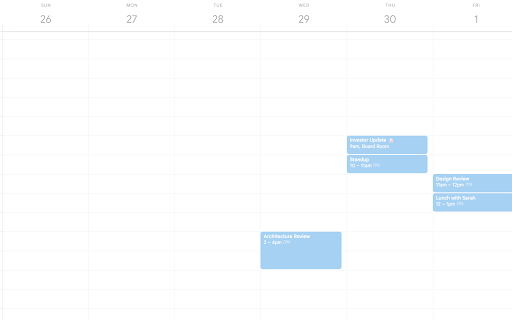


About
SuperCal adds the task-management features Google Calendar is missing — without requiring any setup, accounts, or configuration. Just install and your
  calendar gets smarter.

  Today's Column Highlight
  Always know where you are. Today's column is softly highlighted so it stands out at a glance, without changing any layout.

  Content Indicators
  See at a glance which events have descriptions or notes. A small emoji appears on events with content, so you never forget the briefing document or prep
  notes attached to a meeting.

  Day Focus Mode
  Click any day column header to dim all other days. Focus on what's happening today (or any specific day) without the noise of the rest of the week. Click
  again to reset.

  Bulk Move
  Select multiple events with checkboxes, then move them all to another day with a single click. Supports quick-picks (tomorrow, next week) or a custom
  date. Ideal for rescheduling a busy day.

  Day Colors
  Assign a color to any day of the week. Useful for color-coding recurring schedules — client days, focus days, admin days — at a glance.

  Event Tooltips
  Hover any event to see a rich tooltip with the full title, time, location, and description — without opening the event. Saves clicks.

  Busy Day Dots
  The mini calendar in the sidebar shows a dot under days that have events, so you can see busy vs. free days when navigating weeks.

  Auto-Hide Toolbars
  GCal's toolbars hide automatically and reappear on hover, giving you more vertical space for your calendar grid.

  Each feature has its own toggle in the extension popup. Turn on only what you want.

  Privacy: SuperCal does not collect or transmit your calendar data. It reads events only to power its features, stores only your on/off preferences
  locally, and never shares data with third parties. See the full privacy policy for details.
Technical
- Version
- 1.0.1
- Manifest
- V3
- Size
- 45.56KiB
- Min Chrome
- 88
- Languages
- 1
- Featured
- No
Metadata
- ID
- fklngkmheglnlggcnmnfnoabkpepibfb
- Developer ID
- uc67648ba8b6f4a13b6000a6a09d00fa7
- Developer Email
- [email protected]
- Created
- May 23, 2026
- Last Updated (Store)
- May 23, 2026
- Last Scraped
- Jun 14, 2026
- Website
- —
- Support URL
- —
- Privacy Policy
- —
Data sourced from the Chrome Web Store · last verified Jun 14, 2026.