
SVGmoji
Browser extension for quick access to emoji images from popular libraries
As of May 2026, SVGmoji has 30 users in the Accessibility category.
Usersup 20.0 percent+20.0%
30
30
Ratingno change0%
—
— reviews
Reviewsno change0%
—
Version
2.0.0
Manifest V3
History
1 snapshotsTracking since May 22, 2026.
View as table
| Date | Users | Rating | Reviews | Version |
|---|---|---|---|---|
| May 22, 2026 | 25 | — | — | 2.0.0 |
| Now | 30 | — | — | 2.0.0 |
Permissions & access
- Permissions
- contextMenusstorageclipboardWritenotifications
- Host access
- None declared
Screenshots


About
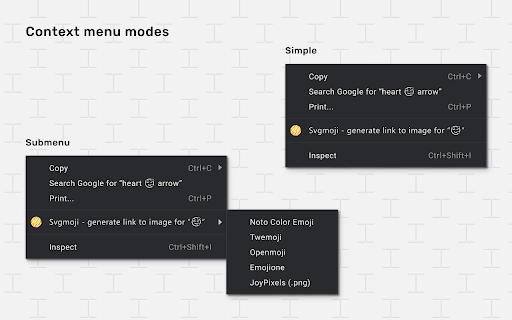
How It Works: 1. Select any text containing emoji on a webpage 2. Right-click to open the context menu 3. Click "Copy emoji image" to get the image or link Use Cases: • 📃 Content Creators: Embed always up-to-date emoji images in Notion, Confluence, or Obsidian pages by using direct links. Keep your documentation and notes visually appealing and synchronized with the latest emoji designs. • 🖌️ Designers: Quickly copy emoji as images for use in Figma, Adobe Photoshop, or Canva. Enhance your designs with high-quality emoji without manual downloads. • 🌐 Social Media Managers: Easily grab emoji images or links to use in social media posts, marketing materials, or community content. Ensure consistent branding across platforms. • 🧑💻 Developers: Use emoji image links in your READMEs, project documentation, or website content. Add visual flair to your projects with minimal effort. Features: • 🎯 Quick access to emoji images through context menu • 🖼️ Support for multiple emoji libraries: ├ Twemoji (Twitter Emoji) ├ Noto Color Emoji (Google) ├ Openmoji ├ Emojione (Legacy) └ JoyPixels (PNG format) • 📋 Copy as image or direct link • 📜 Copy history • 🎛️ Flexible settings Settings: • Source Priority: Choose your preferred emoji library order • Context Menu Mode: Show/hide source selection in context menu • Copy Mode: Toggle between copying image or direct link • History: View and manage your emoji copy history
Technical
- Version
- 2.0.0
- Manifest
- V3
- Size
- 181KiB
- Min Chrome
- 88
- Languages
- 1
- Featured
- No
Metadata
- ID
- fkfpnaflphlcmdjbafoniiaidjcccngh
- Developer ID
- u6c46e83e43996045cc309fb3863cec24
- Developer Email
- [email protected]
- Created
- Jan 21, 2021
- Last Updated (Store)
- Mar 26, 2025
- Last Scraped
- May 22, 2026
- Website
- —
- Support URL
- https://github.com/said-m/svgmoji/issues
- Privacy Policy
- —
Similar extensions
Alternatives to SVGmoji, ranked by description similarity.

PicMo Chrome
Emoji selector for Chrome
36
★ 5.0

Emoji Favicon Randomizer
emoji favicon randomizer with categories, favorites, auto-timer, and many for the ultimate fun browsing experience!
2
★ 5.0

Click to Copy - Unified Content Grabbing
A focused tool to instantly capture any web content—text, links, or image files—using a single Alt+Click gesture.
3

Emoji Widget
Widget for picking Emojis
75
★ 4.7

Demoji
Expose a text description or emoji next to emoji images. Does not process free-text emoji.
23
★ 4.0

Emoji Copy & Paste
Just copy and paste emojis!
21
★ 5.0

pikka: Web Asset Picker
Easily pick, grab, and extract assets from any webpage.
25
★ 4.5

Copy Please! - Clean, Format & Auto Copy Text Anywhere
Automatically copy selected text to clipboard and allow copying by removing copy protection.
86
★ 5.0
Data sourced from the Chrome Web Store · last verified May 22, 2026.