
Stark Accessibility Checker
Find and fix compliance issues in record time with automated checks and smart suggestions.
As of June 2026, Stark Accessibility Checker has 20,000 users and a 3.79/5 rating from 19 reviews in the Developer Tools category.
Usersno change0%
20.0K
20,000
Ratingno change0%
3.79
19 reviews
Reviewsno change0%
19
Version
2.35.0
Manifest V3
90-day change · In the last 90 days this extension 4 version updates.
History
5 snapshotsTracking since Apr 2, 2026.
View as table
| Date | Users | Rating | Reviews | Version |
|---|---|---|---|---|
| Apr 2, 2026 | 20.0K | 3.79 | 19 | 2.33.0 |
| Apr 14, 2026 | 20.0K | 3.79 | 19 | 2.33.2 |
| Apr 28, 2026 | 20.0K | 3.79 | 19 | 2.33.2 |
| May 14, 2026 | 20.0K | 3.79 | 19 | 2.33.3 |
| Jun 10, 2026 | 20.0K | 3.79 | 19 | 2.34.0 |
| Now | 20.0K | 3.79 | 19 | 2.35.0 |
Permissions & access
- Permissions
- storageactiveTabscripting
- Host access
- *://*/*
Screenshots



About
Tired of manually checking spreadsheets, messy handovers, and expensive retrofitting? The all-new Stark Suite is a powerful combination of integrated tools that help you streamline your accessibility workflow.

Now, you can create and test accessible software in record time. Whether you’re building a website, online shop, mobile app, or SaaS product, Stark gives every designer, engineer, PM, and QA expert the manual and automated tools to make it accessible with ease.

With tools like Contrast Checker, Focus Order, Alt-Text Annotations, Vision Simulator, and more all in one place, you can find accessibility issues in a design before it goes into production—or quickly analyze and fix what’s already in flight. Get started for free today!

What’s New
We’re thrilled to introduce the all-new Stark Suite, a powerful combination of fully redesigned plugins, even more browser extensions, and all-new tools to streamline you and your team’s accessibility workflow. New tools include: Alt-Text Annotations, Typography Analysis, Touch Targets and more.

Contrast Checker with Color Suggestions
Check your contrast ratios and get smart color suggestions to ensure your design always adheres to WCAG AA or AAA requirements.

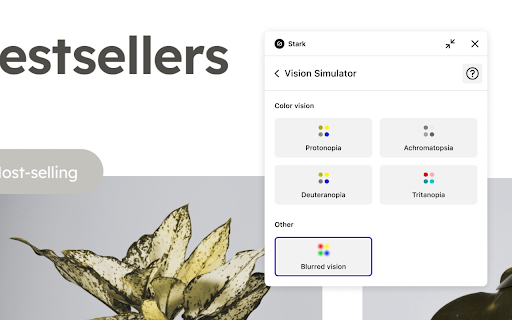
Vision Simulator
Simulate what your design may look like for people with different types of vision, including 4 different forms of color blindness and 6 other forms of impaired vision.

Landmarks and Focus Order
Design for easy navigation with Landmarks and Focus Order, allowing anyone to experience your product with screen readers and other assistive technologies.

Alt-Text Annotations
Get actionable tips for writing alt text optimized for screen-reading tools and even SEO ranking with search engines like Google. We’ll even let you know when an image is decorative and doesn’t require alt text.

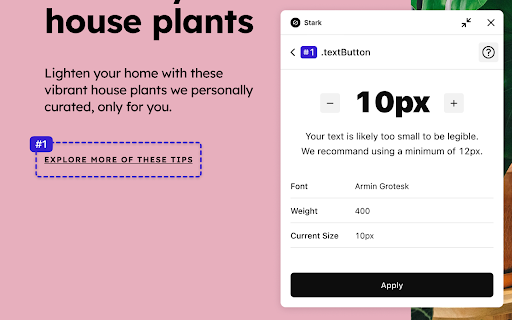
Typography Analysis
Analyze the topography in a design to check that your selected fonts are legible and readable for people with different vision types.

Touch Targets
Create touch targets large enough for everyone to complete tasks in your web and mobile interfaces with a tap.

Live Preview
Everything you change, fix or update in Stark reflects directly in your design for maximum efficiency. With Live Preview you can test accessible contrast updates, color suggestions and font-sizes directly in your browser using your live code.

Let Stark help you streamline your workflow to get your team to long-term, sustained accessibility compliance faster. Learn more about us at https://getstark.co
Technical
- Version
- 2.35.0
- Manifest
- V3
- Size
- 2.67MiB
- Min Chrome
- 88
- Languages
- 1
- Featured
- Yes
Metadata
- ID
- fkfaapnmfippddbeemjjbclenphooipm
- Developer ID
- uaac6813f2eeef86793b4c466ddf9cce1
- Developer Email
- [email protected]
- Created
- May 25, 2021
- Last Updated (Store)
- Jun 8, 2026
- Last Scraped
- Jun 19, 2026
- Website
- getstark.co
- Support URL
- https://www.getstark.co/support
- Privacy Policy
- https://www.getstark.co/privacy
Similar extensions
Alternatives to Stark Accessibility Checker, ranked by description similarity.

Accessibility Checker
The ultimate website accessibility checker. Scans interactive elements and color contrast. Exports instant HTML/JSON/CSV reports.
75

CompliQ - Accessibility Simulator
Simulate accessibility issues like color-blindness, keyboard navigation, and screen readers to build inclusive web experiences.
—

A11y Live - Accessibility Testing Tool
Real-time accessibility testing tool that monitors DOM changes and provides instant feedback on WCAG compliance violations.
27

Designer Toolkit
Toolkit for designers and developers. Pick colors, grab fonts, check WCAG contrast, simulate color blindness and more.
83

Accessibility Chrome Extension
The ultimate accessibility checker. Audit websites for WCAG 2.2, ADA, and Section 508 compliance in one click.
41

RapidA11y
Accessibility testing tool for manual testers.
4

A11y Fix-It Assistant
Identifies common accessibility issues and suggests interactive fixes.
20
★ 5.0

HalfAccessible - Accessibility Toolkit
Accessibility Testing Toolkit, Target Size Checker, Text Spacing, Automated Accessibility & Color Issues, HTML Code Copier
1.0K
★ 5.0
Data sourced from the Chrome Web Store · last verified Jun 19, 2026.