
Copy as Markdown
Copy Link or Image as Markdown code
As of June 2026, Copy as Markdown has 30,000 users and a 4.26/5 rating from 96 reviews in the Workflow & Planning category.
Usersdown 25.0 percent−25.0%
30.0K
30,000
Ratingdown 1.2 percent−1.2%
4.26
96 reviews
Reviewsup 10.3 percent+10.3%
96
Version
3.7.0
Manifest V3
90-day change · In the last 90 days this extension lost 10.0K users, 2 version updates, changed permissions.
History
9 snapshotsTracking since Apr 17, 2026.
View as table
| Date | Users | Rating | Reviews | Version |
|---|---|---|---|---|
| Apr 17, 2026 | 40.0K | 4.31 | 87 | 3.5.0 |
| Apr 23, 2026 | 40.0K | 4.28 | 89 | 3.5.0 |
| Apr 28, 2026 | 40.0K | 4.28 | 90 | 3.6.0 |
| May 8, 2026 | 40.0K | 4.29 | 91 | 3.6.0 |
| May 14, 2026 | 40.0K | 4.29 | 92 | 3.6.0 |
| May 16, 2026 | 40.0K | 4.30 | 93 | 3.6.0 |
| Jun 2, 2026 | 40.0K | 4.27 | 94 | 3.6.0 |
| Jun 5, 2026 | 40.0K | 4.25 | 95 | 3.7.0 |
| Jun 20, 2026 | 40.0K | 4.26 | 96 | 3.7.0 |
| Now | 30.0K | 4.26 | 96 | 3.7.0 |
Changelog
- Jun 2, 2026description
Copy as Markdown is a browser extension that helps you copy the following things as Markdown to your system clipboard:

On the web page:

- Selection Text as Markdown
- A Link on the Page
- An Image on the Page, with or without wrapping link

Exporting tabs in the current window, either all or highlighted tabs:

- Current Tab as Link
- List of Links
- Task List (for GitHub-Flavored Markdown)
- Including your tab grouping

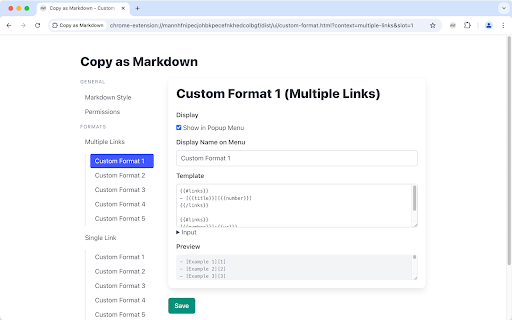
You can add Custom Formats to satisfy your needs!

You can also specify keyboard shortcuts to speed up your workflow.

Known Issues

- Cannot grab image.alt when copying image
- On Microsoft Windows, copied page link doesn't come with the link title

[Important] About Permissions

When using certain features such as tab exporting, you will be promoted to grant optional permissions, so that Copy as Markdown may read data from your browser. You may revoke permissions anytime on the Options page, from Extensions > Copy as Markdown > Extension Options.

Copy as Markdown respects your privacy. It does NOT collect your browsing history, and will only access tabs when you use tab exporting features.

---

Latest update:

- 3.6.0
  - Fix: copying selection as markdown may include extra new lines at the end of the output. Thanks @alexchexes on GitHub
  - Fix: copying on Chrome may fail due to noisy web pages that interfere with iframe message passing. Thanks @alexchexes on GitHub
  - Improve: surface warnings when the output is empty, and prevent writing to clipboard in such cases

For past release notes please see https://github.com/yorkxin/copy-as-markdown/releases
Copy as Markdown is a browser extension that helps you copy the following things as Markdown to your system clipboard:

On the web page:

- Selection Text as Markdown
- A Link on the Page
- An Image on the Page, with or without wrapping link

Exporting tabs in the current window, either all or highlighted tabs:

- Current Tab as Link
- List of Links
- Task List (for GitHub-Flavored Markdown)
- Including your tab grouping

You can add Custom Formats to satisfy your needs!

You can also specify keyboard shortcuts to speed up your workflow.

Known Issues

- Cannot grab image.alt when copying image
- On Microsoft Windows, copied page link doesn't come with the link title

[Important] About Permissions

When using certain features such as tab exporting, you will be promoted to grant optional permissions, so that Copy as Markdown may read data from your browser. You may revoke permissions anytime on the Options page, from Extensions > Copy as Markdown > Extension Options.

Copy as Markdown respects your privacy. It does NOT collect your browsing history, and will only access tabs when you use tab exporting features.

---

Latest update:

- 3.7.0
  - [FIX] Improved reliability of writing text to system clipboard
  - [BREAKING] This version requires minimum Chrome M116 or later. Users under M116 please use 3.5.0 or lower.
  - [NOITCE] You will see a permission warning about clipboard writing during upgrade progress. This is to grant the extension proper permission to write to the clipboard. To be clear, this extension has been writing to the OS clipboard since the very beginning using workarounds that did not require clipboardWrite permission, but now it requires.

For past release notes please see https://github.com/yorkxin/copy-as-markdown/releases
- Jun 2, 2026permissions
activeTab, alarms, contextMenus, scripting, storage
activeTab, alarms, contextMenus, clipboardWrite, offscreen, scripting, storage
- Apr 23, 2026description
Copy as Markdown is a browser extension that helps you copy the following things as Markdown to your system clipboard:

On the web page:

- Selection Text as Markdown
- A Link on the Page
- An Image on the Page, with or without wrapping link

Exporting tabs in the current window, either all or highlighted tabs:

- Current Tab as Link
- List of Links
- Task List (for GitHub-Flavored Markdown)
- Including your tab grouping

You can add Custom Formats to satisfy your needs!

You can also specify keyboard shortcuts to speed up your workflow.

Known Issues

- Cannot grab image.alt when copying image
- On Microsoft Windows, copied page link doesn't come with the link title

[Important] About Permissions

When using certain features such as tab exporting, you will be promoted to grant optional permissions, so that Copy as Markdown may read data from your browser. You may revoke permissions anytime on the Options page, from Extensions > Copy as Markdown > Extension Options.

Copy as Markdown respects your privacy. It does NOT collect your browsing history, and will only access tabs when you use tab exporting features.

---

Latest update:

- 3.5.0
  - Fix Copy Selection as Markdown may generate extra new line at the end of each list item when content is from ChatGPT.
  - Fix Copy Selection as Markdown may generate broken code block when content is from ChatGPT.
  - Add an option to configure code block style for Copy Selection as Markdown
  - Source code is available at https://github.com/yorkxin/copy-as-markdown/releases/tag/v3.5.0
Copy as Markdown is a browser extension that helps you copy the following things as Markdown to your system clipboard:

On the web page:

- Selection Text as Markdown
- A Link on the Page
- An Image on the Page, with or without wrapping link

Exporting tabs in the current window, either all or highlighted tabs:

- Current Tab as Link
- List of Links
- Task List (for GitHub-Flavored Markdown)
- Including your tab grouping

You can add Custom Formats to satisfy your needs!

You can also specify keyboard shortcuts to speed up your workflow.

Known Issues

- Cannot grab image.alt when copying image
- On Microsoft Windows, copied page link doesn't come with the link title

[Important] About Permissions

When using certain features such as tab exporting, you will be promoted to grant optional permissions, so that Copy as Markdown may read data from your browser. You may revoke permissions anytime on the Options page, from Extensions > Copy as Markdown > Extension Options.

Copy as Markdown respects your privacy. It does NOT collect your browsing history, and will only access tabs when you use tab exporting features.

---

Latest update:

- 3.6.0
  - Fix: copying selection as markdown may include extra new lines at the end of the output. Thanks @alexchexes on GitHub
  - Fix: copying on Chrome may fail due to noisy web pages that interfere with iframe message passing. Thanks @alexchexes on GitHub
  - Improve: surface warnings when the output is empty, and prevent writing to clipboard in such cases

For past release notes please see https://github.com/yorkxin/copy-as-markdown/releases
Permissions & access
- Permissions
- activeTabalarmscontextMenusclipboardWriteoffscreenscriptingstorage
- Host access
- None declared
Screenshots



About
Copy as Markdown is a browser extension that helps you copy the following things as Markdown to your system clipboard:

On the web page:

- Selection Text as Markdown
- A Link on the Page
- An Image on the Page, with or without wrapping link

Exporting tabs in the current window, either all or highlighted tabs:

- Current Tab as Link
- List of Links
- Task List (for GitHub-Flavored Markdown)
- Including your tab grouping

You can add Custom Formats to satisfy your needs!

You can also specify keyboard shortcuts to speed up your workflow.

Known Issues

- Cannot grab image.alt when copying image
- On Microsoft Windows, copied page link doesn't come with the link title

[Important] About Permissions

When using certain features such as tab exporting, you will be promoted to grant optional permissions, so that Copy as Markdown may read data from your browser. You may revoke permissions anytime on the Options page, from Extensions > Copy as Markdown > Extension Options.

Copy as Markdown respects your privacy. It does NOT collect your browsing history, and will only access tabs when you use tab exporting features.

---

Latest update:

- 3.7.0
  - [FIX] Improved reliability of writing text to system clipboard
  - [BREAKING] This version requires minimum Chrome M116 or later. Users under M116 please use 3.5.0 or lower.
  - [NOITCE] You will see a permission warning about clipboard writing during upgrade progress. This is to grant the extension proper permission to write to the clipboard. To be clear, this extension has been writing to the OS clipboard since the very beginning using workarounds that did not require clipboardWrite permission, but now it requires.

For past release notes please see https://github.com/yorkxin/copy-as-markdown/releases
Technical
- Version
- 3.7.0
- Manifest
- V3
- Size
- 164KiB
- Min Chrome
- 116
- Languages
- 1
- Featured
- Yes
Metadata
- ID
- fkeaekngjflipcockcnpobkpbbfbhmdn
- Developer ID
- u0e770c79cbcdab91ae9347839f6f7b0d
- Developer Email
- [email protected]
- Created
- Mar 1, 2012
- Last Updated (Store)
- Jun 2, 2026
- Last Scraped
- Jun 20, 2026
- Website
- —
- Privacy Policy
- —
Similar extensions
Alternatives to Copy as Markdown, ranked by description similarity.

Markie - Copy as Markdown
It's super simple. Copy any selected content as Markdown.
89

Any Page to MD
Convert any webpage to clean Markdown. Copy or save with one click.
76

MarkQuote
Copy webpage selections as Markdown quotes with reference source link.
—

Plain Markdown
Convert any webpage to clean Markdown with one click
—
★ 5.0

Copy as Markdown
Convert and copy text as Markdown with formatting preserved
201
★ 5.0

Markdown Linker
Make it easy to copy links with markdown-format
316
★ 2.7

Clipdown — Web to Markdown
Smart Markdown copier. Copy web content as clean Markdown with source citations, smart titles & reading time estimates.
14

Markdown Capturer - BibCit
Capture Markdown, download docx, pdf from chatgpt, Gemini, NotebookLM. For NotebookLM it also includes intext and references.
8.0K
★ 3.8
Data sourced from the Chrome Web Store · last verified Jun 20, 2026.