
massCode Clipper
Save browser content to massCode.
As of June 2026, massCode Clipper has 6 users in the Developer Tools category.
Usersno change0%
6
6
Ratingno change0%
—
— reviews
Reviewsno change0%
—
Version
0.1.0
Manifest V3
History
3 snapshotsTracking since May 14, 2026.
View as table
| Date | Users | Rating | Reviews | Version |
|---|---|---|---|---|
| May 14, 2026 | — | — | — | 0.1.0 |
| May 26, 2026 | — | — | — | 0.1.0 |
| Jun 2, 2026 | 2 | — | — | 0.1.0 |
| Now | 6 | — | — | 0.1.0 |
Permissions & access
- Permissions
- activeTabcontextMenusscriptingstorage
- Host access
- http://localhost/*, http://127.0.0.1/*
Screenshots
About
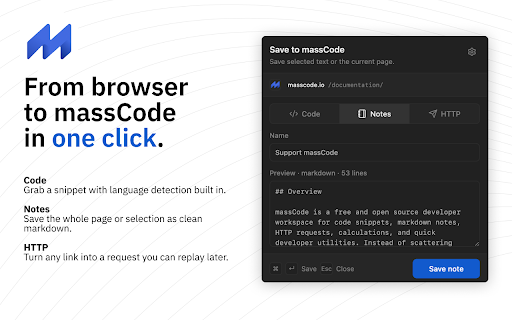
massCode Clipper saves anything from your browser straight into massCode — without leaving the page, without a cloud round-trip, and without the usual copy-paste-clean-up tax.

Highlight, click, done.

WHAT YOU CAN CLIP

• Code — Save the selected text as a snippet. The clipper detects the language from the page or filename, so Python lands in Python and TypeScript lands in TypeScript. No manual sorting.

• Notes — Save the selection or the entire page as clean Markdown. Article formatting, headings, lists, and inline code survive the trip. The page noise doesn't.

• HTTP — Save the current page URL or a selected link as a ready-to-run GET request. Replay it later from massCode whenever you need it.

WHY YOU'LL LIKE IT

• One click. Open the popup, pick a target, hit Save. ⌘ + Enter works too if you live on the keyboard.

• Smart names. The clipper suggests a name based on the page title or selected context — keep it, or type your own.

• Live preview. See exactly what's about to be saved, in the right format, before you commit.

• Local-first. The clipper talks only to your local massCode app on http://localhost. Your captures never touch a cloud server, ours or anyone else's.

SETUP (TAKES 30 SECONDS)

1. Open massCode -> Preferences -> API.
2. Enable Integration API and generate a token.
3. Click the clipper icon in your browser and paste the token.

That's it. Start clipping.

REQUIREMENTS

• The massCode desktop app, running on your machine.
• A generated API token from massCode Preferences -> API.

The extension will not work without the desktop app — it's a companion, not a standalone tool.

PRIVACY

The clipper sends captured content only to your local massCode app at http://localhost or http://127.0.0.1. Nothing is sent to massCode Cloud or any third party. The API token is stored in your browser's extension storage and can be revoked at any time from massCode Preferences -> API.

ABOUT MASSCODE

massCode is a free, open-source code-snippet and notes manager for developers. Learn more at masscode.io.
Technical
- Version
- 0.1.0
- Manifest
- V3
- Size
- 219KiB
- Min Chrome
- 88
- Languages
- 1
- Featured
- No
Metadata
- ID
- fkaaogdifollkhjbfoabbiocecehaaii
- Developer ID
- u2738b3a760a874b2808daad0befcc51f
- Developer Email
- [email protected]
- Created
- May 13, 2026
- Last Updated (Store)
- May 13, 2026
- Last Scraped
- Jun 8, 2026
- Website
- https://masscode.io/
Data sourced from the Chrome Web Store · last verified Jun 8, 2026.