
QueueTube
Queue your YouTube subscription feed and watch videos back-to-back like a playlist. Tag channels to queue by category.
As of June 2026, QueueTube has 28 users and a 5.00/5 rating from 3 reviews in the Functionality & UI category.
Usersup 211.1 percent+211.1%
28
28
Ratingno change0%
5.00
3 reviews
Reviewsup 50.0 percent+50.0%
3
Version
1.1.0
Manifest V3
History
10 snapshotsTracking since Apr 1, 2026.
View as table
| Date | Users | Rating | Reviews | Version |
|---|---|---|---|---|
| Apr 1, 2026 | 9 | 5.00 | 2 | 1.1.0 |
| Apr 10, 2026 | 20 | 5.00 | 2 | 1.1.0 |
| Apr 20, 2026 | 18 | 5.00 | 2 | 1.1.0 |
| Apr 27, 2026 | 19 | 5.00 | 2 | 1.1.0 |
| May 10, 2026 | 20 | 5.00 | 3 | 1.1.0 |
| May 15, 2026 | 24 | 5.00 | 3 | 1.1.0 |
| May 21, 2026 | 26 | 5.00 | 3 | 1.1.0 |
| May 27, 2026 | 29 | 5.00 | 3 | 1.1.0 |
| Jun 3, 2026 | 28 | 5.00 | 3 | 1.1.0 |
| Jun 9, 2026 | 27 | 5.00 | 3 | 1.1.0 |
| Now | 28 | 5.00 | 3 | 1.1.0 |
Permissions & access
- Permissions
- storage
- Host access
- https://www.youtube.com/*
Screenshots


About
Tired of clicking each video one by one in your subscriptions? QueueTube adds a single button to your YouTube subscriptions page that instantly queues everything up and autoplays them in order, with full skip and navigation controls.

Features:
▶️ One-click queuing - hit the button and your subscriptions start playing immediately
⏭️ Autoplay - when a video ends, the next one starts automatically
⏮️ Skip controls - jump forward or back in your queue at any time
📋 Queue panel - shows all queued videos with titles so you know what's coming next
🔴 Watch progress bars - videos you've partially watched show a red progress bar in the queue panel, just like YouTube's own thumbnails, so you can decide whether to skip
🖱️ Click to jump - click any video in the panel to skip straight to it
📜 Load more with scrolling - scroll down your subscriptions before hitting Queue to load even more videos (you can queue 300+ this way!)
🔀 Guilt-free sidebar browsing -- spot something interesting in the sidebar? Click it and watch it normally. Your queue is still saved, so just hit play in the panel to jump straight back to where you were. Or open it in a new tab to keep your queue playing uninterrupted in the original tab

New in v1.1.0:
🏷️ Channel tags - organise your subscribed channels into tags like #gaming, #music or #news and queue only videos from the channels you want
👁️ Queue Unwatched - skip videos you have already started. QueueTube reads YouTube's own progress bars and filters them out automatically
🔄 Continue Previous Queue - closed your tab halfway through? Return to your subscriptions page and pick up exactly where you left off
🎧 Media key and headphone support - use your keyboard media keys or headphone button to skip to the next video without switching to Chrome. Works in the background while you game, work, or browse elsewhere

Privacy:
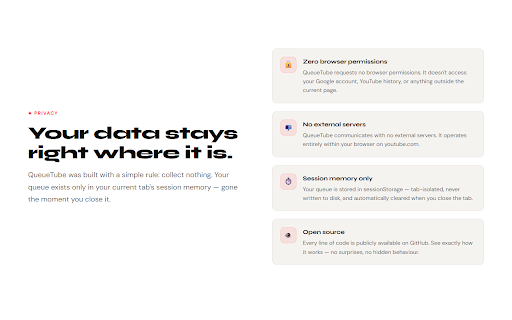
QueueTube requests one browser permission. storage is required so the extension can save and retrieve your channel list and tags using its own sandboxed storage -- this means the tag manager works even when YouTube is not open in a tab. This permission only accesses QueueTube's own data and cannot read anything outside the extension. QueueTube does not access your Google account, your YouTube watch history, or any page outside of youtube.com. No data is ever transmitted to any server. Your active queue is stored in session memory and cleared automatically when you close the tab. Your channel list, tags, and saved queue position persist across sessions in the extension's local storage but never leave your device.
Technical
- Version
- 1.1.0
- Manifest
- V3
- Size
- 24.36KiB
- Min Chrome
- 88
- Languages
- 1
- Featured
- No
Metadata
- ID
- fjcljgepicfodmpacgfimeepjibomlcd
- Developer ID
- u1b11f277aa518fa630c11358226f8442
- Developer Email
- [email protected]
- Created
- Mar 4, 2026
- Last Updated (Store)
- Mar 27, 2026
- Last Scraped
- Jun 9, 2026
- Website
- bethwoodcock.com
Similar extensions
Alternatives to QueueTube, ranked by description similarity.

Cross-Tab YouTube Queue
Queue videos from any tab into a persistent sidebar playlist.
210
★ 4.3

YouTube Previews On Long Click
Play YouTube video previews on long click instead of hover.
792
★ 3.9

Optube
Focus your YouTube experience. Block distracting elements and enhance productivity.
16

QuietTube: Autoplay Blocker for YouTube
Prevents video autoplay exclusively on YouTube. Upgrades your UX.
89
★ 5.0

UnseenTube - Hide Watched Videos
Clean your YouTube feed by automatically hiding videos you've already watched.
335
★ 4.0

TubeTidy
Filter watched and long videos from your YouTube feed.
11
★ 5.0

DelayTube
Delay impulsive YouTube viewing. Intercepts video clicks and adds them to Watch Later instead of auto-playing.
5

YouTube Independent Suggested Videos and Comments Scroll
Keep watching while scrolling. Locks the video so you can browse suggested videos and comments uninterrupted.
42
★ 5.0
Data sourced from the Chrome Web Store · last verified Jun 9, 2026.