
Form Recovery
A simple form recovery tool. Restore lost input after reloads. Upgrade for full-form restore and sync features.
As of June 2026, Form Recovery has 107 users and a 2.00/5 rating from 4 reviews in the Functionality & UI category.
Usersdown 2.7 percent−2.7%
107
107
Ratingno change0%
2.00
4 reviews
Reviewsno change0%
4
Version
1.0.1
Manifest V3
History
5 snapshotsTracking since Apr 19, 2026.
View as table
| Date | Users | Rating | Reviews | Version |
|---|---|---|---|---|
| Apr 19, 2026 | 110 | 2.00 | 4 | 1.0.1 |
| May 4, 2026 | 111 | 2.00 | 4 | 1.0.1 |
| May 13, 2026 | 106 | 2.00 | 4 | 1.0.1 |
| May 26, 2026 | 119 | 2.00 | 4 | 1.0.1 |
| Jun 7, 2026 | 113 | 2.00 | 4 | 1.0.1 |
| Now | 107 | 2.00 | 4 | 1.0.1 |
Permissions & access
- Permissions
- storage
- Host access
- None declared
Screenshots
About
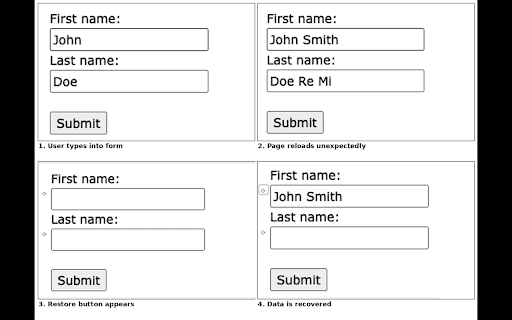
🧩 Form Recovery – Emergency Input Saver for Chrome Form Recovery is a lightweight Chrome extension that automatically saves your form inputs and helps you recover them if a page reloads unexpectedly, a form submit fails, or you accidentally navigate away. Designed for speed, reliability, and simplicity, it’s your silent backup for text fields in any web form. ⸻ 🔧 What It Does • 💾 Automatically saves your input in text fields and textareas • 🔄 Restore lost content after page reloads, crashes, or failed form submissions • 🕒 Keeps data temporarily (24 hours max) — it’s for emergency use, not long-term storage • 🔍 One-click restore buttons near each field — restore only what you want • 🚫 Does NOT save passwords — privacy-conscious by design ⸻ 💡 Why Use It? We’ve all experienced it: • You type a long message or post… • Then the tab reloads or form submit fails… • And all your text is lost. Form Recovery prevents that from happening by saving input text to local storage in real time — so you can bring it back instantly, field-by-field. ⸻ 🛡️ Privacy First • Does not track your activity • Does not transmit data anywhere • All saved inputs are stored locally on your machine, and automatically deleted after 24 hours No login. No cloud. No bloat. ⸻ 🚀 Premium Features (Coming Soon in Form Recovery Pro) Unlock advanced tools for professional users and web developers: • ✅ 1-click full form restore • ✅ Save and restore dropdowns, checkboxes, and radio buttons • ✅ Sync saved input across multiple Chrome browsers/devices • ✅ Restore history beyond 24 hours (up to 7 days) • ✅ Custom field filters and domain rules ⸻ 🧪 Supported Field Types Free version saves: • <input type="text"> • <input type="email"> • <input type="search"> • <input type="number"> • <textarea> 🔒 password fields are intentionally excluded for privacy/security. ⸻ 📦 Lightweight by Design • No external dependencies • No background analytics or tracking • Less than 20 KB installed size ⸻ 🧑💻 Who It’s For • Writers, bloggers, and students • Anyone who fills out forms regularly • Developers and testers working on unstable web environments • People with slow or crash-prone browsers ⸻ Form Recovery is built for peace of mind. You won’t need it every day, but when you do — it’s a lifesaver. 🧠 Install it once. Forget about it. Remember it only when it saves your work. ⸻ For support, Pro version, and other Extension or Software creation on demand - contact our support.
Technical
- Version
- 1.0.1
- Manifest
- V3
- Size
- 14.67KiB
- Min Chrome
- 88
- Languages
- 1
- Featured
- No
Metadata
- ID
- fjckmoepoceejcbbkmhfpkjiigjgkfob
- Developer ID
- ua4c05e510a245be3e94e2f987b4fee22
- Developer Email
- [email protected]
- Created
- May 29, 2025
- Last Updated (Store)
- Jun 1, 2025
- Last Scraped
- Jun 7, 2026
- Website
- adlerclub.tech
- Support URL
- —
- Privacy Policy
- https://adlerclub.tech/policies
Similar extensions
Alternatives to Form Recovery, ranked by description similarity.

Save Tabs Chrome
Organize browser with Save Tabs chrome extension. Restore chrome session in one click. Save tab groups, manage and export tabs
584
★ 4.9

Auto-Fill Forms
Auto-Fill Forms: Quickly fill web forms
11

Tab Saver
Restore tabs anytime - save with one click and never lose them. Backed up to your Google account.
272
★ 5.0

Form Autopilot
Highlights all forms on the current webpage
25
★ 5.0

Random Identity Autofill
Autofill web forms with random identity data securely & seamlessly.
60

TabMeister
Organize tabs into a smart dashboard. Add notes, reminders, secure passwords, and sync across devices with Flipbook view.
11
★ 5.0

Reopen Closed Tabs - Tab History & Session Manager
Reopen Closed Tabs instantly. Restore full browser sessions & manage your tab history. A lightweight, privacy-focused tab manager.
25

RAM Rescue - Memory Usage Dashboard
Track and manage Chrome's memory usage. See which tabs and extensions are eating your RAM.
156
★ 5.0
Data sourced from the Chrome Web Store · last verified Jun 7, 2026.