
Surface filter mode
Apply beautiful filters to any web page
As of June 2026, Surface filter mode has 11 users and a 4.00/5 rating from 1 reviews in the art category.
Usersup 57.1 percent+57.1%
11
11
Ratingno change0%
4.00
1 reviews
Reviewsno change0%
1
Version
1.2
Manifest V3
90-day change · In the last 90 days this extension 1 version update.
History
10 snapshotsTracking since Apr 1, 2026.
View as table
| Date | Users | Rating | Reviews | Version |
|---|---|---|---|---|
| Apr 1, 2026 | 7 | 4.00 | 1 | 1.1 |
| Apr 17, 2026 | 7 | 4.00 | 1 | 1.1 |
| Apr 22, 2026 | 11 | 4.00 | 1 | 1.1 |
| Apr 27, 2026 | 9 | 4.00 | 1 | 1.1 |
| May 5, 2026 | 10 | 4.00 | 1 | 1.1 |
| May 10, 2026 | 9 | 4.00 | 1 | 1.2 |
| May 16, 2026 | 13 | 4.00 | 1 | 1.2 |
| May 28, 2026 | 12 | 4.00 | 1 | 1.2 |
| Jun 4, 2026 | 7 | 4.00 | 1 | 1.2 |
| Jun 10, 2026 | 10 | 4.00 | 1 | 1.2 |
| Now | 11 | 4.00 | 1 | 1.2 |
Permissions & access
- Permissions
- storageactiveTabtabs
- Host access
- <all_urls>
Screenshots




About
Surface Filter Mode – Full Creative Control Over Any Website
Surface Filter Mode is a powerful Chrome extension that lets you completely transform the visual appearance of any website in real time. Whether you want to apply professional-grade filters, create custom designs, or add artistic effects to specific parts of a page, this tool gives you unlimited creative freedom.
With over 50 built-in filters and an advanced custom builder, you can instantly change colors, contrast, saturation, and lighting on any site. But that’s just the beginning. The extension goes far beyond standard filters by letting you work directly with selected areas of the page.
Key Features

50+ professional preset filters including Warm, Cool, Vintage, Dramatic, Neon Dreams, Cyber Dreams, Crimson, Realistic, Aurora, Golden, and many more
Custom Filter Builder with full control over brightness, contrast, saturation, hue rotation, sepia, grayscale, invert, and opacity
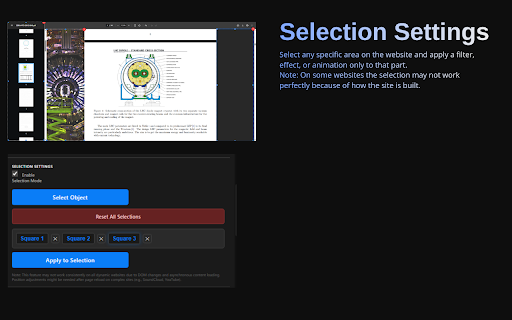
Selection Square system – highlight any area on the page and apply unique effects only to that section
Gradient Map engine with up to 5 custom colors and precise luminance mapping
Spots and organic stains – auto-generation or brush painting mode with full texture and blend control
Marker tool – draw directly on any website with adjustable size, opacity, intensity, and brush types
Light Areas – draggable light sources with color, size, intensity, and blur settings
Border Frames – 8 animated and adaptive frame effects including gradient spin, neon glow, fire wave, matrix rain, electric bolt, and 3D perspective
Duo Tone overlay for instant stylized two-color transformations
Object Particles – add circles, squares, or triangles with custom colors, sizes, and blend modes
Round and animated text – create curved or dynamic text overlays anywhere on the page
Outline effects with color, thickness, gradient, and texture support
Image upload and overlay system with dedicated blend mode and opacity controls

All effects are applied instantly and work on every website – from simple blogs to complex web applications. The extension saves your settings per site and per page, so your custom designs are always ready when you return.
Technical
- Version
- 1.2
- Manifest
- V3
- Size
- 569KiB
- Min Chrome
- 88
- Languages
- 1
- Featured
- No
Metadata
- ID
- fjccfeadinamnlfopinhcafidedhgbbk
- Developer ID
- ubac112189dcc3c1115e66a2773d2fa11
- Developer Email
- [email protected]
- Created
- Mar 22, 2026
- Last Updated (Store)
- May 3, 2026
- Last Scraped
- Jun 10, 2026
- Website
- —
- Support URL
- —
- Privacy Policy
- —
Data sourced from the Chrome Web Store · last verified Jun 10, 2026.