
Memo — Capture Words While Browsing
Highlight a word on any website, save it to Memo with one click. AI context, spaced repetition, your word collection.
As of June 2026, Memo — Capture Words While Browsing has 3 users and a 5.00/5 rating from 1 reviews in the Education category.
Usersno change0%
3
3
Ratingno change0%
5.00
1 reviews
Reviewsno change0%
1
Version
1.0.0
Manifest V3
History
2 snapshotsTracking since Apr 10, 2026.
View as table
| Date | Users | Rating | Reviews | Version |
|---|---|---|---|---|
| Apr 10, 2026 | 3 | 5.00 | 1 | 1.0.0 |
| Apr 20, 2026 | 4 | 5.00 | 1 | 1.0.0 |
| Now | 3 | 5.00 | 1 | 1.0.0 |
Permissions & access
- Permissions
- contextMenusactiveTabstorage
- Host access
- https://heymemo.app/*
Screenshots


About
Memo — Capture Words While Browsing

Save words from any website to your personal vocabulary collection with one click. Memo turns every word into a learning experience — with AI-powered context, spaced repetition, and emotional anchors that make words stick.

Features:

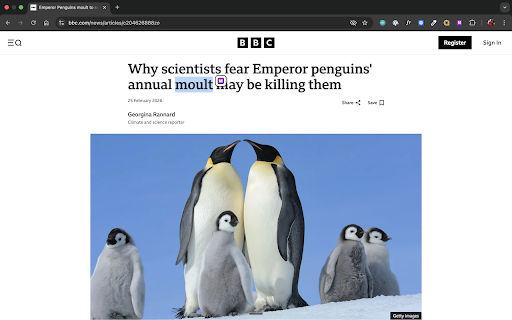
🔍 One-Click Capture — Select any word on any website, right-click, and save it to Memo instantly.

🌐 DeepL Integration — Memo detects when you're translating on DeepL and adds a "Save to Memo" button right in the page.

🤖 AI Context — Every saved word gets automatic translations, example sentences, cultural notes, and emotional anchors (song lyrics, movie quotes, fun facts).

📚 Spaced Repetition — Memo reviews your words at the perfect time using SM-2 scheduling, so they move from short-term to long-term memory.

🎯 6 Exercise Types — Flip Cards, Quick Fire, Spell It, Context Mode, Wördle, and Use It (write your own sentences with AI feedback).

🌍 30+ Languages — From Spanish to Japanese, from Dutch to Swiss German.

🔊 Listen & Speak — Hear any word read aloud and practice your pronunciation.

How it works:

Install the extension
Log in with your Memo account
Highlight a word → Right-click → "Save to Memo"
Open heymemo.app to review, practice, and master your words
Requirements:

A free Memo account at https://heymemo.app
Chrome or Chromium-based browser (Edge, Brave, Arc)
Learn more: https://heymemo.app
Technical
- Version
- 1.0.0
- Manifest
- V3
- Size
- 24.96KiB
- Min Chrome
- 88
- Languages
- 1
- Featured
- No
Metadata
- ID
- fipkckllejndkdfalldpmcndobfkjcpd
- Developer ID
- u5bfc6ec2c0ef85c648c1209e15262a6a
- Developer Email
- [email protected]
- Created
- Mar 13, 2026
- Last Updated (Store)
- Mar 13, 2026
- Last Scraped
- Jun 9, 2026
- Website
- —
- Support URL
- https://heymemo.app/datenschutz
- Privacy Policy
- https://heymemo.app/datenschutz
Similar extensions
Alternatives to Memo — Capture Words While Browsing, ranked by description similarity.

Memomizer - Quick Add
Instantly add words to your Memomizer vocabulary from any webpage with AI-generated personalized examples
5

MemoSwift - Smart Flashcard Creator
Create flashcards instantly. Highlight text, right-click, and add to your study sets.
8

LexiVocab
Master new languages while browsing. Easily save, highlight, and translate vocabulary.
24
★ 5.0

Wordmemo: Learn Words Easy
Translate and learn words with audio, images, and usage examples.
5
★ 5.0

Rememberry - Translate and Memorize with Flashcards
Translate words while browsing and turn them into spaced repetition flashcards to build foreign language vocabulary.
100.0K
★ 4.6

Simple Vocabulary by VH
Translate, markup and learn new words while browsing.
—
★ 5.0

Vocabulary Recall – Learn English While Browsing
Learn English vocabulary naturally while browsing the web. Gentle recall prompts, no flashcards, no pressure.
13
★ 5.0

WordSave Chrome Extension
A Chrome extension for WordSave.app
10
★ 5.0
Data sourced from the Chrome Web Store · last verified Jun 9, 2026.