
Keyboard shortcuts to manage Chrome tabs
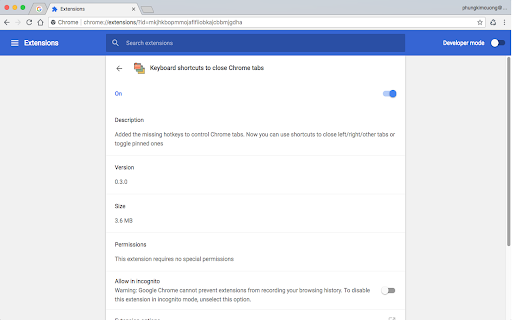
Add hotkeys to 1)close tabs to the left, 2)close tabs to the right, 3)close other tabs, 4)toggle tab pinning
As of May 2026, Keyboard shortcuts to manage Chrome tabs has 7,000 users and a 4.53/5 rating from 34 reviews in the Workflow & Planning category.
Usersup 40.0 percent+40.0%
7.0K
7,000
Ratingno change0%
4.53
34 reviews
Reviewsno change0%
34
Version
0.3.2
Manifest V3
90-day change · In the last 90 days this extension gained 2.0K users.
History
2 snapshotsTracking since Apr 26, 2026.
View as table
| Date | Users | Rating | Reviews | Version |
|---|---|---|---|---|
| Apr 26, 2026 | 5.0K | 4.53 | 34 | 0.3.2 |
| May 23, 2026 | 5.0K | 4.53 | 34 | 0.3.2 |
| Now | 7.0K | 4.53 | 34 | 0.3.2 |
Permissions & access
- Permissions
- None declared
- Host access
- None declared
Screenshots
About
Ever wish Chrome has the hotkeys to close tabs to the right, or to the left, or pin current tab?
This extension will let you do it, and there are more.

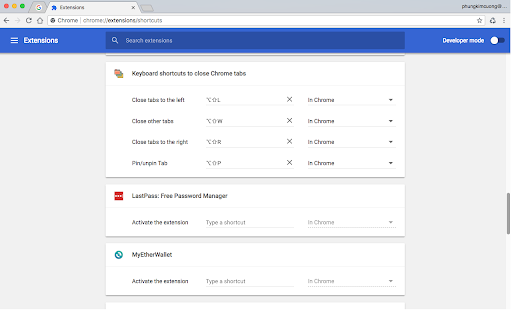
You can configure the hotkeys to:
- Close tabs to the left.
- Close tabs to the right.
- Close other tabs.
- Pin/unpin a tab.

Source code available at : https://github.com/diophung/close-chrome-tabs
Please provide your feedback to Twitter: @diophung or email : [email protected].
Technical
- Version
- 0.3.2
- Manifest
- V3
- Size
- 295KiB
- Min Chrome
- 88
- Languages
- 1
- Featured
- Yes
Metadata
- ID
- fipfgiejfpcdacpjepkohdlnjonchnal
- Developer ID
- u65d515b2031f7093c48f9e8f661fe35b
- Developer Email
- [email protected]
- Created
- Feb 21, 2017
- Last Updated (Store)
- Oct 21, 2024
- Last Scraped
- May 23, 2026
- Website
- diophung.com
Similar extensions
Alternatives to Keyboard shortcuts to manage Chrome tabs, ranked by description similarity.

Close Tabs to Right
Quickly close all tabs to the right of the current active tab with a keyboard shortcut or toolbar button. No data collection.
49
★ 5.0

Simple Hotkeys
A lightweight Chrome extension for enhancing existing Chrome hotkeys.
69
★ 5.0

Close Other Tabs+
Close/pin/unpin/group/ungroup multiple tabs at once, filtering them by a window, pin/group state, or URL.
5.0K
★ 4.4

Close Tabs to the Left
Adds a button to close all tabs to the left of the current tab.
7.0K
★ 4.7

Close Tab by Double Right Click
Close tab by double right clicking anywhere on the page. Inspired by "Rights To Close" legacy extension for Mozilla Firefox.
9.0K
★ 3.0

Panic Button
This extension allows user to close all opened tabs with a single button click or shortcut key Ctrl+Shift+Y .
10.0K
★ 2.3

Tab Shortcut Tools
Duplicate Tab, Pop out Tab, and New Tab to the Right - Configurable Shortcuts
357
★ 4.7

Close Other Tabs
Closes Other Tabs except active one. Press Alt+Shift+W to close other tabs with keyboard
23
★ 5.0
Data sourced from the Chrome Web Store · last verified May 23, 2026.