
Salesforce Screen Recorder
Capture Salesforce screenshots and steps, then generate a downloadable package for debugging or demos.
As of June 2026, Salesforce Screen Recorder has 5 users and a 5.00/5 rating from 1 reviews in the Productivity category.
Usersno change0%
5
5
Ratingno change0%
5.00
1 reviews
Reviewsno change0%
1
Version
1.1.0
Manifest V3
90-day change · In the last 90 days this extension 1 version update.
History
9 snapshotsTracking since Apr 7, 2026.
View as table
| Date | Users | Rating | Reviews | Version |
|---|---|---|---|---|
| Apr 7, 2026 | — | — | — | 1.0.0 |
| Apr 19, 2026 | — | — | — | 1.0.0 |
| Apr 24, 2026 | 3 | — | — | 1.0.0 |
| May 1, 2026 | 3 | — | — | 1.0.0 |
| May 8, 2026 | 4 | — | — | 1.0.0 |
| May 13, 2026 | 6 | 5.00 | 1 | 1.1.0 |
| May 19, 2026 | 5 | 5.00 | 1 | 1.1.0 |
| May 25, 2026 | 6 | 5.00 | 1 | 1.1.0 |
| Jun 1, 2026 | — | 5.00 | 1 | 1.1.0 |
| Now | 5 | 5.00 | 1 | 1.1.0 |
Changelog
- May 8, 2026description
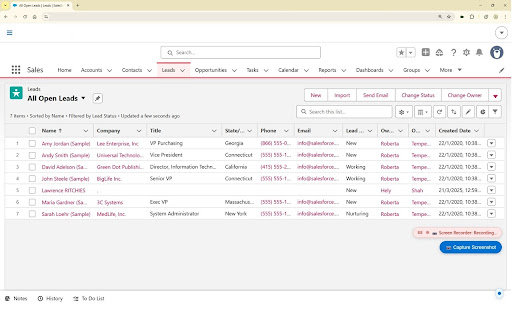
Salesforce Screen Recorder captures reproduction steps, screenshots, and (optionally) debug log data directly from your browser while you navigate Salesforce Lightning pages. It packages everything into a structured ZIP file that developers can use — along with GitHub Copilot — to rapidly analyze and fix bugs.

Debug logs are optional: the extension can be used purely for screen recording and step capture without enabling Salesforce debug logging.
Salesforce Screen Recorder captures reproduction steps, screenshots, and (optionally) debug log data directly from your browser while you navigate Salesforce Lightning pages. It packages everything into a structured ZIP file that developers can use to rapidly analyze and fix bugs.

Debug logs are optional: the extension can be used purely for screen recording and step capture without enabling Salesforce debug logging.
Permissions & access
- Permissions
- scriptingstorageactiveTab
- Host access
- https://*.salesforce.com/*, https://*.lightning.force.com/*
Screenshots


About
Salesforce Screen Recorder captures reproduction steps, screenshots, and (optionally) debug log data directly from your browser while you navigate Salesforce Lightning pages. It packages everything into a structured ZIP file that developers can use to rapidly analyze and fix bugs.

Debug logs are optional: the extension can be used purely for screen recording and step capture without enabling Salesforce debug logging.
Technical
- Version
- 1.1.0
- Manifest
- V3
- Size
- 73.7KiB
- Min Chrome
- 88
- Languages
- 1
- Featured
- No
Metadata
- ID
- figlgicephkldedplehahegfghphhceb
- Developer ID
- u418e907aabd0aa05a9c143a7d906e6fc
- Developer Email
- [email protected]
- Created
- Apr 7, 2026
- Last Updated (Store)
- May 5, 2026
- Last Scraped
- Jun 7, 2026
- Website
- barrio40.cloud
- Support URL
- —
- Privacy Policy
- —
Data sourced from the Chrome Web Store · last verified Jun 7, 2026.