
SpacingJS
Precision spacing measurement tool for web developers and designers. Hold Alt/Option key and hover over elements to measure.
As of June 2026, SpacingJS has 2,000 users and a 4.27/5 rating from 11 reviews in the Developer Tools category.
Usersno change0%
2.0K
2,000
Ratingno change0%
4.27
11 reviews
Reviewsno change0%
11
Version
1.1.0
Manifest V3
History
2 snapshotsTracking since Apr 19, 2026.
View as table
| Date | Users | Rating | Reviews | Version |
|---|---|---|---|---|
| Apr 19, 2026 | 2.0K | 4.27 | 11 | 1.1.0 |
| May 4, 2026 | 2.0K | 4.27 | 11 | 1.1.0 |
| Now | 2.0K | 4.27 | 11 | 1.1.0 |
Permissions & access
- Permissions
- activeTabscripting
- Host access
- None declared
Screenshots


About
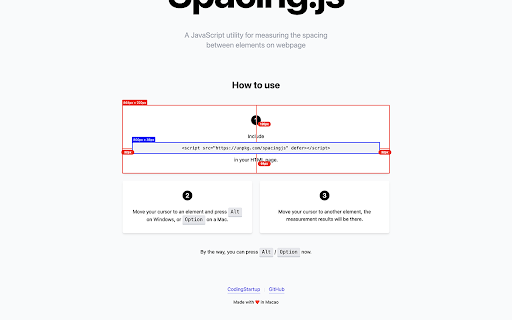
Precision spacing measurement tool for web developers and designers. Measure distances, margins, and padding between webpage elements with pixel-perfect accuracy.

🎯 How to Use:
1. Click the extension icon to activate SpacingJS
2. Hold Alt (Windows) / Option (Mac) and hover over any element
3. Move cursor to another element to see precise measurements
4. Click the icon again to deactivate

⌨️ Quick Access:
- Ctrl+Shift+S (Windows) / Cmd+Shift+S (Mac) to activate
- Alt+S to toggle on/off

✨ What's New in v1.1.0:
- Smart Toggle: Visual feedback shows when active (green dot on icon)
- Keyboard Shortcuts: Quick activation with hotkeys
- Enhanced Measurements: Shows element tag, class, and font size
- Better Compatibility: Works with all element types including SVG

💡 Pro Tips:
- Hold Shift to keep measurements visible longer (perfect for screenshots)
- Works on any website (except browser internal pages)

Perfect for designers, developers, and QA teams who need precise measurements for pixel-perfect layouts.
Technical
- Version
- 1.1.0
- Manifest
- V3
- Size
- 14.8KiB
- Min Chrome
- 88
- Languages
- 1
- Featured
- No
Metadata
- ID
- fhjegjndanjcamfldhenjnhnjheecgcc
- Developer ID
- ua7b1756dcee00f6e3bdbe0f4b310ab08
- Developer Email
- [email protected]
- Created
- Nov 12, 2021
- Last Updated (Store)
- Jun 18, 2025
- Last Scraped
- Jun 7, 2026
- Website
- spacingjs.com
- Support URL
- https://spacingjs.com
Similar extensions
Alternatives to SpacingJS, ranked by description similarity.

PixelProbe
Measure pixel distances between HTML elements with Figma-style measurement overlays
6

CSS Spacing Inspector
Hover to see margin, padding, and gap overlays with pixel values
53

Measure Pixel
Discover Measure Pixel — the ultimate solution for precise pixel measurements on webpages.
1.0K
★ 4.0

Pixel Perfect Extension
Easily measure pixel-perfect distances between elements on any webpage with intuitive tools. Ideal for developers, designers, and QA
404
★ 5.0

SpacingJS - Updated Fork
Precision spacing measurement tool for web developers and designers. Hold Alt/Option key and hover over elements to measure.
105
★ 5.0

LayoutLab–Master Your Webpage Layouts
Professional measurement toolkit: Grid overlay, ruler tool, and box measurements for pixel-perfect web development
—

Spacing Inspector
Visualize CSS margins and padding on webpages
430
Metric Spy Page Ruler
Quickly Measure Elements on Web Pages with a Ruler Tool, Free Selection, and Convenient Keyboard Shortcuts.
10.0K
★ 5.0
Data sourced from the Chrome Web Store · last verified Jun 7, 2026.