
Ai Builder
Build and download a clean starter Chrome extension ZIP locally.
As of June 2026, Ai Builder has 4 users in the Productivity category.
Usersno change0%
4
4
Ratingno change0%
—
— reviews
Reviewsno change0%
—
Version
1.1.0
Manifest V3
History
6 snapshotsTracking since May 5, 2026.
View as table
| Date | Users | Rating | Reviews | Version |
|---|---|---|---|---|
| May 5, 2026 | — | — | — | 1.1.0 |
| May 10, 2026 | — | — | — | 1.1.0 |
| May 16, 2026 | 2 | — | — | 1.1.0 |
| May 28, 2026 | 3 | — | — | 1.1.0 |
| Jun 4, 2026 | 4 | — | — | 1.1.0 |
| Jun 10, 2026 | 5 | — | — | 1.1.0 |
| Now | 4 | — | — | 1.1.0 |
Permissions & access
- Permissions
- None declared
- Host access
- None declared
Screenshots




About
Ai Builder helps you create a basic Chrome extension starter project without setting up a build tool or writing the first files from scratch.

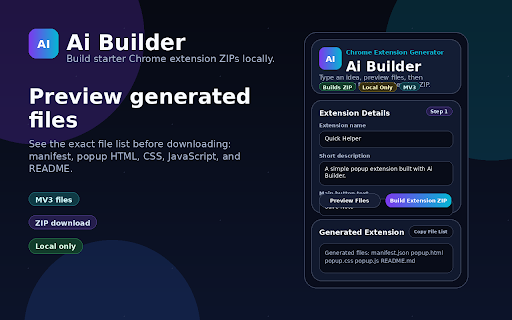
Open the popup, enter your extension name, add a short description, choose a button label, pick an accent color, and generate a ready-to-download starter ZIP. The exported project includes the core files needed for a simple Manifest V3 popup extension: manifest.json, popup.html, popup.css, popup.js, and README.md.

Ai Builder is designed for beginners, rapid prototyping, and small extension ideas. It keeps the first version simple so you can test quickly in chrome://extensions and improve one feature at a time.

Key features:
- Generate a complete starter Chrome extension ZIP
- Create Manifest V3 popup extension files locally
- Customize the extension name, description, button text, color, and popup width
- Preview the generated file list before download
- Export files without account setup, external services, or extra permissions
- Use the included README to load the generated extension in Chrome

How it works:
1. Open Ai Builder from the Chrome toolbar.
2. Fill in the extension details.
3. Click Preview Files to review what will be generated.
4. Click Build Extension ZIP.
5. Unzip the downloaded file.
6. Load the generated extension folder in chrome://extensions with Developer mode enabled.

Privacy note:
Ai Builder is built to work locally in your browser. The current version does not require login, does not request Chrome permissions, and does not send project details to an external server.

Best for:
- Beginners learning Chrome extension structure
- Fast popup-extension prototypes
- Simple productivity tools
- Testing small extension ideas before building a larger version

Limitations:
Ai Builder creates a starter popup extension. Advanced features like content scripts, background service workers, options pages, API integrations, and AI-powered code generation are not included in the current version.
Technical
- Version
- 1.1.0
- Manifest
- V3
- Size
- 14.59KiB
- Min Chrome
- 88
- Languages
- 1
- Featured
- No
Metadata
- ID
- fhhnidneajmlmagjihgnaldfagemoakg
- Developer ID
- uc79378447f4fd966e5f3a48a36403ba5
- Developer Email
- [email protected]
- Created
- May 4, 2026
- Last Updated (Store)
- May 4, 2026
- Last Scraped
- Jun 10, 2026
- Website
- —
- Support URL
- —
Data sourced from the Chrome Web Store · last verified Jun 10, 2026.