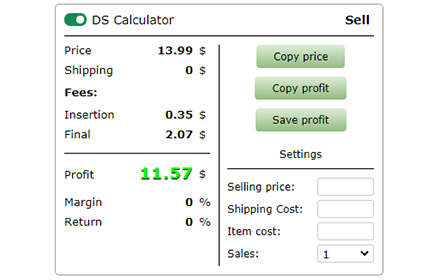
DS Calculator - Ebay / Amazon fee calculator
Dropshipping Calculator - Ebay / Amazon / Walmart deducts fees and item price from supplier.
As of May 2026, DS Calculator - Ebay / Amazon fee calculator has 496 users in the Productivity category.
Usersup 10.2 percent+10.2%
496
496
Ratingno change0%
—
— reviews
Reviewsno change0%
—
Version
2.3.93
Manifest V3
History
2 snapshotsTracking since Apr 26, 2026.
View as table
| Date | Users | Rating | Reviews | Version |
|---|---|---|---|---|
| Apr 26, 2026 | 450 | — | — | 2.3.93 |
| May 23, 2026 | 495 | — | — | 2.3.93 |
| Now | 496 | — | — | 2.3.93 |
Permissions & access
- Permissions
- storagescriptingtabsidentityidentity.email
- Host access
- https://*/*
Screenshots
About
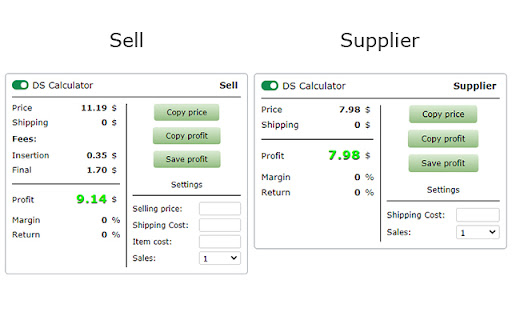
Subtract the price of the product from the selling price.

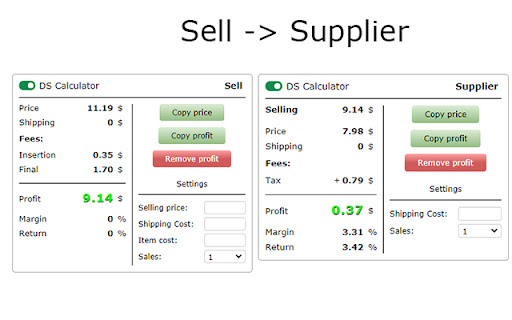
Slide (2) - The extension saves the selling price (takes away all fees), and on the supplier page subtracts the price of the product, and shows the net profit.

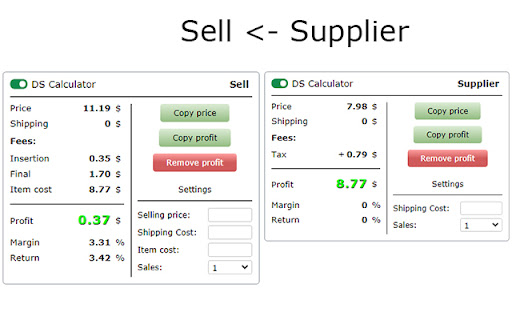
Slide (3) - Or it saves the price of the product from the supplier, and the page for selling the product, takes away all commissions and the price of the product (supplier) from the sales price, and shows the net profit.

The extension is inserted into the page.
All settings are saved for your account (Google).

Settings in the sales block:
	- Upgrades - Select optional listing upgrade.
	- Listing - Select format listing.
	- Store / Account - Select a sales account.
	- Fees - Sales fees, the extension receives fees for each account.
		- You can enter your individual fees.
		- Eprice.it - Extensions receive no sales fees. You need to enter individual fees.
	- Payments - You need to enter individual payments.
	- VAT - You can enter the VAT of your country and your country's VAT will be added to the fees.
	- Sellers performance.
	- Margin - Percentage.
	- Return - Percentage.
	- Fields - For entering individual data:
		- Selling price - Your selling price of the item.
		- Shipping Cost - Your shipping cost.
		- Item cost - The price of the item, from the supplier.
		- Sales - Select the number of sales.


Settings in the supplier block:
	- Cash back - Percentage of popular services.
	- Other fees - You can add or subtract an additional fee to the price of the item, delivery or profit.
	- Sales tax (US, product price) - You can enter sales tax, percentage.
	- Shipping - You can choose whether you have Amazon Prime, Walmart +, and other suppliers so the extension gets Prime shipping or not.
	- Delivery option - If the supplier has several delivery options, you can select the required delivery option and the extension will receive the price of the selected delivery.
	- Margin - Percentage.
	- Return - Percentage.
	- Fields - For entering individual data:
		- Shipping Cost - You can manually enter the shipping cost.
		- Purchase qty (not all suppliers have) - Select the purchase quantity of the product.
		- Sales - Select the number of sales.


*Technical Information (Important):
	- If in the extension the delivery price is “-” - it means that the extension cannot get the delivery price for the product, it is only for a few sites.
	- If the product price or shipping price is incorrect in the extension, or does not appear on the extension page. This is because the site is redesigning and the extension is receiving incorrect data from the site page. If you notice such an error, please inform the developer by email, so the error will be fixed faster.
	- The extensions are constantly checked, and if an error is found, as soon as the developer fixes the error, your extension will be automatically updated and the error will disappear

Sites on which the extension runs:

* Sell:
12 sites

* Supplier:
148 sites

The entire list of sites where the extension works. - https://docs.google.com/document/d/13cqYFnAG-SHysIXV9gNzRM7S8Zt4jCk9jR64lD-rrPU/edit


* For all questions - [email protected]
Technical
- Version
- 2.3.93
- Manifest
- V3
- Size
- 142KiB
- Min Chrome
- 88
- Languages
- 1
- Featured
- Yes
Metadata
- ID
- fhdgfenjelpgogebfamlckjiooaekcdl
- Developer ID
- u23c80ca86069978da4afcdf2a371a445
- Developer Email
- [email protected]
- Created
- Feb 28, 2022
- Last Updated (Store)
- Feb 7, 2025
- Last Scraped
- May 23, 2026
- Support URL
- —
- Privacy Policy
- —
Similar extensions
Alternatives to DS Calculator - Ebay / Amazon fee calculator, ranked by description similarity.

Profit Calculator PRO
Calculate net profit, margin, and detailed cost breakdowns from brutto sales with saved profiles.
—

Lemon Squeezy Fee Calculator
Use this Lemon Squeezy fees calculator to quickly determine fees and your profit.
56
★ 5.0

eBay Profit Calculator
Calculate profit and charges for eBay items.
57

Etsy, Amazon Margin Calculator
Calculate your profit margins on Etsy and Amazon effortlessly with our margin calculator!
47
TAX Calculator - Sales TAX Calculator
Effortlessly compute sales tax with our Tax Calculator. Fast, accurate, and user-friendly for all your financial needs!
105

Amazon Profit Calculator Lite
Floating Profit & ROI Calculator for Amazon Sellers. Auto-detects price.
3
★ 5.0

Dropshipping P&L Calculator
Quickly calculate profit/loss and margin in a compact extension popup.
4
★ 5.0

eBay Sold and Completed (US & UK)
Search sold and completed listings on eBay with quick US/UK switching, live stats, and watch alerts.
183
★ 4.8
Data sourced from the Chrome Web Store · last verified May 23, 2026.