
Export WhatsApp Polls
Export Your WhatsApp Polls To Excel
As of June 2026, Export WhatsApp Polls has 1,000 users and a 2.33/5 rating from 6 reviews in the Productivity category.
Usersno change0%
1.0K
1,000
Ratingno change0%
2.33
6 reviews
Reviewsno change0%
6
Version
0.1.4
Manifest V3
Permissions & access
- Permissions
- None declared
- Host access
- None declared
Screenshots
About
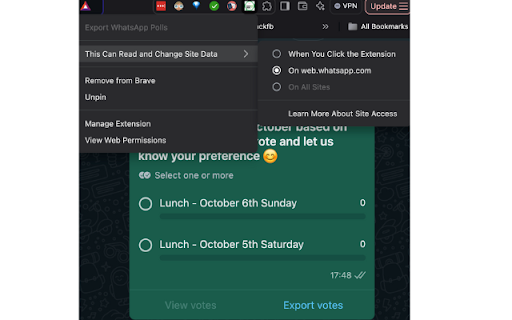
Export Your WhatsApp Polls to Excel is a lightweight and easy-to-use Chrome extension that helps you save and analyze poll results directly from WhatsApp Web. With just one click, you can export poll questions, responses, and voter details into an organized Excel/CSV file for further use.

In case if Export votes doesn't download CSV file then please click on View votes and then click on Export votes button.

Key Features:
✅ Adds an Export button to WhatsApp Web polls.
✅ Exports poll results, including:

The poll name and options
Voter names and phone numbers
Total votes for each option
✅ Saves data as a clean, easy-to-use Excel (CSV) file.
✅ No data is collected or stored — everything happens locally on your device.

How to Use:
- Open WhatsApp Web in your browser.
- Navigate to any poll you want to export.
- Click the Export button added by this extension.
- Download and open the CSV file in Excel or any spreadsheet software.
- Perfect for group admins, organizers, or anyone who needs to analyze poll responses efficiently!

Start exporting your WhatsApp polls to Excel today — it's quick, secure, and hassle-free. 🚀
Technical
- Version
- 0.1.4
- Manifest
- V3
- Size
- 225KiB
- Min Chrome
- 88
- Languages
- 1
- Featured
- No
Metadata
- ID
- fhcpmkmedhoioppkfiinpccgplckjgig
- Developer ID
- uf14b6efdd72d2e5882076592a372bd0c
- Developer Email
- [email protected]
- Created
- Dec 16, 2024
- Last Updated (Store)
- Jun 28, 2025
- Last Scraped
- Jun 7, 2026
- Website
- —
- Support URL
- —
Similar extensions
Alternatives to Export WhatsApp Polls, ranked by description similarity.

WhatsApp Group Member Scraper
Scrape WhatsApp group members names and numbers
285
★ 5.0

WhatsApp Contacts Exporter
Export your WhatsApp Web contacts to CSV/Excel with one click
5

WhatsApp Chat Backup
Backup WhatsApp chats to CSV, JSON, or Excel. Save messages & media with WhatsApp Chat Backup.
611
★ 3.5

WhatsApp Chat Exporter
WhatsApp Chat Exporter - Export Messages to CSV, Excel, JSON and Download Videos, Images, Audio, Documents
323
★ 4.0

WhatsExport: WhatsApp Group Contact Downloader
Extract contact information from WhatsApp groups on WhatsApp Web.
67
★ 5.0

WAExportPro - Backup WhatsApp Chats – One Click
Export WhatsApp contacts from groups and chats. Download and Save your chat history in HTML (web view), CSV or plain text.
245
★ 5.0

Whatsify AI Contact Exporter
Export WhatsApp contacts with Whatsify AI Contact Exporter. Save numbers and names to CSV for easy backup.
8

WA contacts extractor - download group phone numbers
Quickly export WhatsApp contacts & group contacts to CSV, Excel, or JSON with one click
202
★ 3.5
Data sourced from the Chrome Web Store · last verified Jun 7, 2026.