
OneTask — stay focused
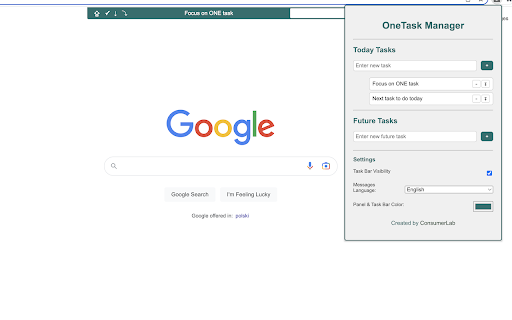
Stay focused on what matters most. A minimalist floating task bar + manager that keeps your #1 task always visible on every page.
As of June 2026, OneTask — stay focused has 35 users and a 5.00/5 rating from 2 reviews in the Workflow & Planning category.
Usersup 25.0 percent+25.0%
35
35
Ratingno change0%
5.00
2 reviews
Reviewsno change0%
2
Version
2.4.0
Manifest V3
90-day change · In the last 90 days this extension 1 version update, changed permissions.
History
9 snapshotsTracking since Apr 1, 2026.
View as table
| Date | Users | Rating | Reviews | Version |
|---|---|---|---|---|
| Apr 1, 2026 | 28 | 5.00 | 2 | 2.1.0 |
| Apr 19, 2026 | 31 | 5.00 | 2 | 2.1.0 |
| Apr 29, 2026 | 28 | 5.00 | 2 | 2.1.0 |
| May 8, 2026 | 30 | 5.00 | 2 | 2.1.0 |
| May 16, 2026 | 31 | 5.00 | 2 | 2.1.0 |
| May 30, 2026 | 29 | 5.00 | 2 | 2.1.0 |
| Jun 4, 2026 | 27 | 5.00 | 2 | 2.4.0 |
| Jun 8, 2026 | 28 | 5.00 | 2 | 2.4.0 |
| Jun 14, 2026 | 30 | 5.00 | 2 | 2.4.0 |
| Now | 35 | 5.00 | 2 | 2.4.0 |
Changelog
- May 30, 2026description
🚀 OneTask 2.0 — The Revamped Way to Stay Focused

New in 2.0:
⏸️ Pause & Break Mode – Temporarily stop your active task or take a 5-minute break (with automatic return and motivational reminder).
⏱️ Real Active Time Tracking – Each completed task now shows how long it was actually active (ignoring pauses and browser downtime).
🧮 Smart Summary – The Completed section displays the total productive time for the day.
⌘ Keyboard Shortcuts – Toggle visibility instantly (Cmd + Shift + O / Y).
🎨 Polished UI – Cleaner panel, smarter layout, and smoother animations.

✨ Improve your focus and streamline your productivity

OneTask 2.0 is an enjoyable, personalized and efficient task manager designed as a user-friendly Chrome extension.
You’re not just managing tasks — you’re adding fun, rhythm and clarity to your daily flow.

🎯 Task Bar on Every Tab
Your focus follows you everywhere you browse. The floating OneTask Bar keeps your current task visible across all tabs (except system pages).

🗂️ Multiple Task Lists
Organize your work into distinct lists — Today, Future, Core and Vision tasks — so you can manage both short-term and long-term goals seamlessly.

😄 Motivational Celebrations
Every completed task triggers one of dozens of random humorous messages. Because progress deserves a smile.

🎨 Customizable Aesthetics
Pick your color theme to match your style and mood — OneTask adapts to you.

⚡ Quick Task Addition
Add tasks instantly from the bar or the panel without breaking your workflow.

🔄 Flexible Rescheduling
Move tasks between lists with a single click and keep your plans fluid.

🧘 Built-In Rest Rhythm
Plan breaks and pause moments as part of your work cycle. OneTask reminds you that rest is also a task.

🌈 The OneTask Way — Your Path to Sustainable Productivity

Plan Today, Conquer Tomorrow – End each day by setting tomorrow’s tasks to wake up with a clear roadmap.

Keep Your Mind Free – Use OneTask to capture ideas and to-dos so your brain stays focused on what matters now.

Break It Down – Work in manageable blocks (≈ 45 min per task) for steady momentum.

Time to Rest – Short breaks recharge your energy and creativity.

Don’t Overbook – Plan for ≈ 80% of your available time to leave room for the unexpected.

The essence of the OneTask Way is not about doing more — it’s about doing better, one task at a time.
Embrace OneTask 2.0 and make every minute count. 💪🚀
🚀 OneTask 2.4 — The Focused Way to Work New in 2.4: 🎨 3 Visual Styles – Switch between Minimal Clean (light), Dark Pro (dark navy) and Glass (frosted glass gradient) — for the panel and the floating bar. 🌙 Dark Mode – A dedicated dark toggle for the Minimal Clean style. 📍 Bar Position – Place the floating bar at the top or bottom of the screen. 💾 Export & Import – Back up all your tasks to a JSON file and restore them anytime. ↩️ Undo – Accidentally deleted a task or finished the wrong one? Hit Undo within 8 seconds. 🕐 Recovery Snapshots – Browse the last 10 automatic saves (shown as "2 min ago", "1 hr ago") and restore any of them with one click. ⚠️ Storage Warning – A banner appears when local storage reaches 80% capacity so you can export before losing data. Previously introduced in 2.0–2.2: ⏸️ Pause & Break Mode – Stop your active task or take a 5-minute break (automatic return with a motivational reminder). ⏱️ Real Active Time Tracking – Each completed task records how long it was actually active (pauses and browser downtime excluded). 🧮 Smart Summary – The Completed section shows total productive time for the day. ⌘ Keyboard Shortcuts – Toggle bar visibility instantly (Cmd+Shift+O / Cmd+Shift+Y). --- ✨ Improve your focus and streamline your productivity OneTask is an enjoyable, personalized and efficient task manager designed as a user-friendly Chrome extension. You're not just managing tasks — you're adding fun, rhythm and clarity to your daily flow. 🎯 Task Bar on Every Tab Your focus follows you everywhere you browse. The floating OneTask Bar keeps your current task visible across all tabs (except system pages). 🗂️ Multiple Task Lists Organize your work into distinct lists — Today, Future, Core Goals and Vision tasks — so you can manage both short-term and long-term goals seamlessly. 💾 Your Data, Safe and Portable Export your full task history to a JSON file at any time. Import it back if you reinstall or switch devices. Automatic snapshots let you roll back to any of the last 10 states — timestamped in plain language ("5 min ago", "yesterday"). 😄 Motivational Celebrations Every completed task triggers one of dozens of random humorous messages. Because progress deserves a smile. 🎨 Customizable Aesthetics Choose from three complete visual styles — light, dark or glass — and pick your accent color. OneTask adapts to you, not the other way around. ⚡ Quick Task Addition Add tasks instantly from the bar or the panel without breaking your workflow. 🔄 Flexible Rescheduling Move tasks between lists with a single click and keep your plans fluid. 🧘 Built-In Rest Rhythm Plan breaks and pause moments as part of your work cycle. OneTask reminds you that rest is also a task. --- 🌈 The OneTask Way — Your Path to Sustainable Productivity Plan Today, Conquer Tomorrow – End each day by setting tomorrow's tasks to wake up with a clear roadmap. Keep Your Mind Free – Use OneTask to capture ideas and to-dos so your brain stays focused on what matters now. Break It Down – Work in manageable blocks (~45 min per task) for steady momentum. Time to Rest – Short breaks recharge your energy and creativity. Don't Overbook – Plan for ~80% of your available time to leave room for the unexpected. The essence of the OneTask Way is not about doing more — it's about doing better, one task at a time. Embrace OneTask and make every minute count. 💪🚀 - May 30, 2026short_description
Stay focused and organized with this simple, minimalistic task manager.
Stay focused on what matters most. A minimalist floating task bar + manager that keeps your #1 task always visible on every page.
- May 30, 2026permissions
storage, unlimitedStorage, activeTab, scripting, commands, tabs
storage, unlimitedStorage, activeTab, scripting, tabs
Permissions & access
- Permissions
- storageunlimitedStorageactiveTabscriptingtabs
- Host access
- <all_urls>
Screenshots
About
🚀 OneTask 2.4 — The Focused Way to Work

New in 2.4:
🎨 3 Visual Styles – Switch between Minimal Clean (light), Dark Pro (dark navy) and Glass (frosted glass gradient) — for the panel and the floating bar.
🌙 Dark Mode – A dedicated dark toggle for the Minimal Clean style.
📍 Bar Position – Place the floating bar at the top or bottom of the screen.
💾 Export & Import – Back up all your tasks to a JSON file and restore them anytime.
↩️ Undo – Accidentally deleted a task or finished the wrong one? Hit Undo within 8 seconds.
🕐 Recovery Snapshots – Browse the last 10 automatic saves (shown as "2 min ago", "1 hr ago") and restore any of them with one click.
⚠️ Storage Warning – A banner appears when local storage reaches 80% capacity so you can export before losing data.

Previously introduced in 2.0–2.2:
⏸️ Pause & Break Mode – Stop your active task or take a 5-minute break (automatic return with a motivational reminder).
⏱️ Real Active Time Tracking – Each completed task records how long it was actually active (pauses and browser downtime excluded).
🧮 Smart Summary – The Completed section shows total productive time for the day.
⌘ Keyboard Shortcuts – Toggle bar visibility instantly (Cmd+Shift+O / Cmd+Shift+Y).

---

✨ Improve your focus and streamline your productivity

OneTask is an enjoyable, personalized and efficient task manager designed as a user-friendly Chrome extension.
You're not just managing tasks — you're adding fun, rhythm and clarity to your daily flow.

🎯 Task Bar on Every Tab
Your focus follows you everywhere you browse. The floating OneTask Bar keeps your current task visible across all tabs (except system pages).

🗂️ Multiple Task Lists
Organize your work into distinct lists — Today, Future, Core Goals and Vision tasks — so you can manage both short-term and long-term goals seamlessly.

💾 Your Data, Safe and Portable
Export your full task history to a JSON file at any time. Import it back if you reinstall or switch devices. Automatic snapshots let you roll back to any of the last 10 states — timestamped in plain language ("5 min ago", "yesterday").

😄 Motivational Celebrations
Every completed task triggers one of dozens of random humorous messages. Because progress deserves a smile.

🎨 Customizable Aesthetics
Choose from three complete visual styles — light, dark or glass — and pick your accent color. OneTask adapts to you, not the other way around.

⚡ Quick Task Addition
Add tasks instantly from the bar or the panel without breaking your workflow.

🔄 Flexible Rescheduling
Move tasks between lists with a single click and keep your plans fluid.

🧘 Built-In Rest Rhythm
Plan breaks and pause moments as part of your work cycle. OneTask reminds you that rest is also a task.

---

🌈 The OneTask Way — Your Path to Sustainable Productivity

Plan Today, Conquer Tomorrow – End each day by setting tomorrow's tasks to wake up with a clear roadmap.

Keep Your Mind Free – Use OneTask to capture ideas and to-dos so your brain stays focused on what matters now.

Break It Down – Work in manageable blocks (~45 min per task) for steady momentum.

Time to Rest – Short breaks recharge your energy and creativity.

Don't Overbook – Plan for ~80% of your available time to leave room for the unexpected.

The essence of the OneTask Way is not about doing more — it's about doing better, one task at a time.
Embrace OneTask and make every minute count. 💪🚀
Technical
- Version
- 2.4.0
- Manifest
- V3
- Size
- 59.03KiB
- Min Chrome
- 88
- Languages
- 2
- Featured
- Yes
Metadata
- ID
- fgllnhlicjdciiiaepgpocbklldbekgb
- Developer ID
- u3f82c47f7ea3e8589ea96e6eec6c2135
- Developer Email
- [email protected]
- Created
- May 9, 2023
- Last Updated (Store)
- May 20, 2026
- Last Scraped
- Jun 14, 2026
- Website
- http://www.consumerlab.pl/
- Support URL
- —
- Privacy Policy
- —
Similar extensions
Alternatives to OneTask — stay focused, ranked by description similarity.
Today's Task
A simple extension that opens a new tab with a daily task to complete.
358
★ 5.0

One Focus
One Focus enhances productivity by integrating time management, task tracking, and continuous motivation in a Chrome extension.
6

Pomodoro Timer & To-Do List Chrome Extension – Boost Focus & Productivity
Stay productive and organized with our free Pomodoro Timer and To-Do List Chrome Extension!
1.0K
★ 3.8

Today's Task - Organize Your Day with a To-Do List Extension
Turn Your Chrome Home Page Into a Powerful To-Do List Manager
44
★ 4.5

TaskDrift
TaskDrift — A beautifully simple task manager with smart capture, reminders, themes, history and backup support.
218
★ 5.0

Do One Thing - ADHD Focus Timer & Task Manager
ADHD focus timer and task manager for deep work and distraction-free productivity.
16

QuickTask - Smart Todo List
Lightning-fast todo list with timestamps, categories, and smart completion tracking
2

Bloom - Daily Todo & Task Manager
Beautiful todo list for your new tab. Smart tasks with priorities, recurring, & AI motivation. Private & offline. Free forever.
18
★ 5.0
Data sourced from the Chrome Web Store · last verified Jun 14, 2026.