
Timeline: ChatGPT & Gemini Chat Enhanced
Timeline, folders, prompt library, virtual pet. Supports DeepSeek, Claude & all AI platforms.
As of June 2026, Timeline: ChatGPT & Gemini Chat Enhanced has 20,000 users and a 4.92/5 rating from 245 reviews in the Productivity category.
Usersup 100.0 percent+100.0%
20.0K
20,000
Ratingup 0.6 percent+0.6%
4.92
245 reviews
Reviewsup 120.7 percent+120.7%
245
Version
4.6.20
Manifest V3
90-day change · In the last 90 days this extension gained 10.0K users, 9 version updates.
History
23 snapshotsTracking since Apr 3, 2026.
View as table
| Date | Users | Rating | Reviews | Version |
|---|---|---|---|---|
| Apr 3, 2026 | 10.0K | 4.89 | 111 | 4.5.4 |
| Apr 8, 2026 | 10.0K | 4.89 | 115 | 4.5.4 |
| Apr 17, 2026 | 10.0K | 4.85 | 120 | 4.5.8 |
| Apr 22, 2026 | 20.0K | 4.84 | 129 | 4.6.0 |
| Apr 25, 2026 | 20.0K | 4.84 | 131 | 4.6.0 |
| Apr 28, 2026 | 20.0K | 4.84 | 135 | 4.6.3 |
| May 1, 2026 | 20.0K | 4.84 | 135 | 4.6.4 |
| May 7, 2026 | 20.0K | 4.84 | 135 | 4.6.5 |
| May 9, 2026 | 20.0K | 4.87 | 134 | 4.6.5 |
| May 11, 2026 | 20.0K | 4.87 | 135 | 4.6.5 |
| May 13, 2026 | 20.0K | 4.88 | 136 | 4.6.6 |
| May 16, 2026 | 20.0K | 4.89 | 148 | 4.6.7 |
| May 18, 2026 | 20.0K | 4.90 | 164 | 4.6.8 |
| May 21, 2026 | 20.0K | 4.90 | 166 | 4.6.8 |
| May 23, 2026 | 20.0K | 4.90 | 169 | 4.6.9 |
| May 26, 2026 | 20.0K | 4.92 | 208 | 4.6.9 |
| May 29, 2026 | 20.0K | 4.92 | 208 | 4.6.10 |
| Jun 1, 2026 | 20.0K | 4.91 | 215 | 4.6.11 |
| Jun 4, 2026 | 20.0K | 4.91 | 218 | 4.6.12 |
| Jun 7, 2026 | 20.0K | 4.92 | 231 | 4.6.13 |
| Jun 9, 2026 | 20.0K | 4.92 | 236 | 4.6.13 |
| Jun 12, 2026 | 20.0K | 4.92 | 236 | 4.6.14 |
| Jun 17, 2026 | 20.0K | 4.92 | 239 | 4.6.16 |
| Now | 20.0K | 4.92 | 245 | 4.6.20 |
Changelog
- May 13, 2026short_description
Supports DeepSeek, Claude & all AI platforms. Timeline, folders, prompt library, virtual pet.
Timeline, folders, prompt library, virtual pet. Supports DeepSeek, Claude & all AI platforms.
- May 11, 2026short_description
The ultimate AI chat companion — works with ChatGPT, Gemini, DeepSeek and all major AI platforms.
Supports DeepSeek, Claude & all AI platforms. Timeline, folders, prompt library, virtual pet.
- May 11, 2026name
Timeline: Enhance AI Chat Experience
Timeline: ChatGPT & Gemini Chat Enhanced
- May 1, 2026description
✅ Timeline is a powerful AI conversation enhancement extension, It doubles your efficiency when chatting with AI in your browser.

💪 Key Features:

👉 Interactive Conversation Timeline
✔️ Organizes your AI conversations into an interactive timeline.
✔️ Jump to conversations: Quickly navigate between messages in long chats.
✔️ Bookmark: Save conversations across different AI platforms.

👉 Copy LaTeX Formulas
✔️ Intelligently detects formulas on any webpage.
✔️ Copy: Click to copy in LaTeX format.

👉 Prompt Library
✔️ Save your frequently used prompts.
✔️ Use the '/' shortcut to quickly access saved prompts.

👉 Enter Key for New Line in AI Input
✔️ Press Enter to add a new line in the AI input box. Double-tap Enter quickly to send the message.

💻 How to Use:
🔸 Click "Add to Chrome" to install.
🔸 Open any AI platform and start a simple conversation.
🔸 A timeline will appear on the right side of the page!

📪 Contact Us:
Have questions or suggestions? Reach out to us at 💌 [[email protected]].
Try it now—may we boost your efficiency.
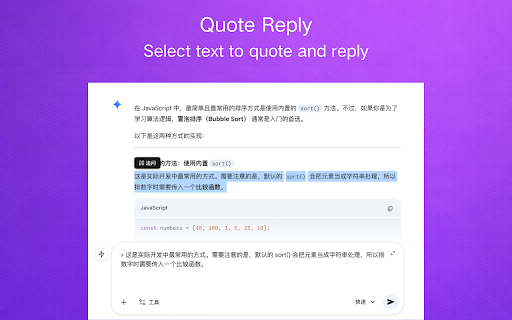
✅ With this powerful extension, you can easily jump to any conversation via the timeline, organize important chats into folders, save your favorite prompts for one-click reuse, highlight key text or quote-and-follow-up just by selecting an AI reply, plus run code blocks, render Mermaid diagrams, and copy LaTeX formulas right on the page — making your AI conversations truly efficient.

⚡ Features:

1️⃣ Conversation Timeline
💡 Automatically generates a vertical timeline on the right side of any AI chat page, with each question as a clickable node
💡 Get a bird's-eye view of dozens of turns at a glance — click a node to jump instantly, no more endless scrolling

2️⃣ Folders
💡 Save single Q&As or entire chats into folders, with multi-level nesting, drag-and-drop sorting, pinning, and notes
💡 Great answers and key code from AI are kept forever and easy to find again — never lost in the sea of conversations

3️⃣ Custom Prompt Library
💡 Save your favorite prompts and insert them with one click from the left side of the input box
💡 Those prompts you've used a hundred times — "translate this", "polish my writing", "act as an expert" — no more copy-pasting. The more you use, the more time you save

4️⃣ Formula Copy
💡 Click any math formula on the page to copy it instantly as LaTeX or MathML
💡 Writing papers or notes? No more screenshots or retyping — copy formulas in LaTeX or MathML with one click

5️⃣ Text Highlight
💡 Select any text on the page to highlight it, with 4 styles (full / half / underline / text-only) + 15 customizable colors + inline annotations for your thoughts
💡 Mark up AI replies just like a paper book — turn answers into annotated documents and let key info pop out visually

6️⃣ Pixel Pets
💡 While the AI is thinking, watch a snail / zombie / ant / wizard happily march above your input box
💡 A little fun while you wait — say goodbye to staring at the loading bar, and stay in a good mood through long AI sessions

7️⃣ Google Drive Cloud Sync
💡 Upload or download all your data to your own Google Drive with one click
💡 Switch computers or browsers without losing a thing — folders, prompts, highlights all preserved. Your data lives in your own cloud, untouched by the extension

💻 How to Use:
🔸 Click the "Add to Chrome" button on this page to install.
🔸 Open any AI platform and start chatting — it just works.

📪 Contact Us:
Got questions or suggestions? Reach out via 💌 [[email protected]].
- May 1, 2026short_description
Supports all mainstream AI platforms. Integrated with chat timeline, prompts, text highlight, quick notes and many more features.
The ultimate AI chat companion — works with ChatGPT, Gemini, DeepSeek and all major AI platforms.
- Apr 25, 2026description
🔥 AI Timeline is your powerful AI efficiency assistant.
When you use AI in your browser, you'll need it.

💪 Key Features:

👉 Interactive Conversation Timeline
✔️ Organizes your AI conversations into an interactive timeline.
✔️ Jump to conversations: Quickly navigate between messages in long chats.
✔️ Bookmark: Save conversations across different AI platforms.

👉 Copy LaTeX Formulas
✔️ Intelligently detects formulas on any webpage.
✔️ Copy: Click to copy in LaTeX format.

👉 Prompt Library
✔️ Save your frequently used prompts.
✔️ Use the '/' shortcut to quickly access saved prompts.

👉 Run Code
✔️ Run simple code blocks directly on the webpage. Supports JavaScript, TypeScript, Python, SQL, HTML, JSON, Markdown, Lua, Ruby.

👉 Enter Key for New Line in AI Input
✔️ Press Enter to add a new line in the AI input box. Double-tap Enter quickly to send the message.

💻 How to Use:
🔸 Click "Add to Chrome" to install.
🔸 Open any AI platform and start a simple conversation.
🔸 A timeline will appear on the right side of the page!

📪 Contact Us:
Have questions or suggestions? Reach out to us at 💌 [[email protected]].
Try it now—may we boost your efficiency.
✅ Timeline is a powerful AI conversation enhancement extension, It doubles your efficiency when chatting with AI in your browser.

💪 Key Features:

👉 Interactive Conversation Timeline
✔️ Organizes your AI conversations into an interactive timeline.
✔️ Jump to conversations: Quickly navigate between messages in long chats.
✔️ Bookmark: Save conversations across different AI platforms.

👉 Copy LaTeX Formulas
✔️ Intelligently detects formulas on any webpage.
✔️ Copy: Click to copy in LaTeX format.

👉 Prompt Library
✔️ Save your frequently used prompts.
✔️ Use the '/' shortcut to quickly access saved prompts.

👉 Enter Key for New Line in AI Input
✔️ Press Enter to add a new line in the AI input box. Double-tap Enter quickly to send the message.

💻 How to Use:
🔸 Click "Add to Chrome" to install.
🔸 Open any AI platform and start a simple conversation.
🔸 A timeline will appear on the right side of the page!

📪 Contact Us:
Have questions or suggestions? Reach out to us at 💌 [[email protected]].
Try it now—may we boost your efficiency.
- Apr 25, 2026short_description
Double your AI chat experience. Chat timeline, folders, copy LaTeX formulas, quick notes, custom prompt library, and many more…
Supports all mainstream AI platforms. Integrated with chat timeline, prompts, text highlight, quick notes and many more features.
- Apr 25, 2026name
Timeline: AI Chat Enhancement Plugin
Timeline: Enhance AI Chat Experience
Permissions & access
- Permissions
- storageunlimitedStorageidentityactiveTab
- Host access
- None declared
Screenshots



About
✅ With this powerful extension, you can easily jump to any conversation via the timeline, organize important chats into folders, save your favorite prompts for one-click reuse, highlight key text or quote-and-follow-up just by selecting an AI reply, plus run code blocks, render Mermaid diagrams, and copy LaTeX formulas right on the page — making your AI conversations truly efficient.

⚡ Features:

1️⃣ Conversation Timeline
💡 Automatically generates a vertical timeline on the right side of any AI chat page, with each question as a clickable node
💡 Get a bird's-eye view of dozens of turns at a glance — click a node to jump instantly, no more endless scrolling

2️⃣ Folders
💡 Save single Q&As or entire chats into folders, with multi-level nesting, drag-and-drop sorting, pinning, and notes
💡 Great answers and key code from AI are kept forever and easy to find again — never lost in the sea of conversations

3️⃣ Custom Prompt Library
💡 Save your favorite prompts and insert them with one click from the left side of the input box
💡 Those prompts you've used a hundred times — "translate this", "polish my writing", "act as an expert" — no more copy-pasting. The more you use, the more time you save

4️⃣ Formula Copy
💡 Click any math formula on the page to copy it instantly as LaTeX or MathML
💡 Writing papers or notes? No more screenshots or retyping — copy formulas in LaTeX or MathML with one click

5️⃣ Text Highlight
💡 Select any text on the page to highlight it, with 4 styles (full / half / underline / text-only) + 15 customizable colors + inline annotations for your thoughts
💡 Mark up AI replies just like a paper book — turn answers into annotated documents and let key info pop out visually

6️⃣ Pixel Pets
💡 While the AI is thinking, watch a snail / zombie / ant / wizard happily march above your input box
💡 A little fun while you wait — say goodbye to staring at the loading bar, and stay in a good mood through long AI sessions

7️⃣ Google Drive Cloud Sync
💡 Upload or download all your data to your own Google Drive with one click
💡 Switch computers or browsers without losing a thing — folders, prompts, highlights all preserved. Your data lives in your own cloud, untouched by the extension

💻 How to Use:
🔸 Click the "Add to Chrome" button on this page to install.
🔸 Open any AI platform and start chatting — it just works.

📪 Contact Us:
Got questions or suggestions? Reach out via 💌 [[email protected]].
Technical
- Version
- 4.6.20
- Manifest
- V3
- Size
- 2.7MiB
- Min Chrome
- 88
- Languages
- 18
- Featured
- No
Metadata
- ID
- fgebdnlceacaiaeikopldglhffljjlhh
- Developer ID
- u9fe843c42f52425e7d164de7ea181b0e
- Developer Email
- [email protected]
- Created
- Oct 13, 2025
- Last Updated (Store)
- Jun 17, 2026
- Last Scraped
- Jun 17, 2026
- Website
- https://timeline4ai.com/
- Support URL
- —
- Privacy Policy
- https://timeline4ai.com/privacy.html
Similar extensions
Alternatives to Timeline: ChatGPT & Gemini Chat Enhanced, ranked by description similarity.

AI assistant
Use AI Assistant Chrome Extension for ai coding assistant and ai chat online productivity with smart, instant help in your browser.
688
★ 5.0

GPT Quicker
Excellence GPT assistant with useful extensions and powerful prompts. Use ChatGPT, Claude, Bard, Bing anywhere online.
152
★ 3.7

ChromeAiAgent
AI assistant for browser automation with natural language commands and intelligent web page interaction.
8

AIChatHelper
Navigate AI Chat conversation history. Lists user questions in sidebar, click to jump to position.
4

Thir - Intelligent ChatGPT AI Assistant (Gemini, Grok, Claude, DeepSeek)
AI assistant with Browser, Web, Video, Academic, Code, Equations, Travel, Deep Research, and Design tools for chat, read and write.
8

Egenie AI
Egenie AI
—

AIChatOne : AI ChatGPT Copilot (ChatHub tools)
Your AI Copilot powered by ChatGPT. Answers complex questions. Writes emails, reads articles, searches smartly. Usable everywhere.
811
★ 4.5

AI4Chat
🔥 Use AI4Chat to interact with websites, YouTube videos, Google Docs, and emails, plus generate images and reply with AI-powered…
38
★ 4.7
Data sourced from the Chrome Web Store · last verified Jun 17, 2026.