
ZenToons - Online video filter
This extension helps prevent overstimulation in children when they are viewing YouTube, Netflix, and other platforms.
As of May 2026, ZenToons - Online video filter has 44 users and a 5.00/5 rating from 1 reviews in the Well Being category.
Usersup 12.8 percent+12.8%
44
44
Ratingno change0%
5.00
1 reviews
Reviewsno change0%
1
Version
1.1
Manifest V3
History
2 snapshotsTracking since Apr 25, 2026.
View as table
| Date | Users | Rating | Reviews | Version |
|---|---|---|---|---|
| Apr 25, 2026 | 39 | 5.00 | 1 | 1.1 |
| May 21, 2026 | 41 | 5.00 | 1 | 1.1 |
| Now | 44 | 5.00 | 1 | 1.1 |
Permissions & access
- Permissions
- activeTabstoragescripting
- Host access
- None declared
Screenshots
About
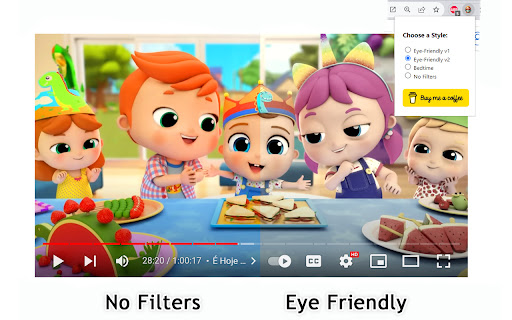
It's worth noting that intense colors and stimulating visual experiences can impact children's behavior, similar to the effects of drugs on the brain. ZenToons - Online video filter allow for the application of custom filters to online videos, offering a gentler visual experience on popular platforms like YouTube, Netflix, and many others.


Choose from four different modes to make videos more child-friendly :

-  Natural Colors: Reduce vibrant colors for a soothing viewing experience.
-  Low Saturation:  Colors less saturated than "natural colors" profile.
- Night Mode: Prepare your child for sleep with dimmed and calming colors, while reducing the blue light, which can help promote better sleep.
- No Filter: Disable filters when not needed.


How to Use:

1. Install ZenToons - Online video filter from the Chrome Web Store.
2. After installation, click on the extension icon in your browser's toolbar.
3.Pin the filter to the toolbar using the pin icon
4. Select your preferred filter mode from the dropdown menu.

Enjoy safer and more child-appropriate video content.


Known Issues:

The filter may deactivate after refreshing the page or restarting the browser, but this can be advantageous, especially if a child shares the computer with an adult.
Technical
- Version
- 1.1
- Manifest
- V3
- Size
- 141KiB
- Min Chrome
- 88
- Languages
- 1
- Featured
- Yes
Metadata
- ID
- ffjnpaoblphhnjjanijbfhiledgcmfnh
- Developer ID
- ufcf690706e2b9a1d3a62a16892d7da4d
- Developer Email
- [email protected]
- Created
- Sep 5, 2023
- Last Updated (Store)
- Sep 11, 2023
- Last Scraped
- May 21, 2026
- Website
- —
- Support URL
- —
- Privacy Policy
- —
Similar extensions
Alternatives to ZenToons - Online video filter, ranked by description similarity.

TubeZen
Take control of YouTube. Block distractions, filter content, and set time limits. Fully private — all data stays on your device.
9
★ 5.0

YT Kids Guard — Parental YouTube Timer & Blocker
Parental control for YouTube: set watch timers, allow specific channels, block Shorts and unwanted content. Kid-friendly design.
18

Youtube Ad Zen
Mute ads, blur the screen, and play zen music during YouTube ads.
8
★ 5.0

Destimulate YT
Blocks out all tools YouTube™ uses to keep you hooked, such as thumbnails, comments, recommendations, endscreens, shorts, and more
17
★ 5.0

Colorful Chrome
Browsing should be colorful and fun! With Colorful Chrome you can apply a filter and paint the world with your favorite color!
1
★ 5.0

Kaini - YouTube Scene Change Detector
Kaini automatically detects and blocks YouTube videos containing successive rapid scene changes.
24
★ 5.0

Calming TV
Curate a calmer YouTube: filter by channels/topics, hide comments/shorts, and export a mindful weekly reflection—stored locally.
—

YT Studio Kittens
YT Studio Kittens: A Purr-fect Way to Soften YouTube Analytics
Overview:
As a YouTube creator, watching your latest video's…
3
Data sourced from the Chrome Web Store · last verified May 21, 2026.