
ChatGpt Chat Exporter
Use this extension to export chatgpt chats in PDF, Text, CSV, and Excel formats instantly.
As of June 2026, ChatGpt Chat Exporter has 20 users in the Productivity category.
Usersup 5.3 percent+5.3%
20
20
Ratingno change0%
—
— reviews
Reviewsno change0%
—
Version
1.0
Manifest V3
History
5 snapshotsTracking since Apr 1, 2026.
View as table
| Date | Users | Rating | Reviews | Version |
|---|---|---|---|---|
| Apr 1, 2026 | 19 | — | — | 1.0 |
| Apr 21, 2026 | 18 | — | — | 1.0 |
| May 6, 2026 | 16 | — | — | 1.0 |
| May 24, 2026 | 17 | — | — | 1.0 |
| Jun 6, 2026 | 18 | — | — | 1.0 |
| Now | 20 | — | — | 1.0 |
Permissions & access
- Permissions
- storagewebRequestnotifications
- Host access
- https://chatgpt.com/*
Screenshots


About
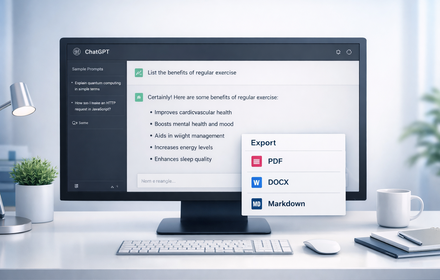
Are you looking for a simple way to save your ChatGPT conversations? Or are you searching for a tool that can quickly export your chats in different formats? The ChatGPT Chat Exporter extension lets you instantly download your ChatGPT chats in PDF, Text, CSV, and Excel formats. Whether you need them for study, documentation, research, or sharing, this tool makes it fast and hassle-free. With just a click, you can securely store your conversations and access them anytime offline.


Key Features

1. Multiple Export Formats

Save your chats in PDF, Text, CSV, or Excel based on your preference.

2. One-Click Export

Quickly download entire conversations with just a single click.

3. Organized & Shareable

Exported files are cleanly formatted, making them easy to read and share.

4. Lightweight & Secure

Fast, user-friendly extension that keeps your data safe.


How to Use

Step 1: Install the Extension

Add the ChatGPT Chat Exporter extension to your Chrome browser.

Step 2: Open Your Chat

Go to ChatGPT and open the conversation you want to export.

Step 3: Choose Export Format

Select from PDF, Text, CSV, or Excel as per your requirement.

Step 4: Download Instantly

Click the export button and get your conversation file within seconds.


Why It Is Useful?

This extension is useful because it helps you save important ChatGPT conversations for later use. Whether you’re doing research, creating study notes, managing client queries, or documenting brainstorming sessions, having the chats in multiple formats ensures flexibility and easy access.


Who Can Use It?

The ChatGPT Chat Exporter extension is ideal for students, professionals, researchers, writers, teachers, and business users who want to store and organize their AI conversations. Anyone who frequently interacts with ChatGPT and needs offline or shareable records will find this tool extremely handy.
Technical
- Version
- 1.0
- Manifest
- V3
- Size
- 264KiB
- Min Chrome
- 88
- Languages
- 1
- Featured
- No
Metadata
- ID
- ffhijeieagpnioebmdacphoopmnppglc
- Developer ID
- u3896594b4f8f021ff7c7a899df8b7385
- Developer Email
- [email protected]
- Created
- Sep 12, 2025
- Last Updated (Store)
- May 12, 2026
- Last Scraped
- Jun 6, 2026
- Website
- —
- Support URL
- —
Similar extensions
Alternatives to ChatGpt Chat Exporter, ranked by description similarity.

ChatGPT Chat Exporter
Export your ChatGPT conversations to text, JSON, markdown, and PDF
85

ChatGPT PDF Exporter – Download ChatGPT History
Easily save your ChatGPT chats as PDF, Markdown, or other formats—every detail preserved flawlessly.
260
★ 4.4

Gemini Chat Exporter
Use this extension to export Gemini chats in PDF, Text, CSV, and Excel formats instantly.
9.0K
★ 3.1

ChatGPT to PDF
Use ChatGPT to PDF extension to save Images, Math Equations, Save AI responses, tables. Convert ChatGPT to PDF and doc in one click!
4.0K
★ 4.3

Chat Conversation Exporter
Export chat conversations from various LLM platforms (Markdown, PDF, HTML, JSON)
124
★ 3.5

ChatGPT Simple PDF Exporter
Simply save ChatGPT conversations as PDF
13
★ 3.0

Save Chat to Doc
A simple extension that save Chat to doc file.
475
★ 5.0
ChatGPT Exporter
Export ChatGPT conversations to PDF, Word, Markdown, and Text.
194
★ 1.0
Data sourced from the Chrome Web Store · last verified Jun 6, 2026.