
WeBrief
WeBrief A3-style reading assistant for Chrome side panel workflows.
As of June 2026, WeBrief has 3 users in the Workflow & Planning category.
Usersno change0%
3
3
Ratingno change0%
—
— reviews
Reviewsno change0%
—
Version
0.1.3
Manifest V3
90-day change · In the last 90 days this extension 1 version update.
History
6 snapshotsTracking since Apr 23, 2026.
View as table
| Date | Users | Rating | Reviews | Version |
|---|---|---|---|---|
| Apr 23, 2026 | — | — | — | 0.1.2 |
| Apr 27, 2026 | — | — | — | 0.1.2 |
| May 5, 2026 | 1 | — | — | 0.1.2 |
| May 10, 2026 | 2 | — | — | 0.1.3 |
| Jun 5, 2026 | 3 | — | — | 0.1.3 |
| Jun 11, 2026 | 4 | — | — | 0.1.3 |
| Now | 3 | — | — | 0.1.3 |
Permissions & access
- Permissions
- sidePanelstoragescriptingactiveTabtabs
- Host access
- https://*/*, http://*/*, file://*/*
Screenshots
About
# WeBrief - Chrome Web Store Listing (English)

## Short Description

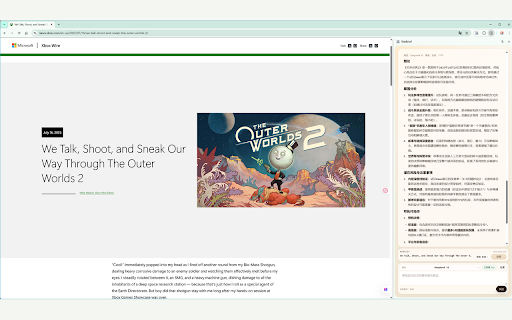
AI-powered side panel assistant to summarize and chat about any web page with your own model.

## Detailed Description

WeBrief is an AI reading assistant that lives in Chrome's side panel. Read and summarize any web page without leaving your current tab.

### Key Features

- 📄 Extract main content from any web page automatically
- 🤖 Generate summaries with your own AI model (OpenAI-compatible)
- 💬 Chat about page content with customizable prompts
- ⚙️ Configure your own API endpoint and model settings
- 🔒 Your API keys stay in local storage, never shared
- 🎯 Works in side panel for focused reading workflows

### How to Use

1. Install the extension
2. Open Options to configure your AI model API key and endpoint
3. Click the extension icon to open side panel
4. Extract page content and start summarizing

### Privacy

WeBrief does not collect any personal data. All configurations are stored locally.
Technical
- Version
- 0.1.3
- Manifest
- V3
- Size
- 1.75MiB
- Min Chrome
- 114
- Languages
- 3
- Featured
- No
Metadata
- ID
- ffghcpkfjoneebikodloepeolnhdlecn
- Developer ID
- u501d0e64118a28e8e865af64de9bf05f
- Developer Email
- [email protected]
- Created
- Apr 22, 2026
- Last Updated (Store)
- Apr 29, 2026
- Last Scraped
- Jun 11, 2026
- Website
- —
- Support URL
- —
- Privacy Policy
- https://ascendgz.github.io/webrief-site/
Data sourced from the Chrome Web Store · last verified Jun 11, 2026.