
NoteSource
Clip any web page as Markdown — save to Google Drive, local, or clipboard. Built for NotebookLM & Gemini.
As of June 2026, NoteSource has — users and a 5.00/5 rating from 1 reviews in the Productivity category.
Usersno change0%
—
—
Ratingno change0%
5.00
1 reviews
Reviewsno change0%
1
Version
1.0.3
Manifest V3
History
2 snapshotsTracking since May 29, 2026.
Not enough history yet for this metric — the chart fills in as we collect more snapshots.
View as table
| Date | Users | Rating | Reviews | Version |
|---|---|---|---|---|
| May 29, 2026 | — | — | — | 1.0.3 |
| Jun 10, 2026 | — | — | — | 1.0.3 |
| Now | — | 5.00 | 1 | 1.0.3 |
Permissions & access
- Permissions
- storagescriptingtabsidentitydownloadsactiveTab
- Host access
- None declared
Screenshots


About
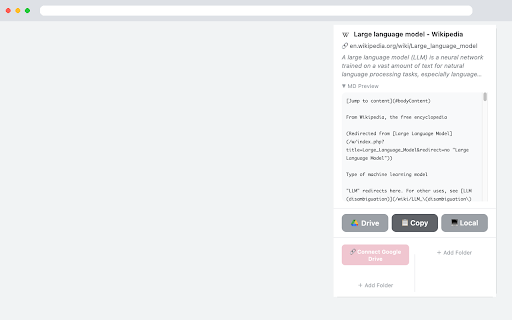
NoteSource clips any web page as clean Markdown with one click — save to Google Drive, download locally, or copy to clipboard.

  ✦ What it does
  • Converts the current page to Markdown with YAML frontmatter (title, source, author, published date)
  • Save to Google Drive — uploads directly to your chosen folder
  • Save locally — downloads as a .md file
  • Copy to clipboard — paste into Obsidian, Notion, NotebookLM, or any app

  ✦ Privacy
  Your data never touches any third-party server. Files go directly from your browser to your own Google Drive. The OAuth app only verifies your identity — no content is collected or stored by the developer.

  ✦ Perfect for
  • NotebookLM & Gemini users who want to clip web research
  • Obsidian / Markdown-based note-taking workflows
  • Anyone who wants a clean, distraction-free version of any article

  ✦ Setup
  1. Click the NoteSource icon
  2. Connect Google Drive (one-time sign-in)
  3. Add a Drive folder
  4. Click Drive, Copy, or Local to save
Technical
- Version
- 1.0.3
- Manifest
- V3
- Size
- 29.5KiB
- Min Chrome
- 88
- Languages
- 1
- Featured
- No
Metadata
- ID
- fffkfjeplofeidhlmnpdfcpnicogmooi
- Developer ID
- u19e88b35bb8151f24f4b1a4b396adac9
- Developer Email
- [email protected]
- Created
- May 28, 2026
- Last Updated (Store)
- May 28, 2026
- Last Scraped
- Jun 10, 2026
- Website
- —
- Support URL
- —
Data sourced from the Chrome Web Store · last verified Jun 10, 2026.