
TabVault — Save & Restore Tab Workspaces
Save your tabs as a workspace in one click. Restore the exact set later. Never lose your context again.
As of June 2026, TabVault — Save & Restore Tab Workspaces has 3 users and a 5.00/5 rating from 1 reviews in the Productivity category.
Usersno change0%
3
3
Ratingno change0%
5.00
1 reviews
Reviewsno change0%
1
Version
1.0.0
Manifest V3
History
5 snapshotsTracking since May 5, 2026.
View as table
| Date | Users | Rating | Reviews | Version |
|---|---|---|---|---|
| May 5, 2026 | — | — | — | 1.0.0 |
| May 10, 2026 | — | — | — | 1.0.0 |
| May 16, 2026 | 1 | 5.00 | 1 | 1.0.0 |
| May 28, 2026 | — | 5.00 | 1 | 1.0.0 |
| Jun 10, 2026 | 1 | 5.00 | 1 | 1.0.0 |
| Now | 3 | 5.00 | 1 | 1.0.0 |
Permissions & access
- Permissions
- tabsstoragewindowstabGroups
- Host access
- https://extensionpay.com/*
Screenshots


About
Stop losing your tabs.

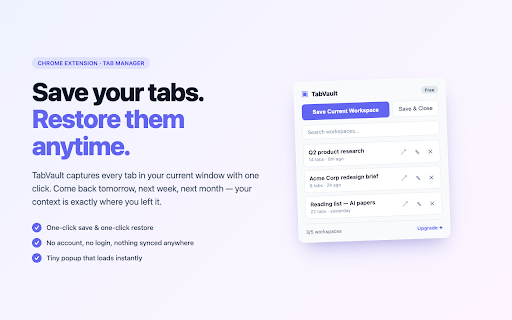
You open 20 tabs to research a project, then get pulled into a meeting. By the time you come back, you've lost half of them. TabVault fixes this in two clicks.

━━ HOW IT WORKS ━━
• Click the TabVault icon
• Hit "Save Current Workspace" — every tab in this window is saved with its title and URL
• Anytime later: click "Restore" — they all come back exactly as they were

━━ WHY IT'S DIFFERENT ━━
✓ No account required. No login. No syncing your tabs to someone else's server.
✓ Tiny popup that loads instantly — not a heavy SPA or new-tab takeover.
✓ Restored tabs open as a colored, labeled tab group (Pro) — so you can stack 3 workspaces side-by-side in one window.
✓ Auto-save catches windows when you close them, so accidental closes never lose work (Pro).
✓ Works fully offline. Everything stays on your device.

━━ FREE ━━
• Up to 5 saved workspaces
• Save, restore, rename, delete, search
• Save & close all tabs in one click
• Open popup keyboard shortcut

━━ PRO — $4.99/mo or $19.99 one-time ━━
• Unlimited workspaces
• Restore as colored tab groups (in current window or a new one — your choice)
• Auto-save before browser quit
• Notes per workspace
• Quick-save & restore-last keyboard shortcuts
• 7-day refund, cancel anytime

━━ PRIVACY ━━
• All workspace data stored locally via Chrome's storage API. Never sent anywhere.
• No analytics, no tracking, no telemetry.
• Pro license is the only thing that talks to our payment processor (ExtensionPay).

Made for researchers, freelancers, students, and anyone whose tabs are their working memory.

━━ HEADS UP ━━
Chrome 126+ automatically pins any tab group (including TabVault's restored ones) to your bookmarks bar. To turn that off, right-click any group's colored label in your tab bar and choose "Hide group from bookmarks bar" — or disable globally at chrome://flags by searching "saved tab groups."

Bug reports & feature requests: [email protected]
Technical
- Version
- 1.0.0
- Manifest
- V3
- Size
- 37.67KiB
- Min Chrome
- 88
- Languages
- 1
- Featured
- No
Metadata
- ID
- fffichfabfgdhlofmgkmodehnaeagoog
- Developer ID
- u5a0696677a8c944a66bd47a1d8a90c2c
- Developer Email
- [email protected]
- Created
- May 4, 2026
- Last Updated (Store)
- May 4, 2026
- Last Scraped
- Jun 10, 2026
- Website
- —
- Support URL
- —
- Privacy Policy
- https://tabvault-privacy.netlify.app
Data sourced from the Chrome Web Store · last verified Jun 10, 2026.