
YT Float — YouTube Picture-in-Picture Player
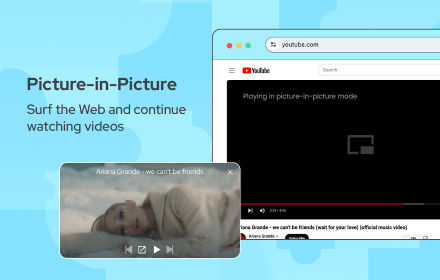
Float YouTube videos always on top with PiP. Track watch time, control playback, theater & fullscreen — all from one click.
As of June 2026, YT Float — YouTube Picture-in-Picture Player has 40 users in the Entertainment category.
Usersup 66.7 percent+66.7%
40
40
Ratingno change0%
—
— reviews
Reviewsno change0%
—
Version
2.0.0
Manifest V3
90-day change · In the last 90 days this extension 1 version update, changed permissions.
History
9 snapshotsTracking since Apr 6, 2026.
View as table
| Date | Users | Rating | Reviews | Version |
|---|---|---|---|---|
| Apr 6, 2026 | 24 | — | — | 1.0.0 |
| Apr 18, 2026 | 31 | — | — | 2.0.0 |
| Apr 25, 2026 | 40 | — | — | 2.0.0 |
| May 9, 2026 | 39 | — | — | 2.0.0 |
| May 14, 2026 | 36 | — | — | 2.0.0 |
| May 20, 2026 | 34 | — | — | 2.0.0 |
| May 26, 2026 | 35 | — | — | 2.0.0 |
| Jun 2, 2026 | 37 | — | — | 2.0.0 |
| Jun 8, 2026 | 39 | — | — | 2.0.0 |
| Now | 40 | — | — | 2.0.0 |
Changelog
- Apr 6, 2026description
YouTube Pop Out Player – Always On Top & Smart Controls

YouTube Pop Out Player is a Chrome extension that allows you to watch YouTube videos in a floating, always-on-top window while continuing to work or browse without interruptions.

The extension is designed to improve multitasking by keeping your video visible above all applications and providing essential playback controls in a compact, movable player.

Key Features
📌 Always On Top Player

Keeps the video window above all applications

Works seamlessly with any application

Fully resizable and draggable

Supports multiple monitors

🚫 Ad Blocking Controls

Automatically skips YouTube video ads

Hides banner and overlay ads

Blocks promoted content

Can be toggled on or off at any time

📊 Watch Statistics

Track daily, weekly, and monthly YouTube watch time

View all-time usage summary

Select custom date ranges

Export watch statistics as JSON

View usage with visual charts

⚙️ Advanced Playback Options

Fullscreen mode

Theater mode

Mini player support

Quick access settings

⏮️⏭️ Media Controls

Play and pause videos

Skip to next or previous video

Seek forward and backward

Control playback directly from the pop-out window

⌨️ Keyboard Shortcuts

Alt + P to instantly toggle the pop-out player

Works anywhere on YouTube

Why Choose YouTube Pop Out Player?

Watch videos while multitasking

Stay productive without pausing content

Clean, lightweight, and easy to use

Designed for smooth, uninterrupted viewing

Privacy & Performance

YouTube Pop Out Player does not collect personal data.
All functionality runs locally in the browser and is focused only on improving the YouTube viewing experience.

Important Notice

This extension is not affiliated with or endorsed by YouTube or Google.
Watch YouTube videos in a floating always-on-top window while working on other tasks.

YouTube Always On Top allows you to pop out any video into a movable, resizable window that stays above all other applications. Perfect for multitasking, studying, or entertainment while working.

✨ Features:
• Floating video player (always on top)
• One-click pop out from YouTube player
• Clean and modern user interface
• Draggable and resizable window
• Keyboard shortcut support
• Works seamlessly with YouTube

🎯 Use Cases:
• Watch videos while working on documents
• Follow tutorials side-by-side
• Multitask without switching tabs

Simple, fast, and lightweight — designed for a smooth viewing experience.
- Apr 6, 2026short_description
Pop out YouTube videos into an Always On Top window, block ads, and track watch statistics easily.
Float YouTube videos always on top with PiP. Track watch time, control playback, theater & fullscreen — all from one click.
- Apr 6, 2026name
YouTube Pop Out Player
YT Float — YouTube Picture-in-Picture Player
- Apr 6, 2026permissions
tabs, scripting, storage, declarativeNetRequest, declarativeNetRequestWithHostAccess
tabs, scripting, storage
Permissions & access
- Permissions
- tabsscriptingstorage
- Host access
- *://*.youtube.com/*
Screenshots


About
Watch YouTube videos in a floating always-on-top window while working on other tasks.

YouTube Always On Top allows you to pop out any video into a movable, resizable window that stays above all other applications. Perfect for multitasking, studying, or entertainment while working.

✨ Features:
• Floating video player (always on top)
• One-click pop out from YouTube player
• Clean and modern user interface
• Draggable and resizable window
• Keyboard shortcut support
• Works seamlessly with YouTube

🎯 Use Cases:
• Watch videos while working on documents
• Follow tutorials side-by-side
• Multitask without switching tabs

Simple, fast, and lightweight — designed for a smooth viewing experience.
Technical
- Version
- 2.0.0
- Manifest
- V3
- Size
- 20.45KiB
- Min Chrome
- 88
- Languages
- 1
- Featured
- No
Metadata
- ID
- fffgiblnfflbgpfholopdpbogjjojddk
- Developer ID
- ud997398170b748b698960ee2c3dc729b
- Developer Email
- [email protected]
- Created
- Jan 8, 2026
- Last Updated (Store)
- Apr 1, 2026
- Last Scraped
- Jun 8, 2026
- Website
- —
- Support URL
- —
- Privacy Policy
- —
Similar extensions
Alternatives to YT Float — YouTube Picture-in-Picture Player, ranked by description similarity.

Youtube Preview Popup
Watch and control YouTube videos in a sleek preview popup for a more immersive and cool viewing experience.
35
★ 5.0

Popout Shorts
Watch YouTube Shorts in a floating, resizable, always-on-top window with playback controls and autoplay for nonstop entertainment.
51
★ 2.3

Floating Video Player – Picture-in-Picture
Allows users to watch videos in Picture-in-Picture video player.
2.0K
★ 5.0

Pic-in-Pic Floating Window works with Youtube [QVI]
Independent software - not affiliated with YouTube. Watch YouTube videos and Shorts in a floating always-on-top window.
487
★ 4.5
PiP Extension
A Chrome extension to control video PiP, volume, and play/pause.
25

YouTube Quick Actions & Player Controls
Quick actions on YouTube thumbnails and powerful player controls – fully customizable.
54

YouTube Maximize
Expand YouTube videos to fill your entire browser window for a clean, immersive viewing experience
47
★ 4.4

Mini YouTube
Floating YouTube Player for True Multitasking.
49
Data sourced from the Chrome Web Store · last verified Jun 8, 2026.