
DuckDuckGo Search - Context Menu and Omnibox
Search DuckDuckGo using the context menu option and omnibox.
As of May 2026, DuckDuckGo Search - Context Menu and Omnibox has 1,000 users and a 4.33/5 rating from 6 reviews in the Productivity category.
Usersno change0%
1.0K
1,000
Ratingno change0%
4.33
6 reviews
Reviewsno change0%
6
Version
0.0.4
Manifest V3
History
1 snapshotsTracking since Apr 25, 2026.
View as table
| Date | Users | Rating | Reviews | Version |
|---|---|---|---|---|
| Apr 25, 2026 | 1.0K | 4.33 | 6 | 0.0.4 |
| Now | 1.0K | 4.33 | 6 | 0.0.4 |
Permissions & access
- Permissions
- contextMenus
- Host access
- None declared
Screenshots
About
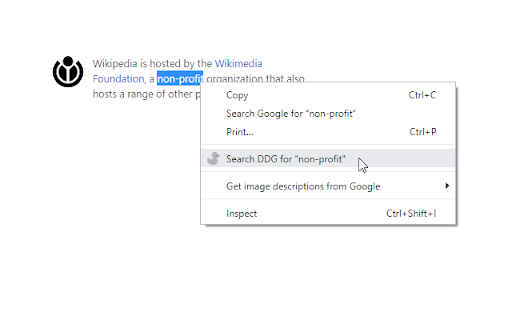
1> Highlight text and right click on it. Select the option to search that text query with DuckDuckGo search engine in a new tab.

2> Type "ddg <space>" in the address bar (omnibox), and type your search query and hit the enter key.

Simple and light-weight extension. Doesn't require any permission. Read more on our homepage: https://browsernative.com/duckduckgo-chrome-extension/

Extension created by BrowserNative, not affiliated with DuckDuckGo.
Technical
- Version
- 0.0.4
- Manifest
- V3
- Size
- 8.84KiB
- Min Chrome
- 88
- Languages
- 1
- Featured
- Yes
Metadata
- ID
- fepjgbgflmnaieiodmkkclhjfihdhoid
- Developer ID
- uc60968e0b1e89845e2ee80c502e47d91
- Developer Email
- [email protected]
- Created
- Oct 10, 2019
- Last Updated (Store)
- May 24, 2024
- Last Scraped
- May 21, 2026
- Website
- browsernative.com
- Privacy Policy
- https://browsernative.com/extensions-privacy-policy/
Similar extensions
Alternatives to DuckDuckGo Search - Context Menu and Omnibox, ranked by description similarity.

Search with DuckDuckGo
Search with DuckDuckGo in Chrome
3.0K
★ 2.6

DuckDuckGo to Google
Unhappy with DuckDuckGo results? Quickly search the same query on Google. Use the toolbar button or the keyboard command shift + g
271
★ 5.0

DuckDuckFree Tab
Revamp your Chrome new tab with DuckDuckFree Tab.
—

Better ChatGPT Search
Use ChatGPT Search without changing your default search engine. Search using address bar and context menu.
20

Google™ AI Mode Search
Use Google's AI Mode Search using the context menu, or type '@gai' in the address bar followed by your query.
985
★ 5.0
Select and Search
Select and Search on Google
6

CustomSearch
Extension to perform custom searches from the context menu
7

ChatGPT Quick Search
Quickly search ChatGPT from any context with omnibox, right-click menu, or popup interface and show historical records
7
Data sourced from the Chrome Web Store · last verified May 21, 2026.