
Url Shortener
One Click Url Shortener. Easily create short and powerful links and manage them easily.
As of June 2026, Url Shortener has 4 users in the Productivity category.
Usersno change0%
4
4
Ratingno change0%
—
— reviews
Reviewsno change0%
—
Version
1.0
Manifest V3
History
5 snapshotsTracking since Apr 18, 2026.
View as table
| Date | Users | Rating | Reviews | Version |
|---|---|---|---|---|
| Apr 18, 2026 | — | — | — | 1.0 |
| May 7, 2026 | 4 | — | — | 1.0 |
| May 14, 2026 | 3 | — | — | 1.0 |
| May 24, 2026 | 4 | — | — | 1.0 |
| Jun 3, 2026 | 3 | — | — | 1.0 |
| Now | 4 | — | — | 1.0 |
Permissions & access
- Permissions
- activeTabstoragecontextMenus
- Host access
- https://theshortener.com/api/*
Screenshots




About
Url Shortener – Free Url Shortener for Chrome

🔗 Shorten links instantly with one click
The Url Shortener Chrome Extension lets you create short, shareable URLs directly from your browser after connecting your account via API key.

By default, links are shortened using theshortener.com, with additional supported domains available depending on your account settings.

Built for speed and simplicity, this extension is ideal for users who need quick link shortening without leaving the page they’re on.

---

🌐 Supported Short Domains

🔗 theshortener.com (default)
🔗 tkpd.me
🔗 dly.social
🔗 srty.me

You can select the preferred domain based on availability and your account configuration.

---

✨ Key Features

⚡ One-Click URL Shortening
Shorten the current page or any link directly from the toolbar.

🖱️ Right-Click Shortening
Shorten links instantly from the context menu—no copy and paste required.

🕘 Recent Links History
Quickly access your most recently shortened URLs.

🏷️ Custom Domains & Aliases
Create branded links using supported domains and custom slugs.

---

🔐 Account & API Key Requirement

This extension requires a theshortener.com account and a personal API key to function.

You must:

📧 Sign up using an email address
🔑 Log in to your dashboard
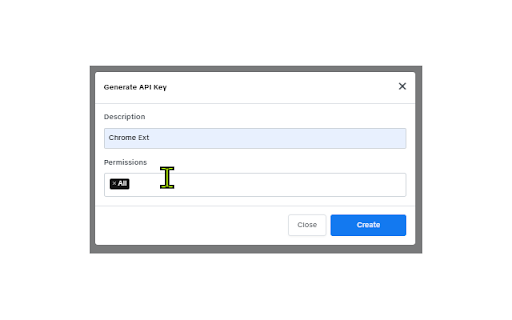
⚙️ Generate an API key
📋 Paste the API key into the extension

Anonymous usage is not supported.

---

🧭 How to Get Your API Key

1️⃣ Visit theshortener.com
2️⃣ Sign up or log in to your account
3️⃣ Open your dashboard
4️⃣ Go to Settings
5️⃣ Copy your API key and paste it into the extension

You can regenerate your API key at any time from the Settings page.

---

🔒 Privacy & Data Use

👁️The extension does not run in the background and does not read or modify website content.
🛡️ This extension does NOT collect browsing history.
🔐 It accesses the current tab URL only after an explicit user action (clicking the extension or context menu) for the purpose of shortening the link.
📡 The URL is sent securely to theshortener.com only to generate a shortened link.
🔑 API keys are used solely for user authentication and request authorization.
🚫 No personal data is sold, shared, or used for tracking or advertising.

For full details, see the theshortener.com Privacy Policy.

---

🚀 Get Started

Install Url Shortener, connect your API key, choose your preferred short domain, and start shortening links instantly—directly from your browser.
Technical
- Version
- 1.0
- Manifest
- V3
- Size
- 27.81KiB
- Min Chrome
- 88
- Languages
- 1
- Featured
- No
Metadata
- ID
- fekdmeolejpejaekikiamaimiboadfhn
- Developer ID
- udd32da403ba27c28d2fa5b87fd381bc4
- Developer Email
- [email protected]
- Created
- Dec 27, 2025
- Last Updated (Store)
- Dec 27, 2025
- Last Scraped
- Jun 3, 2026
- Website
- theshortener.com
- Support URL
- theshortener.com/support
- Privacy Policy
- http://theshortener.com/privacy-policy
Similar extensions
Alternatives to Url Shortener, ranked by description similarity.

URL Shortener by Recut
Free URL shortener to quickly shorten links with a single click. Simple and easy to use link shortener.
19
★ 5.0

URL Shortener
Create a tiny URL
9
★ 5.0

KLPT Extension
Browser extension for KLPT
2

Url Shortener for Google Chrome™
Use Url Shortener for Google Chrome™ to create short URL and shorten hyperlink for sharing and manage shortened links.
20.0K
★ 4.2

Url Shortener
The best way to create short links using T.LY, JPEG.ly, Bitly, Rebrandly, TinyUrl, and more!
300.0K
★ 3.8

URL Short
Shorten and copy the current page URL.
—

URL Shortener Extension
One Click URL Shortener. Create links with TinyUrl, QR Code, fast copy paste for Google Chrome. Simple but Best!
2

Short Link Generator
Generate short links via vsl.im.
10
Data sourced from the Chrome Web Store · last verified Jun 3, 2026.