
OptiPie TradingView Optimizer
TradingView Parameter Optimizer as an extension
As of June 2026, OptiPie TradingView Optimizer has 3,000 users and a 3.75/5 rating from 44 reviews in the Workflow & Planning category.
Usersno change0%
3.0K
3,000
Ratingdown 0.8 percent−0.8%
3.75
44 reviews
Reviewsup 10.0 percent+10.0%
44
Version
1.5.3
Manifest V3
90-day change · In the last 90 days this extension 3 version updates.
History
6 snapshotsTracking since Apr 16, 2026.
View as table
| Date | Users | Rating | Reviews | Version |
|---|---|---|---|---|
| Apr 16, 2026 | 3.0K | 3.78 | 40 | 1.5.0 |
| Apr 27, 2026 | 3.0K | 3.78 | 40 | 1.5.0 |
| May 18, 2026 | 3.0K | 3.78 | 40 | 1.5.0 |
| Jun 2, 2026 | 3.0K | 3.78 | 40 | 1.5.1 |
| Jun 6, 2026 | 3.0K | 3.71 | 42 | 1.5.1 |
| Jun 10, 2026 | 3.0K | 3.75 | 44 | 1.5.2 |
| Now | 3.0K | 3.75 | 44 | 1.5.3 |
Changelog
- Jun 10, 2026description
OptiPie is an open source strategy optimizer automation tool for TradingView.

Easily optimize strategies, store optimization reports and make analysis via simple UI.

Download as Chrome Extension Now!

Quick Start:

 1. Open TradingView and load a chart with a strategy applied.
 2. Open the strategy's Settings window (click the gear icon on the strategy)
 3. Click the OptiPie extension icon to open the popup
 4. Configure your parameter ranges and click Optimize

Features

Optimize Strategies Up to 5 Parameters
Optimize any TradingView Strategy you want up to 5 Parameters.

Limitless Parameter Input Range
Unless your Internet or TradingView is broken, you can optimize with any input range you want.

Find, Sort, View & Analyze Reports
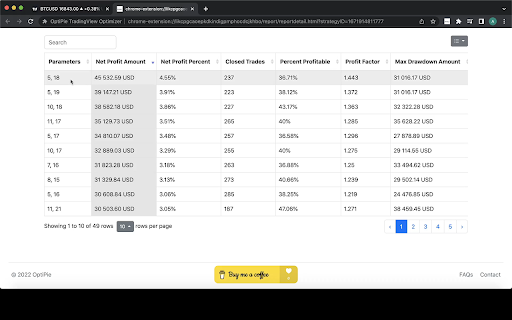
Easily find your report in Reports tab with table search and sorts. Open report detail view to make a deep analysis.

Reports Stored ⚙️
All optimization reports are saved locally thus can be viewed or deleted any time within 'Reports' tab.

Last Entered Parameter Inputs Stored In State
During your Chrome Session, last entered parameter inputs are per unique strategy - switch strategies freely.

OptiPie Plus, The Ultimate Input Optimizer  📢

Join the OptiPie Plus Membership, discover amazing features, go beyond the limits!
- Multi-Timeframe Optimization
- Selectable Parameters
- Stoppable Optimization with Partial Report
- Extended Report Data
- Optimize Strategies Up to 20 Parameters

Try now!
https://buymeacoffee.com/optipieapp/membership

Latest Updates 📢 (v1.5.2)
New Feature:
Save & Restore Your Optimizations!
No more re-entering parameters - switch strategies freely.

• Keep up with the TradingView changes to maintain app functionality
• Try Last Used Parameters: Enable in Settings to automatically carry over parameters when running the same strategy across different symbols or intervals.
  • Auto-save per strategy: OptiPie remembers your optimization parameters per strategy, symbol, and interval.
  • Reset Parameters button to clear inputs and start fresh.
  • Saved configs are automatically cleaned up after 30, 60, or 90 days — configurable in Settings.

Checkout news for the latest updates here!
optipie.app/news

Visit optipie.app for more!
OptiPie is an open source strategy optimizer automation tool for TradingView.

Easily optimize strategies, store optimization reports and make analysis via simple UI.

Download as Chrome Extension Now!

Quick Start:

 1. Open TradingView and load a chart with a strategy applied.
 2. Open the strategy's Settings window (click the gear icon on the strategy)
 3. Click the OptiPie extension icon to open the popup
 4. Configure your parameter ranges and click Optimize

Features

Optimize Strategies Up to 5 Parameters
Optimize any TradingView Strategy you want up to 5 Parameters.

Limitless Parameter Input Range
Unless your Internet or TradingView is broken, you can optimize with any input range you want.

Find, Sort, View & Analyze Reports
Easily find your report in Reports tab with table search and sorts. Open report detail view to make a deep analysis.

Reports Stored ⚙️
All optimization reports are saved locally thus can be viewed or deleted any time within 'Reports' tab.

Last Entered Parameter Inputs Stored In State
During your Chrome Session, last entered parameter inputs are per unique strategy - switch strategies freely.

OptiPie Plus, The Ultimate Input Optimizer  📢

Join the OptiPie Plus Membership, discover amazing features, go beyond the limits!
- Multi-Timeframe Optimization
- Selectable Parameters
- Stoppable Optimization with Partial Report
- Extended Report Data
- Optimize Strategies Up to 20 Parameters

Try now!
https://buymeacoffee.com/optipieapp/membership

Latest Updates 📢 (v1.5.3)
New Feature:
Save & Restore Your Optimizations!
No more re-entering parameters - switch strategies freely.

• Keep up with the TradingView changes to maintain app functionality
• Try Last Used Parameters: Enable in Settings to automatically carry over parameters when running the same strategy across different symbols or intervals.
  • Auto-save per strategy: OptiPie remembers your optimization parameters per strategy, symbol, and interval.
  • Reset Parameters button to clear inputs and start fresh.
  • Saved configs are automatically cleaned up after 30, 60, or 90 days — configurable in Settings.

Checkout news for the latest updates here!
optipie.app/news

Visit optipie.app for more!
- Jun 6, 2026description
OptiPie is an open source strategy optimizer automation tool for TradingView.

Easily optimize strategies, store optimization reports and make analysis via simple UI.

Download as Chrome Extension Now!

Quick Start:

 1. Open TradingView and load a chart with a strategy applied.
 2. Open the strategy's Settings window (click the gear icon on the strategy)
 3. Click the OptiPie extension icon to open the popup
 4. Configure your parameter ranges and click Optimize

Features

Optimize Strategies Up to 5 Parameters
Optimize any TradingView Strategy you want up to 5 Parameters.

Limitless Parameter Input Range
Unless your Internet or TradingView is broken, you can optimize with any input range you want.

Find, Sort, View & Analyze Reports
Easily find your report in Reports tab with table search and sorts. Open report detail view to make a deep analysis.

Reports Stored ⚙️
All optimization reports are saved locally thus can be viewed or deleted any time within 'Reports' tab.

Last Entered Parameter Inputs Stored In State
During your Chrome Session, last entered parameter inputs are per unique strategy - switch strategies freely.

OptiPie Plus, The Ultimate Input Optimizer  📢

Join the OptiPie Plus Membership, discover amazing features, go beyond the limits!
- Multi-Timeframe Optimization
- Selectable Parameters
- Stoppable Optimization with Partial Report
- Extended Report Data
- Optimize Strategies Up to 20 Parameters

Try now!
https://buymeacoffee.com/optipieapp/membership

Latest Updates 📢 (v1.5.1)
New Feature:
Save & Restore Your Optimizations!
No more re-entering parameters - switch strategies freely.

• Try Last Used Parameters: Enable in Settings to automatically carry over parameters when running the same strategy across different symbols or intervals.
  • Auto-save per strategy: OptiPie remembers your optimization parameters per strategy, symbol, and interval.
  • Reset Parameters button to clear inputs and start fresh.
  • Saved configs are automatically cleaned up after 30, 60, or 90 days — configurable in Settings.

Checkout news for the latest updates here!
optipie.app/news

Visit optipie.app for more!
OptiPie is an open source strategy optimizer automation tool for TradingView.

Easily optimize strategies, store optimization reports and make analysis via simple UI.

Download as Chrome Extension Now!

Quick Start:

 1. Open TradingView and load a chart with a strategy applied.
 2. Open the strategy's Settings window (click the gear icon on the strategy)
 3. Click the OptiPie extension icon to open the popup
 4. Configure your parameter ranges and click Optimize

Features

Optimize Strategies Up to 5 Parameters
Optimize any TradingView Strategy you want up to 5 Parameters.

Limitless Parameter Input Range
Unless your Internet or TradingView is broken, you can optimize with any input range you want.

Find, Sort, View & Analyze Reports
Easily find your report in Reports tab with table search and sorts. Open report detail view to make a deep analysis.

Reports Stored ⚙️
All optimization reports are saved locally thus can be viewed or deleted any time within 'Reports' tab.

Last Entered Parameter Inputs Stored In State
During your Chrome Session, last entered parameter inputs are per unique strategy - switch strategies freely.

OptiPie Plus, The Ultimate Input Optimizer  📢

Join the OptiPie Plus Membership, discover amazing features, go beyond the limits!
- Multi-Timeframe Optimization
- Selectable Parameters
- Stoppable Optimization with Partial Report
- Extended Report Data
- Optimize Strategies Up to 20 Parameters

Try now!
https://buymeacoffee.com/optipieapp/membership

Latest Updates 📢 (v1.5.2)
New Feature:
Save & Restore Your Optimizations!
No more re-entering parameters - switch strategies freely.

• Keep up with the TradingView changes to maintain app functionality
• Try Last Used Parameters: Enable in Settings to automatically carry over parameters when running the same strategy across different symbols or intervals.
  • Auto-save per strategy: OptiPie remembers your optimization parameters per strategy, symbol, and interval.
  • Reset Parameters button to clear inputs and start fresh.
  • Saved configs are automatically cleaned up after 30, 60, or 90 days — configurable in Settings.

Checkout news for the latest updates here!
optipie.app/news

Visit optipie.app for more!
- May 18, 2026description
OptiPie is an open source strategy optimizer automation tool for TradingView.

Easily optimize strategies, store optimization reports and make analysis via simple UI.

Download as Chrome Extension Now!

Features

Optimize Strategies Up to 5 Parameters
Optimize any TradingView Strategy you want up to 5 Parameters.

Limitless Parameter Input Range
Unless your Internet or TradingView is broken, you can optimize with any input range you want.

Find, Sort, View & Analyze Reports
Easily find your report in Reports tab with table search and sorts. Open report detail view to make a deep analysis.

Reports Stored ⚙️
All optimization reports are saved locally thus can be viewed or deleted any time within 'Reports' tab.

Last Entered Parameter Inputs Stored In State
During your Chrome Session, last entered parameter inputs are per unique strategy - switch strategies freely.

OptiPie Plus, The Ultimate Input Optimizer  📢

Join the OptiPie Plus Membership, discover amazing features, go beyond the limits!
- Multi-Timeframe Optimization
- Selectable Parameters
- Stoppable Optimization with Partial Report
- Extended Report Data
- Optimize Strategies Up to 20 Parameters

Try now!
https://buymeacoffee.com/optipieapp/membership

Latest Updates 📢 (v1.5.0)
New Feature:
Save & Restore Your Optimizations!
No more re-entering parameters - switch strategies freely.

  • Auto-save per strategy: OptiPie remembers your optimization parameters per strategy, symbol, and interval.
  • Auto-restore on switch: parameters are automatically restored when you switch back to a strategy.
  • Reset Parameters button to clear inputs and start fresh.
  • Saved configs are automatically cleaned up after 30, 60, or 90 days — configurable in Settings.

New Feature: Real-time Report Monitoring & Instant Analysis!
> No delays. No data loss. Analyze instantly.

Checkout news for the latest updates here!
optipie.app/news

Visit optipie.app for more!
OptiPie is an open source strategy optimizer automation tool for TradingView. Easily optimize strategies, store optimization reports and make analysis via simple UI. Download as Chrome Extension Now! Quick Start: 1. Open TradingView and load a chart with a strategy applied. 2. Open the strategy's Settings window (click the gear icon on the strategy) 3. Click the OptiPie extension icon to open the popup 4. Configure your parameter ranges and click Optimize Features Optimize Strategies Up to 5 Parameters Optimize any TradingView Strategy you want up to 5 Parameters. Limitless Parameter Input Range Unless your Internet or TradingView is broken, you can optimize with any input range you want. Find, Sort, View & Analyze Reports Easily find your report in Reports tab with table search and sorts. Open report detail view to make a deep analysis. Reports Stored ⚙️ All optimization reports are saved locally thus can be viewed or deleted any time within 'Reports' tab. Last Entered Parameter Inputs Stored In State During your Chrome Session, last entered parameter inputs are per unique strategy - switch strategies freely. OptiPie Plus, The Ultimate Input Optimizer 📢 Join the OptiPie Plus Membership, discover amazing features, go beyond the limits! - Multi-Timeframe Optimization - Selectable Parameters - Stoppable Optimization with Partial Report - Extended Report Data - Optimize Strategies Up to 20 Parameters Try now! https://buymeacoffee.com/optipieapp/membership Latest Updates 📢 (v1.5.1) New Feature: Save & Restore Your Optimizations! No more re-entering parameters - switch strategies freely. • Try Last Used Parameters: Enable in Settings to automatically carry over parameters when running the same strategy across different symbols or intervals. • Auto-save per strategy: OptiPie remembers your optimization parameters per strategy, symbol, and interval. • Reset Parameters button to clear inputs and start fresh. • Saved configs are automatically cleaned up after 30, 60, or 90 days — configurable in Settings. Checkout news for the latest updates here! optipie.app/news Visit optipie.app for more!
Permissions & access
- Permissions
- storageactiveTabscriptingnotificationsidentityidentity.emailunlimitedStorage
- Host access
- https://*.optipie.app/*
Screenshots



About
OptiPie is an open source strategy optimizer automation tool for TradingView.

Easily optimize strategies, store optimization reports and make analysis via simple UI.

Download as Chrome Extension Now!

Quick Start:

 1. Open TradingView and load a chart with a strategy applied.
 2. Open the strategy's Settings window (click the gear icon on the strategy)
 3. Click the OptiPie extension icon to open the popup
 4. Configure your parameter ranges and click Optimize

Features

Optimize Strategies Up to 5 Parameters
Optimize any TradingView Strategy you want up to 5 Parameters.

Limitless Parameter Input Range
Unless your Internet or TradingView is broken, you can optimize with any input range you want.

Find, Sort, View & Analyze Reports
Easily find your report in Reports tab with table search and sorts. Open report detail view to make a deep analysis.

Reports Stored ⚙️
All optimization reports are saved locally thus can be viewed or deleted any time within 'Reports' tab.

Last Entered Parameter Inputs Stored In State
During your Chrome Session, last entered parameter inputs are per unique strategy - switch strategies freely.

OptiPie Plus, The Ultimate Input Optimizer  📢

Join the OptiPie Plus Membership, discover amazing features, go beyond the limits!
- Multi-Timeframe Optimization
- Selectable Parameters
- Stoppable Optimization with Partial Report
- Extended Report Data
- Optimize Strategies Up to 20 Parameters

Try now!
https://buymeacoffee.com/optipieapp/membership

Latest Updates 📢 (v1.5.3)
New Feature:
Save & Restore Your Optimizations!
No more re-entering parameters - switch strategies freely.

• Keep up with the TradingView changes to maintain app functionality
• Try Last Used Parameters: Enable in Settings to automatically carry over parameters when running the same strategy across different symbols or intervals.
  • Auto-save per strategy: OptiPie remembers your optimization parameters per strategy, symbol, and interval.
  • Reset Parameters button to clear inputs and start fresh.
  • Saved configs are automatically cleaned up after 30, 60, or 90 days — configurable in Settings.

Checkout news for the latest updates here!
optipie.app/news

Visit optipie.app for more!
Technical
- Version
- 1.5.3
- Manifest
- V3
- Size
- 5.92MiB
- Min Chrome
- 88
- Languages
- 1
- Featured
- No
Metadata
- ID
- fdndgpohalkoklpaopahkblpomlhmifm
- Developer ID
- uadaf99e65a8d29117e64447b8f2c1736
- Developer Email
- [email protected]
- Created
- Jan 29, 2023
- Last Updated (Store)
- Jun 6, 2026
- Last Scraped
- Jun 22, 2026
- Website
- optipie.app
- Support URL
- https://optipie.app/#faq-
- Privacy Policy
- https://optipie.app/privacy/
Similar extensions
Alternatives to OptiPie TradingView Optimizer, ranked by description similarity.

The Optimiser - TradingView Strategies
Optimise TradingView Strategies An assistant for optimising (Optimize) & backtesting trading strategies in Tradingview
5.0K
★ 4.0

TVBacktestManager
Simplify TradingView Backtesting with TVBacktestManager.
Automatically test, optimize, and record strategy results directly to…
25
★ 5.0

Robinhood Better Reports
Invest better with the Robinhood Better Reports
44
★ 3.7

Quant Companion
A tool to help you better understand your trade performance
8
★ 5.0

TradingView Strategy Finder
Automated Backtesting Tool
10.0K
★ 2.8

finqtool - Crypto Trading Toolkit
Live crypto prices, charts, order book, funding rates, watchlists, alerts & calculators. Private, works offline.
348
★ 5.0

PipsBot for Pocketoptions
Automatically trade with profit on Pocketoptions
136
★ 3.5

Optimsy - The Etsy AI Assistant
Revolutionize your Etsy shop with AI-powered SEO, dynamic listing generation, and market analysis right inside your browser.
5
Data sourced from the Chrome Web Store · last verified Jun 22, 2026.