
ScreenToGIF
Use ScreenToGIF for online GIF capture from any tab, window, or desktop region. Screen to GIF app with MP4 & WebM export.
As of July 2026, ScreenToGIF has — users in the Productivity category.
Usersno change0%
—
—
Ratingno change0%
—
— reviews
Reviewsno change0%
—
Version
1.0.0
Manifest V3
History
1 snapshotsTracking since Jul 21, 2026.
Not enough history yet for this metric — the chart fills in as we collect more snapshots.
View as table
| Date | Users | Rating | Reviews | Version |
|---|---|---|---|---|
| Jul 21, 2026 | — | — | — | 1.0.0 |
| Now | — | — | — | 1.0.0 |
Permissions & access
- Permissions
- activeTabdownloadsnotificationsoffscreenscriptingstoragetabCapturetabswebNavigation
- Host access
- None declared
Screenshots


About
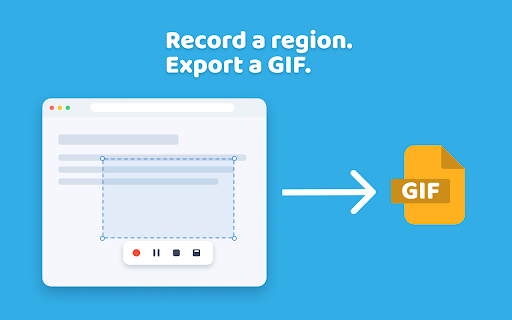
🧩 ScreenToGIF for Chrome is a lightweight screen recorder that turns any tab, window, or region of your screen into a shareable animated GIF — or an MP4/WebM clip — in seconds. Pick what to capture, frame it, and hit record. No installer, no sign-up, no watermark.

What you can do with it
1. Record a single Chrome tab, including animations, hovers, and scroll behavior.
2. Capture any open application window from your desktop.
3. Grab a free-form region anywhere on screen, then take a GIF of a notification, terminal, or design tool.
4. Pause mid-recording, line up the next interaction, and resume on the same clip.
5. Preview the loop right inside the ScreenToGIF selection box before you commit to saving.
6. Export the same capture as an animated GIF, or as MP4/WebM video when you want a smaller file or higher fidelity.
7. Start capture on a countdown of up to 10 seconds, so you have time to set up the shot.
8. Save your defaults once — FPS, countdown, quality, format, and a light, dark, or system theme — and every capture opens the way you like it.

Why people pick ScreenToGIF
▸ Sample frames at any rate from 1 to 30 FPS, so motion looks as smooth or as light as the clip needs.
▸ The compression slider shows a live size estimate before you encode.
▸ GIF recording, encoding, and export in ScreenToGIF happen locally. Nothing leaves your machine.
▸ Export as GIF, MP4, or WebM — output drops straight into your Chrome downloads folder, no upload step.
▸ No account, no link wall, no expiring share page — your file is yours the moment it is saved.

🌐 If you have been looking for a screentogif alternative that just lives in the browser, this is it — set up ScreenToGIF online, then the same gif creator and GIF screen capture workflow is one click away on whatever machine you happen to be using.

🐧 Linux users who went searching for a screentogif linux build will find this is the closest no-fuss equivalent that does not involve compiling anything. ChromeOS works too, since it is just Chrome.

Who ScreenToGIF Chrome is for
🎯 Engineers attaching repro steps to a Jira ticket or a GitHub issue using a GIF screen recorder.
🎯 QA folks who need a gif recorder to show, not describe, the bug.
🎯 Designers sharing micro-interactions and prototype flows in Figma comments — a frequent screen2gif use-case.
🎯 Educators recording GIFs as short how-tos for students or social.

How the capture flow works in our gif maker
➤ Click the toolbar icon to drop a ScreenToGIF selection rectangle onto the page.
➤ Drag the handles to frame exactly the region you want, or pick a full tab or window from the source menu.
➤ Set frame rate depending on whether you want a tiny loop or a smooth demo.
➤ Hit record, perform the action, then stop.
➤ Review the looping preview, adjust compression if needed, then save.

Limitations
1️⃣ Clips are deliberately capped at 60 seconds in the ScreenToGIF application. GIF recording longer than that tends to be enormous and unfriendly to share.
2️⃣ Some Chrome surfaces are off-limits to extensions by design, so chrome:// pages and the Web Store itself cannot be captured.
3️⃣ Minimum selection size is 30 by 30 pixels so the encoder has something to work with.

Privacy
- ScreenToGIF doesn't store telemetry of captured content.
- No frames or videos sent to a remote server for processing.
- Your recording lives in memory until you save or discard it.

FAQs
❓ Does ScreenToGIF work on Mac?
💬 Yes. Anyone who has wanted a screentogif macos experience gets the same record-region-then-export flow inside Chrome, with nothing to install beyond the extension itself.

❓ Does ScreenToGIF work on Windows?
💬 Yes. The screentogif windows experience is identical to any other Chrome extension — the workflow drops straight into the browser you already have open.

❓ Does ScreenToGIF work without a network connection?
💬 Yes. Capture and encoding are local — the whole screen2gif workflow runs in your browser. You only need a network if the page you are recording needs one.

❓ Can I capture GIF of screen with system audio or my microphone?
💬 Not in this version. ScreenToGIF currently focuses on silent captures, which is what most documentation and bug-report use cases actually need.

❓ Is ScreenToGIF a screen recorder too?
💬 Yes. Beyond GIFs, ScreenToGIF works as an in-browser screen recorder — capture a tab, window, or region and export it as MP4 or WebM video.

❓ Does ScreenToGIF have a dark mode?
💬 Yes. Choose a light, dark, or system theme in settings — the overlay follows your pick, or your OS automatically.

🚀 Install ScreenToGIF for Chrome, pin it to your toolbar, and the next time someone asks for a repro or a quick demo, you are a minute away from sending a clean, looping clip.
Technical
- Version
- 1.0.0
- Manifest
- V3
- Size
- 274KiB
- Min Chrome
- 122
- Languages
- 52
- Featured
- No
Metadata
- ID
- fdlpnodgipcoajckagigbhohgepofgji
- Developer ID
- u7e6a2acb2747c464feb3a9bfa6881a6e
- Developer Email
- [email protected]
- Created
- Jul 20, 2026
- Last Updated (Store)
- Jul 20, 2026
- Last Scraped
- Jul 21, 2026
- Website
- —
- Support URL
- —
Data sourced from the Chrome Web Store · last verified Jul 21, 2026.