
InjectJS – JavaScript Injector & Custom Script Manager
Inject custom JavaScript (JS) into any webpage, automate tasks, and manage scripts. Ideal for developers and power users.
As of June 2026, InjectJS – JavaScript Injector & Custom Script Manager has 696 users and a 4.60/5 rating from 10 reviews in the Developer Tools category.
Usersup 12.1 percent+12.1%
696
696
Ratingno change0%
4.60
10 reviews
Reviewsno change0%
10
Version
4.1.0
Manifest V3
History
8 snapshotsTracking since Apr 5, 2026.
View as table
| Date | Users | Rating | Reviews | Version |
|---|---|---|---|---|
| Apr 5, 2026 | 621 | 4.60 | 10 | 4.1.0 |
| Apr 18, 2026 | 590 | 4.60 | 10 | 4.1.0 |
| Apr 23, 2026 | 628 | 4.60 | 10 | 4.1.0 |
| May 4, 2026 | 637 | 4.60 | 10 | 4.1.0 |
| May 11, 2026 | 636 | 4.60 | 10 | 4.1.0 |
| May 20, 2026 | 642 | 4.60 | 10 | 4.1.0 |
| May 30, 2026 | 656 | 4.60 | 10 | 4.1.0 |
| Jun 7, 2026 | 687 | 4.60 | 10 | 4.1.0 |
| Now | 696 | 4.60 | 10 | 4.1.0 |
Permissions & access
- Permissions
- storagescriptingwebNavigationuserScriptscontextMenus
- Host access
- <all_urls>
Screenshots


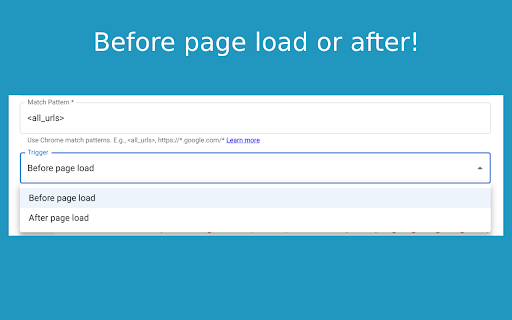
About
Inject JS lets you effortlessly inject custom JavaScript (JS) scripts into any webpage. Automate tasks, enhance websites, and instantly modify page behaviors.

New Update:
* Import/Export Scripts
* Expanded Script File Size Limit

Key Features:
* Inject JavaScript instantly into any website.
* Custom Script Management: Create, edit, enable, disable, or delete scripts.
* URL & Pattern Matching: Precisely control where scripts run using URL or regex.
* Right-Click Context Menu: Quickly execute scripts manually on any webpage.
* Mini Dashboard: Access scripts directly by clicking the extension's icon.
* Code Auto-Formatting: Built-in editor ensures clean and error-free JS code.
* Fully Local & Secure: Scripts remain securely stored on your device.
* Manifest V3 Compliant: Meets Chrome’s latest performance and security standards.

How to Use Inject JS:
1. Open Inject JS to create a new script.
2. Paste or write your JavaScript code and set URL patterns.
3. Enable scripts to auto-run, or trigger manually via right-click context menu or the mini dashboard (extension icon).

Inject JS is perfect for developers, QA testers, automation enthusiasts, and power users who want easy control of JavaScript injection.

Install Inject JS today to transform and personalize your browsing experience!
Technical
- Version
- 4.1.0
- Manifest
- V3
- Size
- 50.17KiB
- Min Chrome
- 88
- Languages
- 1
- Featured
- No
Metadata
- ID
- fdidkffdehkbdhelhlankfaofaadiopn
- Developer ID
- ud8a3903467fc2f54158ad840909f79f8
- Developer Email
- [email protected]
- Created
- Jul 15, 2025
- Last Updated (Store)
- Jan 19, 2026
- Last Scraped
- Jun 7, 2026
- Website
- injectjs.net
- Support URL
- https://injectjs.userjot.com
- Privacy Policy
- —
Similar extensions
Alternatives to InjectJS – JavaScript Injector & Custom Script Manager, ranked by description similarity.

Inject JavaScript
Inject JavaScript
Inject JavaScript adds a smart sidebar to your browser that lets you run custom JavaScript on web pages…
35
★ 5.0

User Scripts Manager
User Scripts Manager is a powerful yet simple extension that lets you customize your browsing experience by injecting custom…
523

Blank Extension
A Chrome extension that allows you to inject custom JavaScript into any website. Create, manage, and execute your own user scripts…
3

Moonly - javascript and css injector
Inject javascript and css into pages dynamically.
709
★ 5.0

ABC JS Injector
A injector extension for Chrome users. Now in Manifest V3
40

Run Javascript
Run custom Javascript, each time you visit a website
20.0K
★ 4.1

Boost: JavaScript & CSS Injector
Custom JavaScript & CSS Injector. Edit & inject custom JavaScript and CSS per domain - mobile friendly
12

ScriptForge
Automate your browser with custom userscripts. Create, manage, and run JavaScript on any website.
1
Data sourced from the Chrome Web Store · last verified Jun 7, 2026.