
PageScope — Summarize Pages, PDFs & YouTube
Summarize any webpage, PDF, or YouTube video and ask follow-up questions grounded in the page you are reading.
As of June 2026, PageScope — Summarize Pages, PDFs & YouTube has 2 users in the Workflow & Planning category.
Usersno change0%
2
2
Ratingno change0%
—
— reviews
Reviewsno change0%
—
Version
0.1.8
Manifest V3
90-day change · In the last 90 days this extension 4 version updates.
History
5 snapshotsTracking since May 14, 2026.
View as table
| Date | Users | Rating | Reviews | Version |
|---|---|---|---|---|
| May 14, 2026 | — | — | — | 0.1.0 |
| May 20, 2026 | — | — | — | 0.1.0 |
| May 26, 2026 | — | — | — | 0.1.3 |
| Jun 2, 2026 | 1 | — | — | 0.1.6 |
| Jun 8, 2026 | 1 | — | — | 0.1.7 |
| Now | 2 | — | — | 0.1.8 |
Changelog
- May 26, 2026description
PageScope helps you understand the page in front of you.

📝 Summarize webpages, PDFs, and supported video pages
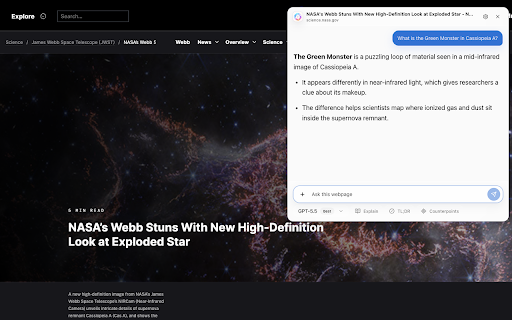
💬 Ask follow-up questions tied to the source page
✂️ Highlight text to explain, translate, or ask about it

Instead of copying chunks into a blank chat, start with the page itself.

💡 WHAT YOU CAN DO
- Summarize a webpage, PDF, or supported video in one click
- Read and summarize local PDFs
- Highlight text to summarize, translate, explain, or ask
- Follow-ups stay grounded in the captured page
- Customize prompts, response language, quick prompts
- Lens plugins run extra prompts against a summary

🎯 USE IT FOR
- Research and studying
- Reading documentation and debugging
- Comparing products and reviews
- Skimming long discussion threads
- Catching up on videos without scrubbing

❓ FAQ
Q: Do I need an API key?
A: No. PageScope works with the provider account you already use.

Q: Where does my data go?
A: Only to the AI provider you select, only when you trigger a request. Settings and optional history stay in browser storage on your device. No third-party analytics. No tracking.

Q: Is PageScope free?
A: Yes. PageScope is free and open source.


PageScope is independent. Not affiliated with, endorsed by, or sponsored by any provider or website it can connect to.
PageScope helps you understand the website content.

📝 Summarize webpages, PDFs, and supported video pages
💬 Ask follow-up questions tied to the source page
✂️ Highlight text to explain, translate, or ask about it

Instead of copying chunks into a blank chat, start with the page itself.

💡 WHAT YOU CAN DO
- Summarize a webpage, PDF, or supported video in one click
- Read and summarize local PDFs
- Highlight text to summarize, translate, explain, or ask
- Follow-ups stay grounded in the captured page
- Customize prompts, response language, quick prompts
- Lens plugins run extra prompts against a summary

🎯 USE IT FOR
- Research and studying
- Reading documentation and debugging
- Comparing products and reviews
- Skimming long discussion threads
- Catching up on videos without scrubbing

❓ FAQ
Q: Do I need an API key?
A: No. PageScope works with the provider account you already use.

Q: Where does my data go?
A: Only to the AI provider you select, only when you trigger a request. Settings and optional history stay in browser storage on your device. No third-party analytics. No tracking.

Q: Is PageScope free?
A: Yes. PageScope is free and open source.


PageScope is independent. Not affiliated with, endorsed by, or sponsored by any provider or website it can connect to.
- May 20, 2026description
PageScope helps you understand the page in front of you.

With PageScope, you can:

- Summarize webpages, PDFs, supported video pages, and selected text.
- Ask follow-up questions that stay tied to the source page.
- Explain, translate, summarize, or ask about a highlighted passage in a couple of clicks.
- Use richer context from supported video transcripts and comments.
- Keep a page-grounded conversation open in the popup or side panel while you continue reading.
- Add screenshots or files when your question needs more visual or document context.
- Save optional local history with search, retention controls, import, and export.
- Choose the AI provider that works for you.

It is useful for research, studying, debugging, reading docs, comparing products, skimming long discussions, or catching up on videos without scrubbing through the whole thing. Instead of pasting chunks into a blank chat and explaining where they came from, start with the page itself.

Your settings and optional history stay in browser storage on your device. PageScope sends prompt text, captured page context, and attachments only to the provider you choose for the request.

PageScope is independent and is not affiliated with, endorsed by, or sponsored by any provider or website it can connect to.
PageScope helps you understand the page in front of you.

📝 Summarize webpages, PDFs, and supported video pages
💬 Ask follow-up questions tied to the source page
✂️ Highlight text to explain, translate, or ask about it

Instead of copying chunks into a blank chat, start with the page itself.

💡 WHAT YOU CAN DO
- Summarize a webpage, PDF, or supported video in one click
- Read and summarize local PDFs
- Highlight text to summarize, translate, explain, or ask
- Follow-ups stay grounded in the captured page
- Customize prompts, response language, quick prompts
- Lens plugins run extra prompts against a summary

🎯 USE IT FOR
- Research and studying
- Reading documentation and debugging
- Comparing products and reviews
- Skimming long discussion threads
- Catching up on videos without scrubbing

❓ FAQ
Q: Do I need an API key?
A: No. PageScope works with the provider account you already use.

Q: Where does my data go?
A: Only to the AI provider you select, only when you trigger a request. Settings and optional history stay in browser storage on your device. No third-party analytics. No tracking.

Q: Is PageScope free?
A: Yes. PageScope is free and open source.


PageScope is independent. Not affiliated with, endorsed by, or sponsored by any provider or website it can connect to.
- May 20, 2026short_description
Summarize selected text or the current page with LLM providers, then ask follow-up questions from the popup.
Summarize any webpage, PDF, or YouTube video and ask follow-up questions grounded in the page you are reading.
- May 20, 2026name
PageScope
PageScope — Summarize Pages, PDFs & YouTube
- May 20, 2026category
productivity/tools
productivity/workflow
Permissions & access
- Permissions
- activeTabtabsstoragecontextMenuswebRequestsidePanelclipboardWrite
- Host access
- http://*/*, https://*/*
Screenshots


About
PageScope helps you understand the website content.

📝 Summarize webpages, PDFs, and supported video pages
💬 Ask follow-up questions tied to the source page
✂️ Highlight text to explain, translate, or ask about it

Instead of copying chunks into a blank chat, start with the page itself.

💡 WHAT YOU CAN DO
- Summarize a webpage, PDF, or supported video in one click
- Read and summarize local PDFs
- Highlight text to summarize, translate, explain, or ask
- Follow-ups stay grounded in the captured page
- Customize prompts, response language, quick prompts
- Lens plugins run extra prompts against a summary

🎯 USE IT FOR
- Research and studying
- Reading documentation and debugging
- Comparing products and reviews
- Skimming long discussion threads
- Catching up on videos without scrubbing

❓ FAQ
Q: Do I need an API key?
A: No. PageScope works with the provider account you already use.

Q: Where does my data go?
A: Only to the AI provider you select, only when you trigger a request. Settings and optional history stay in browser storage on your device. No third-party analytics. No tracking.

Q: Is PageScope free?
A: Yes. PageScope is free and open source.


PageScope is independent. Not affiliated with, endorsed by, or sponsored by any provider or website it can connect to.
Technical
- Version
- 0.1.8
- Manifest
- V3
- Size
- 1.23MiB
- Min Chrome
- 114
- Languages
- 11
- Featured
- No
Metadata
- ID
- fcpgdoakaneljeofpmijbbikmfebmfjm
- Developer ID
- u1cd5db08670b7227d762d9fa3e61650b
- Developer Email
- [email protected]
- Created
- May 13, 2026
- Last Updated (Store)
- Jun 4, 2026
- Last Scraped
- Jun 8, 2026
- Website
- —
- Support URL
- —
- Privacy Policy
- —
Data sourced from the Chrome Web Store · last verified Jun 8, 2026.