
PactPilot
Your AI co-pilot for high-stakes client conversations.
As of June 2026, PactPilot has 2 users and a 5.00/5 rating from 1 reviews in the Communication category.
Usersno change0%
2
2
Ratingno change0%
5.00
1 reviews
Reviewsno change0%
1
Version
1.0.4
Manifest V3
90-day change · In the last 90 days this extension 5 version updates, changed permissions.
History
7 snapshotsTracking since Apr 30, 2026.
View as table
| Date | Users | Rating | Reviews | Version |
|---|---|---|---|---|
| Apr 30, 2026 | — | — | — | 0.1.0 |
| May 7, 2026 | — | — | — | 0.1.0 |
| May 11, 2026 | 3 | 5.00 | 1 | 1.0.0 |
| May 17, 2026 | 4 | 5.00 | 1 | 1.0.1 |
| May 23, 2026 | 5 | 5.00 | 1 | 1.0.2 |
| May 30, 2026 | — | 5.00 | 1 | 1.0.2 |
| Jun 14, 2026 | 2 | 5.00 | 1 | 1.0.3 |
| Now | 2 | 5.00 | 1 | 1.0.4 |
Changelog
- May 30, 2026description
Your AI co-pilot for high-stakes client conversations.

PactPilot is a Chrome Side Panel assistant for freelancers, consultants, and small agency teams who negotiate through email, marketplaces, and other text-based client channels.

Use PactPilot when a client message, contract clause, or project request needs a second read before you reply.

What it does
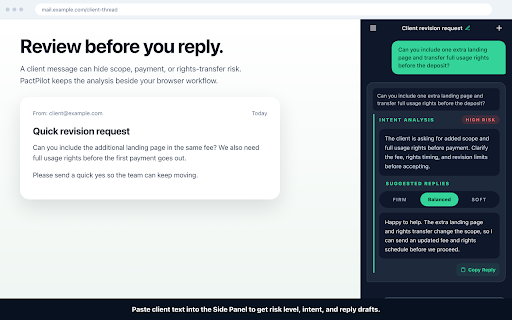
- Paste a client message and get a structured analysis with risk level, intent, and suggested replies.
- Upload a PDF or image of a contract clause to surface red flags before you respond.
- Right-click selected text on a page and send it into the PactPilot Side Panel for review.
- Use the floating page button on WhatsApp Web, Slack, and Upwork Messages to send selected client text into the Side Panel without losing context.
- Draft replies in different tones so you can answer clearly without leaving your browser workflow.

What it does not do
- It does not upload full page DOM, cookies, browsing history, or tabs.
- It does not automatically extract messages. On WhatsApp Web, Slack, and Upwork, the in-page button only sends text you have manually selected.
- It does not store API keys, passwords, OAuth tokens, or login credentials locally.

Privacy
PactPilot uses an anonymous browser identifier, formatted as browser_ext_<uuid-v4>, to keep guest sessions consistent. Only the text and files you actively send to PactPilot leave your browser. Direct file uploads use short-lived storage URLs returned by the PactPilot API.

Read the full privacy notice:
https://pactpilot.ai/legal/extension-privacy
PactPilot is a Chrome Side Panel assistant for freelancers, consultants, and small agency teams who negotiate through email, marketplaces, and other text-based client channels.

Use PactPilot when a client message, contract clause, or project request needs a second read before you reply.

What it does
- Paste a client message and get a structured analysis with risk level, intent, and suggested replies.
- Upload a PDF or image of a contract clause to surface red flags before you respond.
- Right-click selected text on a page and send it into the PactPilot Side Panel for review.
- Use the floating page button on WhatsApp Web, Slack, and Upwork Messages to send selected client text into the Side Panel without losing context.
- Draft replies in different tones so you can answer clearly without leaving your browser workflow.

What it does not do
- It does not upload full page DOM, cookies, browsing history, or tabs.
- It does not automatically extract messages. On WhatsApp Web, Slack, and Upwork, the in-page button only sends text you have manually selected.
- It does not store API keys, passwords, OAuth tokens, or login credentials locally.

Privacy
PactPilot uses an anonymous browser identifier, formatted as browser_ext_<uuid-v4>, to keep guest sessions consistent. Only the text and files you actively send to PactPilot leave your browser. Direct file uploads use short-lived storage URLs returned by the PactPilot API.

Read the full privacy notice:
https://pactpilot.ai/legal/extension-privacy
- May 11, 2026description
Your AI co-pilot for high-stakes client conversations.

PactPilot is a Chrome Side Panel assistant for freelancers, consultants, and small agency teams who negotiate through email, marketplaces, and other text-based client channels.

Use PactPilot when a client message, contract clause, or project request needs a second read before you reply.

What it does
- Paste a client message and get a structured analysis with risk level, intent, and suggested replies.
- Upload a PDF or image of a contract clause to surface red flags before you respond.
- Right-click selected text on a page and send it into the PactPilot Side Panel for review.
- Use the floating page button on WhatsApp Web, Slack, and Upwork Messages to send selected client text into the Side Panel without losing context.
- Draft replies in different tones so you can answer clearly without leaving your browser workflow.

What it does not do
- It does not upload full page DOM, cookies, browsing history, or tabs.
- It does not automatically extract messages. On WhatsApp Web, Slack, and Upwork, the in-page button only sends text you have manually selected.
- It does not store API keys, passwords, OAuth tokens, or login credentials locally.

Privacy
PactPilot uses an anonymous browser identifier, formatted as browser_ext_<uuid-v4>, to keep guest sessions consistent. Only the text and files you actively send to PactPilot leave your browser. Direct file uploads use short-lived storage URLs returned by the PactPilot API.

Read the full privacy notice:
https://pactpilot.omnitext.top/legal/extension-privacy
Your AI co-pilot for high-stakes client conversations.

PactPilot is a Chrome Side Panel assistant for freelancers, consultants, and small agency teams who negotiate through email, marketplaces, and other text-based client channels.

Use PactPilot when a client message, contract clause, or project request needs a second read before you reply.

What it does
- Paste a client message and get a structured analysis with risk level, intent, and suggested replies.
- Upload a PDF or image of a contract clause to surface red flags before you respond.
- Right-click selected text on a page and send it into the PactPilot Side Panel for review.
- Use the floating page button on WhatsApp Web, Slack, and Upwork Messages to send selected client text into the Side Panel without losing context.
- Draft replies in different tones so you can answer clearly without leaving your browser workflow.

What it does not do
- It does not upload full page DOM, cookies, browsing history, or tabs.
- It does not automatically extract messages. On WhatsApp Web, Slack, and Upwork, the in-page button only sends text you have manually selected.
- It does not store API keys, passwords, OAuth tokens, or login credentials locally.

Privacy
PactPilot uses an anonymous browser identifier, formatted as browser_ext_<uuid-v4>, to keep guest sessions consistent. Only the text and files you actively send to PactPilot leave your browser. Direct file uploads use short-lived storage URLs returned by the PactPilot API.

Read the full privacy notice:
https://pactpilot.ai/legal/extension-privacy
- May 7, 2026permissions
contextMenus, sidePanel, storage, clipboardRead
contextMenus, sidePanel, storage, clipboardRead, identity
Permissions & access
- Permissions
- contextMenussidePanelstorageclipboardReadidentity
- Host access
- https://api.pactpilot.ai/*, https://*.supabase.co/*
Screenshots


About
PactPilot is a Chrome Side Panel assistant for freelancers, consultants, and small agency teams who negotiate through email, marketplaces, and other text-based client channels.

Use PactPilot when a client message, contract clause, or project request needs a second read before you reply.

What it does
- Paste a client message and get a structured analysis with risk level, intent, and suggested replies.
- Upload a PDF or image of a contract clause to surface red flags before you respond.
- Right-click selected text on a page and send it into the PactPilot Side Panel for review.
- Use the floating page button on WhatsApp Web, Slack, and Upwork Messages to send selected client text into the Side Panel without losing context.
- Draft replies in different tones so you can answer clearly without leaving your browser workflow.

What it does not do
- It does not upload full page DOM, cookies, browsing history, or tabs.
- It does not automatically extract messages. On WhatsApp Web, Slack, and Upwork, the in-page button only sends text you have manually selected.
- It does not store API keys, passwords, OAuth tokens, or login credentials locally.

Privacy
PactPilot uses an anonymous browser identifier, formatted as browser_ext_<uuid-v4>, to keep guest sessions consistent. Only the text and files you actively send to PactPilot leave your browser. Direct file uploads use short-lived storage URLs returned by the PactPilot API.

Read the full privacy notice:
https://pactpilot.ai/legal/extension-privacy
Technical
- Version
- 1.0.4
- Manifest
- V3
- Size
- 121KiB
- Min Chrome
- 116
- Languages
- 8
- Featured
- No
Metadata
- ID
- fcohfbelhcpffnalnhgiepalpldgkaic
- Developer ID
- uc5fddb813617b1196778d3a31cbbdf16
- Developer Email
- [email protected]
- Created
- Apr 29, 2026
- Last Updated (Store)
- Jun 13, 2026
- Last Scraped
- Jun 14, 2026
- Website
- —
- Support URL
- https://pactpilot.ai/about
- Privacy Policy
- https://pactpilot.ai/legal/extension-privacy
Data sourced from the Chrome Web Store · last verified Jun 14, 2026.