
Diggy Miner AI Scraper
Powerful AI powered web scraping tool that extracts data from any website.
As of June 2026, Diggy Miner AI Scraper has 36 users in the Productivity category.
Usersup 5.9 percent+5.9%
36
36
Ratingno change0%
—
— reviews
Reviewsno change0%
—
Version
1.56
Manifest V3
History
9 snapshotsTracking since Apr 1, 2026.
View as table
| Date | Users | Rating | Reviews | Version |
|---|---|---|---|---|
| Apr 1, 2026 | 34 | — | — | 1.56 |
| Apr 16, 2026 | 32 | — | — | 1.56 |
| Apr 24, 2026 | 35 | — | — | 1.56 |
| May 1, 2026 | 31 | — | — | 1.56 |
| May 7, 2026 | 33 | — | — | 1.56 |
| May 12, 2026 | 32 | — | — | 1.56 |
| May 21, 2026 | 31 | — | — | 1.56 |
| May 30, 2026 | 34 | — | — | 1.56 |
| Jun 8, 2026 | 40 | — | — | 1.56 |
| Now | 36 | — | — | 1.56 |
Permissions & access
- Permissions
- activeTabstoragescriptingwebNavigationtabs
- Host access
- <all_urls>
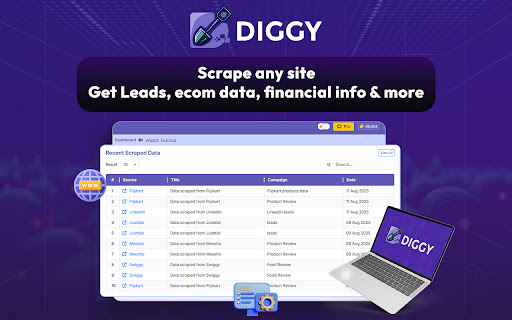
Screenshots


About
Tired of complex web scraping scripts and getting blocked? Diggy Miner is the cutting-edge Chrome extension that uses AI to instantly extract, organize, and analyze data from any website—no coding required. Turn the entire web into your personal data source with just a click!

🔥 Key Features That Dig Deep:
AI Auto-Pilot Scraping
Our advanced AI dynamically reads and understands the structure of any webpage, letting you scrape complex data (tables, lists, text, images, and links) from hyper-localized and niche platforms effortlessly.

Data Analysis on Demand
Go beyond simple extraction. Use our in-built AI analysis tool to instantly find actionable insights, like identifying customer pain points from reviews or spotting market trends, directly from your scraped data.

One-Click Export
Download your results instantly into clean, structured formats, including CSV, JSON, and XLSX, ready for your CRM, outreach campaigns, or spreadsheets.

Smart Automation
Automate tasks like following pagination, clicking links, and handling pop-ups to get comprehensive data sets without manual work.

⛏️ Who is Diggy Miner For?
Lead Generation
Quickly mine contact info, emails, and leads from professional and community websites.

E-commerce & Retail
Monitor competitor pricing, product data, and user reviews at scale.

Market Research
Gather financial data, article content, and critical market intelligence.

Recruiters
Extract candidate information from various job boards and professional networks.

Stop wasting time on manual data entry or fragile, outdated scrapers. Install Diggy Miner today and start mining the data you need to grow your business, effortlessly and intelligently.
Technical
- Version
- 1.56
- Manifest
- V3
- Size
- 848KiB
- Min Chrome
- 88
- Languages
- 1
- Featured
- No
Metadata
- ID
- fcmbajgiicnamlpiabchcffahkiiejhp
- Developer ID
- u2ec523ffb4c5a996b0821d6dcf449326
- Developer Email
- [email protected]
- Created
- Aug 13, 2025
- Last Updated (Store)
- Feb 9, 2026
- Last Scraped
- Jun 8, 2026
- Website
- —
- Support URL
- https://teknikforce.com/support
- Privacy Policy
- https://teknikforce.com/privacy
Similar extensions
Alternatives to Diggy Miner AI Scraper, ranked by description similarity.

Deep Scraper
AI-powered browser automation for deep web scraping.
276

Web Scraper - Free AI-Based Data Extractor
Free AI-powered data extraction tool. Scrape any website with AI assistance.
12

Data Scraper
Powerful data extraction from any website. Auto-detect tables, lists, emails, images. Export to CSV, JSON, Excel.
5

Easy Data Scraper - Instant Data Scraper
Easy Data Scraper - Automatically detects, scrapes, and highlights data from multiple sections on a page.
308
★ 5.0

Super Web Scraper
Super Web Scraper: Instantly extract text, images, emails & links from any site. One-click, fast & powerful data scraper tool.
1.0K
★ 3.8
Data Scraper - Easy Web Scraping
Data Scraper extracts data out of HTML web pages and imports it into Microsoft Excel spreadsheets
300.0K
★ 3.9

Ultimate Web Scraper
Extract data instantly: Grab text, images, emails & links from any website with a single click. Fast, simple & powerful web scraper
90.0K
★ 4.6

Page Scraper
Simple and easy to use scraper tool.
57
Data sourced from the Chrome Web Store · last verified Jun 8, 2026.