
Sticky Notes
Add sticky notes to websites
As of June 2026, Sticky Notes has 5 users in the Productivity category.
Usersdown 44.4 percent−44.4%
5
5
Ratingno change0%
—
— reviews
Reviewsno change0%
—
Version
1.0
Manifest V3
History
3 snapshotsTracking since Apr 19, 2026.
View as table
| Date | Users | Rating | Reviews | Version |
|---|---|---|---|---|
| Apr 19, 2026 | 9 | — | — | 1.0 |
| May 11, 2026 | 5 | — | — | 1.0 |
| Jun 6, 2026 | 7 | — | — | 1.0 |
| Now | 5 | — | — | 1.0 |
Permissions & access
- Permissions
- storageactiveTab
- Host access
- None declared
Screenshots


About
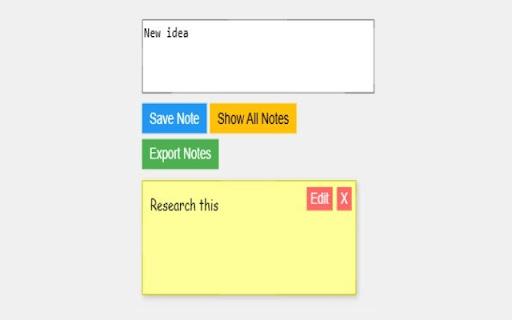
Sticky Notes is a simple Chrome extension that lets you attach notes to any website you visit. Whether you're researching, bookmarking ideas, or leaving reminders, Sticky Notes keeps your thoughts organized.

Features:
- Add notes instantly to the current website.
- Edit or delete notes with ease.
- Toggle between viewing notes for the current site or all sites.
- Export your notes as a text file or CSV for backup or sharing.
- Classic sticky note design with a yellow background.

How to Use:
1. Click the extension icon to open the popup.
2. Type your note and click "Save Note."
3. Use "Show All Notes" to see notes across all sites.
4. Edit or delete notes as needed.
5. Export all notes via the "Export Notes" button.

Your notes are synced across devices using Chrome’s storage, so you’ll never lose track of your ideas. Perfect for students, researchers, or anyone who loves staying organized online!
Technical
- Version
- 1.0
- Manifest
- V3
- Size
- 9.67KiB
- Min Chrome
- 88
- Languages
- 1
- Featured
- No
Metadata
- ID
- fcinidfmjbdmgknepoeelmohhaipickp
- Developer ID
- uff502fc75534d77535f2273defba297e
- Developer Email
- [email protected]
- Created
- Apr 10, 2025
- Last Updated (Store)
- Apr 10, 2025
- Last Scraped
- Jun 6, 2026
- Website
- —
Similar extensions
Alternatives to Sticky Notes, ranked by description similarity.

Sticky Notes for Chrome
A simple sticky notes chrome extension
11
★ 5.0

Sticky Notes
Quick sticky notes in your browser. Create multiple notes, auto-save instantly, and sync across devices using Chrome Sync.
3
★ 5.0

Stick it - web notes
This handy Chrome extension allows you to create and save Stick it - web notes directly on the websites you visit
34

Sticky notes
Add sticky notes to your favorite web pages.
4

Sticky Notes
Quick, draggable sticky notes on any site—stay organized without leaving your tab.
14
★ 5.0

Web Sticky Notes
Add sticky notes to any webpage for better organization and note-taking
18

Beautiful Sticky Notes
Take beautiful, stylish notes right from your browser!
2

Sticky Notes
Add sticky notes to web pages and save your notes.
3
Data sourced from the Chrome Web Store · last verified Jun 6, 2026.