
TradingView Remix: AI Chart Copilot
AI-powered chatbot interface for TradingView
As of June 2026, TradingView Remix: AI Chart Copilot has 100,000 users and a 4.30/5 rating from 86 reviews in the Productivity category.
Usersup 149153.7 percent+149153.7%
100.0K
100,000
Ratingdown 14.0 percent−14.0%
4.30
86 reviews
Reviewsup 2050.0 percent+2050.0%
86
Version
0.16.4
Manifest V3
90-day change · In the last 90 days this extension gained 99.9K users, 9 version updates.
History
23 snapshotsTracking since Apr 1, 2026.
View as table
| Date | Users | Rating | Reviews | Version |
|---|---|---|---|---|
| Apr 1, 2026 | 67 | 5.00 | 4 | 0.8.6 |
| Apr 16, 2026 | 75 | 5.00 | 4 | 0.9.2 |
| Apr 20, 2026 | 20.0K | 4.33 | 24 | 0.11.14 |
| Apr 24, 2026 | 20.0K | 4.36 | 25 | 0.12.3 |
| Apr 26, 2026 | 20.0K | 4.38 | 26 | 0.12.5 |
| Apr 29, 2026 | 30.0K | 4.19 | 31 | 0.12.6 |
| May 2, 2026 | 30.0K | 4.19 | 32 | 0.12.9 |
| May 6, 2026 | 30.0K | 4.19 | 32 | 0.14.2 |
| May 9, 2026 | 50.0K | 4.25 | 44 | 0.14.6 |
| May 11, 2026 | 70.0K | 4.33 | 52 | 0.15.0 |
| May 13, 2026 | 70.0K | 4.37 | 57 | 0.15.2 |
| May 15, 2026 | 80.0K | 4.38 | 60 | 0.15.4 |
| May 18, 2026 | 80.0K | 4.36 | 64 | 0.15.8 |
| May 20, 2026 | 90.0K | 4.38 | 69 | 0.15.12 |
| May 23, 2026 | 90.0K | 4.37 | 73 | 0.15.14 |
| May 26, 2026 | 100.0K | 4.39 | 75 | 0.15.14 |
| May 28, 2026 | 90.0K | 4.37 | 76 | 0.15.14 |
| May 31, 2026 | 90.0K | 4.38 | 77 | 0.15.16 |
| Jun 3, 2026 | 90.0K | 4.34 | 79 | 0.15.16 |
| Jun 6, 2026 | 100.0K | 4.34 | 80 | 0.15.17 |
| Jun 11, 2026 | 100.0K | 4.35 | 82 | 0.16.0 |
| Jun 16, 2026 | 100.0K | 4.35 | 82 | 0.16.1 |
| Jun 23, 2026 | 100.0K | 4.33 | 84 | 0.16.2 |
| Now | 100.0K | 4.30 | 86 | 0.16.4 |
Changelog
- May 11, 2026description
Your official AI-powered chart copilot for TradingView. Analyze markets, automate your charts, manage alerts, paper trade, and get actionable insights — all through natural conversation.

TradingView Remix lives in your browser's side panel and works directly with your TradingView charts. Just ask, and it does the rest.

What can it do?

Market Analysis & Research: Ask about any stock, crypto, forex pair, or commodity and get instant analysis powered by TradingView's real-time data. Get live quotes, fundamental metrics (P/E, EPS, revenue, margins), technical ratings (RSI, MACD, moving averages), earnings calendars, economic event schedules, and the latest news — all synthesized into actionable insights, not raw data dumps.

Chart Automation: Stop clicking through menus. Tell the AI to switch symbols, change timeframes, add or remove indicators, set up multi-chart layouts, overlay comparisons, change chart types (candles, Heikin Ashi, Volume Footprint, Market Profile, and more), and navigate to specific dates. It reads your current chart state and works with what you already have set up.

Smart Drawings: The AI draws directly on your chart to illustrate analysis — support/resistance levels, trend lines, Fibonacci retracements, price zones, entry/exit signals, and text annotations. It positions drawings accurately using your chart's visible range and current prices.

Alert Management: Create, list, pause, restart, and delete price alerts through conversation. Set alerts with specific conditions (cross, cross up, cross down, above, below) and delivery preferences (push, email, popup, webhook). No more navigating alert dialogs.

Paper Trading: Practice trading without risk. Place market, limit, and stop orders with optional take-profit and stop-loss brackets. Manage positions, review trade history, and track P&L — all through chat. The AI always shows you the trade plan and asks for confirmation before executing.

Portfolio Tracking: Manage your TradingView investment portfolios through conversation. View all your portfolios, check holdings with live valuations, and review performance metrics — total gains, unrealized/realized P&L, annualized yield, and period returns (YTD, 1M, 3M, 6M, 1Y, all-time). Get risk analysis with Sharpe ratio, Sortino ratio, and beta vs. benchmark. Record buy/sell transactions, log cash deposits and withdrawals, and create or reorganize portfolios — all without leaving the chat.

Stock Screener: Find trading opportunities using TradingView's powerful screener. Filter by price, volume, market cap, P/E ratio, technical signals, sector, and more across US stocks, crypto, forex, and international markets.

Watchlist Integration: Scan your TradingView watchlists for setups. The AI reads your active watchlist, pulls batch quotes and technicals, and ranks symbols by how actionable they look.

Pine Script Assistant: Write, edit, and deploy custom Pine Script indicators directly from the chat. The AI opens the editor, writes the code, compiles it, and adds it to your chart — handling errors automatically.

MCP Server Integration: Connect your own external tools and data sources using the Model Context Protocol (MCP). Add any MCP-compatible server — private APIs, databases, proprietary analytics — and the AI can discover and call those tools during your conversation. Supports OAuth and API key authentication. All requests are proxied through your browser, so your credentials never leave your machine.

Persistent Notes: Save analysis, trade rationale, and key findings to TradingView's built-in text notes. The AI uses these as long-term memory to recall past analysis across sessions.

Works across all markets — stocks, crypto, forex, commodities, futures, and indices. The AI automatically adapts its analysis style to the asset class you're viewing.

How it works:

- Open any chart on TradingView
- Click the TradingView Remix icon to open the side panel
- Sign in with Google
- Start chatting

Pricing: Free during Public Beta. 15 AI requests per day. All features included, no credit card required.

Privacy: Your TradingView session data stays in your browser. The AI processes your questions server-side but never stores your trading data or chart history.
Your official AI-powered chart copilot for TradingView. Analyze markets, automate your charts, manage alerts, paper trade, and get actionable insights — all through natural conversation.

TradingView Remix lives in your browser's side panel and works directly with your TradingView charts. Just ask, and it does the rest.

What can it do?

Market Analysis & Research: Ask about any stock, crypto, forex pair, or commodity and get instant analysis powered by TradingView's real-time data. Get live quotes, fundamental metrics (P/E, EPS, revenue, margins), technical ratings (RSI, MACD, moving averages), earnings calendars, economic event schedules, and the latest news — all synthesized into actionable insights, not raw data dumps.

Chart Automation: Stop clicking through menus. Tell the AI to switch symbols, change timeframes, add or remove indicators, set up multi-chart layouts, overlay comparisons, change chart types (candles, Heikin Ashi, Volume Footprint, Market Profile, and more), and navigate to specific dates. It reads your current chart state and works with what you already have set up.

Smart Drawings: The AI draws directly on your chart to illustrate analysis — support/resistance levels, trend lines, Fibonacci retracements, price zones, entry/exit signals, and text annotations. It positions drawings accurately using your chart's visible range and current prices.

Alert Management: Create, list, pause, restart, and delete price alerts through conversation. Set alerts with specific conditions (cross, cross up, cross down, above, below) and delivery preferences (push, email, popup, webhook). No more navigating alert dialogs.

Paper Trading: Practice trading without risk. Place market, limit, and stop orders with optional take-profit and stop-loss brackets. Manage positions, review trade history, and track P&L — all through chat. The AI always shows you the trade plan and asks for confirmation before executing.

Portfolio Tracking: Manage your TradingView investment portfolios through conversation. View all your portfolios, check holdings with live valuations, and review performance metrics — total gains, unrealized/realized P&L, annualized yield, and period returns (YTD, 1M, 3M, 6M, 1Y, all-time). Get risk analysis with Sharpe ratio, Sortino ratio, and beta vs. benchmark. Record buy/sell transactions, log cash deposits and withdrawals, and create or reorganize portfolios — all without leaving the chat.

Stock Screener: Find trading opportunities using TradingView's powerful screener. Filter by price, volume, market cap, P/E ratio, technical signals, sector, and more across US stocks, crypto, forex, and international markets.

Watchlist Integration: Scan your TradingView watchlists for setups. The AI reads your active watchlist, pulls batch quotes and technicals, and ranks symbols by how actionable they look.

Pine Script Assistant: Write, edit, and deploy custom Pine Script indicators directly from the chat. The AI opens the editor, writes the code, compiles it, and adds it to your chart — handling errors automatically.

MCP Server Integration: Connect your own external tools and data sources using the Model Context Protocol (MCP). Add any MCP-compatible server — private APIs, databases, proprietary analytics — and the AI can discover and call those tools during your conversation. Supports OAuth and API key authentication. All requests are proxied through your browser, so your credentials never leave your machine.

Persistent Notes: Save analysis, trade rationale, and key findings to TradingView's built-in text notes. The AI uses these as long-term memory to recall past analysis across sessions.

Works across all markets — stocks, crypto, forex, commodities, futures, and indices. The AI automatically adapts its analysis style to the asset class you're viewing.

How it works:

- Open any chart on TradingView
- Click the TradingView Remix icon to open the side panel
- Sign in with Google
- Start chatting

Pricing: Free during Public Beta. Every user gets a weekly usage limit that scales with their TradingView plan: Free 0.25x, Essential 1x, Plus 2x, Premium 5x, Ultimate 20x. Free-tier users have all analysis features but the Pine code authoring assistant is reserved for Essential and above. Insiders are unlimited. No credit card required — see the pie indicator in the side panel header for live usage and the upgrade link.


Privacy: Your TradingView session data stays in your browser. The AI processes your questions server-side but never stores your trading data or chart history.
- Apr 26, 2026description
Your AI-powered chart copilot for TradingView. Analyze markets, automate your charts, manage alerts, paper trade, and get actionable insights — all through natural conversation.

TradingView Remix lives in your browser's side panel and works directly with your TradingView charts. Just ask, and it does the rest.

What can it do?

Market Analysis & Research: Ask about any stock, crypto, forex pair, or commodity and get instant analysis powered by TradingView's real-time data. Get live quotes, fundamental metrics (P/E, EPS, revenue, margins), technical ratings (RSI, MACD, moving averages), earnings calendars, economic event schedules, and the latest news — all synthesized into actionable insights, not raw data dumps.

Chart Automation: Stop clicking through menus. Tell the AI to switch symbols, change timeframes, add or remove indicators, set up multi-chart layouts, overlay comparisons, change chart types (candles, Heikin Ashi, Volume Footprint, Market Profile, and more), and navigate to specific dates. It reads your current chart state and works with what you already have set up.

Smart Drawings: The AI draws directly on your chart to illustrate analysis — support/resistance levels, trend lines, Fibonacci retracements, price zones, entry/exit signals, and text annotations. It positions drawings accurately using your chart's visible range and current prices.

Alert Management: Create, list, pause, restart, and delete price alerts through conversation. Set alerts with specific conditions (cross, cross up, cross down, above, below) and delivery preferences (push, email, popup, webhook). No more navigating alert dialogs.

Paper Trading: Practice trading without risk. Place market, limit, and stop orders with optional take-profit and stop-loss brackets. Manage positions, review trade history, and track P&L — all through chat. The AI always shows you the trade plan and asks for confirmation before executing.

Portfolio Tracking: Manage your TradingView investment portfolios through conversation. View all your portfolios, check holdings with live valuations, and review performance metrics — total gains, unrealized/realized P&L, annualized yield, and period returns (YTD, 1M, 3M, 6M, 1Y, all-time). Get risk analysis with Sharpe ratio, Sortino ratio, and beta vs. benchmark. Record buy/sell transactions, log cash deposits and withdrawals, and create or reorganize portfolios — all without leaving the chat.

Stock Screener: Find trading opportunities using TradingView's powerful screener. Filter by price, volume, market cap, P/E ratio, technical signals, sector, and more across US stocks, crypto, forex, and international markets.

Watchlist Integration: Scan your TradingView watchlists for setups. The AI reads your active watchlist, pulls batch quotes and technicals, and ranks symbols by how actionable they look.

Pine Script Assistant: Write, edit, and deploy custom Pine Script indicators directly from the chat. The AI opens the editor, writes the code, compiles it, and adds it to your chart — handling errors automatically.

MCP Server Integration: Connect your own external tools and data sources using the Model Context Protocol (MCP). Add any MCP-compatible server — private APIs, databases, proprietary analytics — and the AI can discover and call those tools during your conversation. Supports OAuth and API key authentication. All requests are proxied through your browser, so your credentials never leave your machine.

Persistent Notes: Save analysis, trade rationale, and key findings to TradingView's built-in text notes. The AI uses these as long-term memory to recall past analysis across sessions.

Works across all markets — stocks, crypto, forex, commodities, futures, and indices. The AI automatically adapts its analysis style to the asset class you're viewing.

How it works:

- Open any chart on TradingView
- Click the TradingView Remix icon to open the side panel
- Sign in with Google
- Start chatting

Pricing: Free during Public Beta. 15 AI requests per day. All features included, no credit card required.

Privacy: Your TradingView session data stays in your browser. The AI processes your questions server-side but never stores your trading data or chart history.
Your official AI-powered chart copilot for TradingView. Analyze markets, automate your charts, manage alerts, paper trade, and get actionable insights — all through natural conversation.

TradingView Remix lives in your browser's side panel and works directly with your TradingView charts. Just ask, and it does the rest.

What can it do?

Market Analysis & Research: Ask about any stock, crypto, forex pair, or commodity and get instant analysis powered by TradingView's real-time data. Get live quotes, fundamental metrics (P/E, EPS, revenue, margins), technical ratings (RSI, MACD, moving averages), earnings calendars, economic event schedules, and the latest news — all synthesized into actionable insights, not raw data dumps.

Chart Automation: Stop clicking through menus. Tell the AI to switch symbols, change timeframes, add or remove indicators, set up multi-chart layouts, overlay comparisons, change chart types (candles, Heikin Ashi, Volume Footprint, Market Profile, and more), and navigate to specific dates. It reads your current chart state and works with what you already have set up.

Smart Drawings: The AI draws directly on your chart to illustrate analysis — support/resistance levels, trend lines, Fibonacci retracements, price zones, entry/exit signals, and text annotations. It positions drawings accurately using your chart's visible range and current prices.

Alert Management: Create, list, pause, restart, and delete price alerts through conversation. Set alerts with specific conditions (cross, cross up, cross down, above, below) and delivery preferences (push, email, popup, webhook). No more navigating alert dialogs.

Paper Trading: Practice trading without risk. Place market, limit, and stop orders with optional take-profit and stop-loss brackets. Manage positions, review trade history, and track P&L — all through chat. The AI always shows you the trade plan and asks for confirmation before executing.

Portfolio Tracking: Manage your TradingView investment portfolios through conversation. View all your portfolios, check holdings with live valuations, and review performance metrics — total gains, unrealized/realized P&L, annualized yield, and period returns (YTD, 1M, 3M, 6M, 1Y, all-time). Get risk analysis with Sharpe ratio, Sortino ratio, and beta vs. benchmark. Record buy/sell transactions, log cash deposits and withdrawals, and create or reorganize portfolios — all without leaving the chat.

Stock Screener: Find trading opportunities using TradingView's powerful screener. Filter by price, volume, market cap, P/E ratio, technical signals, sector, and more across US stocks, crypto, forex, and international markets.

Watchlist Integration: Scan your TradingView watchlists for setups. The AI reads your active watchlist, pulls batch quotes and technicals, and ranks symbols by how actionable they look.

Pine Script Assistant: Write, edit, and deploy custom Pine Script indicators directly from the chat. The AI opens the editor, writes the code, compiles it, and adds it to your chart — handling errors automatically.

MCP Server Integration: Connect your own external tools and data sources using the Model Context Protocol (MCP). Add any MCP-compatible server — private APIs, databases, proprietary analytics — and the AI can discover and call those tools during your conversation. Supports OAuth and API key authentication. All requests are proxied through your browser, so your credentials never leave your machine.

Persistent Notes: Save analysis, trade rationale, and key findings to TradingView's built-in text notes. The AI uses these as long-term memory to recall past analysis across sessions.

Works across all markets — stocks, crypto, forex, commodities, futures, and indices. The AI automatically adapts its analysis style to the asset class you're viewing.

How it works:

- Open any chart on TradingView
- Click the TradingView Remix icon to open the side panel
- Sign in with Google
- Start chatting

Pricing: Free during Public Beta. 15 AI requests per day. All features included, no credit card required.

Privacy: Your TradingView session data stays in your browser. The AI processes your questions server-side but never stores your trading data or chart history.
- Apr 1, 2026description
Your AI-powered chart copilot for TradingView. Analyze markets, automate your charts, manage alerts, paper trade, and get actionable insights — all through natural conversation.

TradingView Remix lives in your browser's side panel and works directly with your TradingView charts. Just ask, and it does the rest.

What can it do?

Market Analysis & Research: Ask about any stock, crypto, forex pair, or commodity and get instant analysis powered by TradingView's real-time data. Get live quotes, fundamental metrics (P/E, EPS, revenue, margins), technical ratings (RSI, MACD, moving averages), earnings calendars, economic event schedules, and the latest news — all synthesized into actionable insights, not raw data dumps.

Chart Automation: Stop clicking through menus. Tell the AI to switch symbols, change timeframes, add or remove indicators, set up multi-chart layouts, overlay comparisons, change chart types (candles, Heikin Ashi, Volume Footprint, Market Profile, and more), and navigate to specific dates. It reads your current chart state and works with what you already have set up.

Smart Drawings: The AI draws directly on your chart to illustrate analysis — support/resistance levels, trend lines, Fibonacci retracements, price zones, entry/exit signals, and text annotations. It positions drawings accurately using your chart's visible range and current prices.

Alert Management: Create, list, pause, restart, and delete price alerts through conversation. Set alerts with specific conditions (cross, cross up, cross down, above, below) and delivery preferences (push, email, popup, webhook). No more navigating alert dialogs.

Paper Trading: Practice trading without risk. Place market, limit, and stop orders with optional take-profit and stop-loss brackets. Manage positions, review trade history, and track P&L — all through chat. The AI always shows you the trade plan and asks for confirmation before executing.

Stock Screener: Find trading opportunities using TradingView's powerful screener. Filter by price, volume, market cap, P/E ratio, technical signals, sector, and more across US stocks, crypto, forex, and international markets.

Watchlist Integration: Scan your TradingView watchlists for setups. The AI reads your active watchlist, pulls batch quotes and technicals, and ranks symbols by how actionable they look.

Pine Script Assistant: Write, edit, and deploy custom Pine Script indicators directly from the chat. The AI opens the editor, writes the code, compiles it, and adds it to your chart — handling errors automatically.

Persistent Notes: Save analysis, trade rationale, and key findings to TradingView's built-in text notes. The AI uses these as long-term memory to recall past analysis across sessions.

Works across all markets — stocks, crypto, forex, commodities, futures, and indices. The AI automatically adapts its analysis style to the asset class you're viewing.

How it works:

- Open any chart on TradingView
- Click the TradingView Remix icon to open the side panel
- Sign in with Google
- Start chatting

Pricing: Free during Public Beta. 15 AI requests per day. All features included, no credit card required.

Privacy: Your TradingView session data stays in your browser. The AI processes your questions server-side but never stores your trading data or chart history.
Your AI-powered chart copilot for TradingView. Analyze markets, automate your charts, manage alerts, paper trade, and get actionable insights — all through natural conversation.

TradingView Remix lives in your browser's side panel and works directly with your TradingView charts. Just ask, and it does the rest.

What can it do?

Market Analysis & Research: Ask about any stock, crypto, forex pair, or commodity and get instant analysis powered by TradingView's real-time data. Get live quotes, fundamental metrics (P/E, EPS, revenue, margins), technical ratings (RSI, MACD, moving averages), earnings calendars, economic event schedules, and the latest news — all synthesized into actionable insights, not raw data dumps.

Chart Automation: Stop clicking through menus. Tell the AI to switch symbols, change timeframes, add or remove indicators, set up multi-chart layouts, overlay comparisons, change chart types (candles, Heikin Ashi, Volume Footprint, Market Profile, and more), and navigate to specific dates. It reads your current chart state and works with what you already have set up.

Smart Drawings: The AI draws directly on your chart to illustrate analysis — support/resistance levels, trend lines, Fibonacci retracements, price zones, entry/exit signals, and text annotations. It positions drawings accurately using your chart's visible range and current prices.

Alert Management: Create, list, pause, restart, and delete price alerts through conversation. Set alerts with specific conditions (cross, cross up, cross down, above, below) and delivery preferences (push, email, popup, webhook). No more navigating alert dialogs.

Paper Trading: Practice trading without risk. Place market, limit, and stop orders with optional take-profit and stop-loss brackets. Manage positions, review trade history, and track P&L — all through chat. The AI always shows you the trade plan and asks for confirmation before executing.

Portfolio Tracking: Manage your TradingView investment portfolios through conversation. View all your portfolios, check holdings with live valuations, and review performance metrics — total gains, unrealized/realized P&L, annualized yield, and period returns (YTD, 1M, 3M, 6M, 1Y, all-time). Get risk analysis with Sharpe ratio, Sortino ratio, and beta vs. benchmark. Record buy/sell transactions, log cash deposits and withdrawals, and create or reorganize portfolios — all without leaving the chat.

Stock Screener: Find trading opportunities using TradingView's powerful screener. Filter by price, volume, market cap, P/E ratio, technical signals, sector, and more across US stocks, crypto, forex, and international markets.

Watchlist Integration: Scan your TradingView watchlists for setups. The AI reads your active watchlist, pulls batch quotes and technicals, and ranks symbols by how actionable they look.

Pine Script Assistant: Write, edit, and deploy custom Pine Script indicators directly from the chat. The AI opens the editor, writes the code, compiles it, and adds it to your chart — handling errors automatically.

MCP Server Integration: Connect your own external tools and data sources using the Model Context Protocol (MCP). Add any MCP-compatible server — private APIs, databases, proprietary analytics — and the AI can discover and call those tools during your conversation. Supports OAuth and API key authentication. All requests are proxied through your browser, so your credentials never leave your machine.

Persistent Notes: Save analysis, trade rationale, and key findings to TradingView's built-in text notes. The AI uses these as long-term memory to recall past analysis across sessions.

Works across all markets — stocks, crypto, forex, commodities, futures, and indices. The AI automatically adapts its analysis style to the asset class you're viewing.

How it works:

- Open any chart on TradingView
- Click the TradingView Remix icon to open the side panel
- Sign in with Google
- Start chatting

Pricing: Free during Public Beta. 15 AI requests per day. All features included, no credit card required.

Privacy: Your TradingView session data stays in your browser. The AI processes your questions server-side but never stores your trading data or chart history.
Permissions & access
- Permissions
- sidePanelscriptingstorageidentityalarms
- Host access
- https://www.tradingview.com/*, https://*.tradingview.com/*
Screenshots


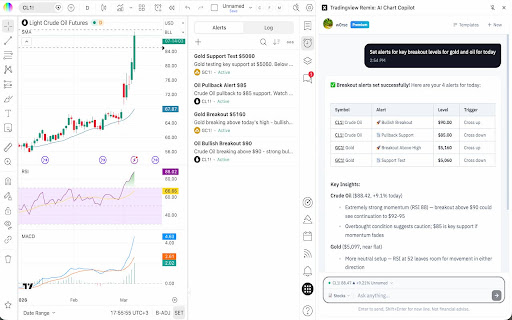
About
Your official AI-powered chart copilot for TradingView. Analyze markets, automate your charts, manage alerts, paper trade, and get actionable insights — all through natural conversation.

TradingView Remix lives in your browser's side panel and works directly with your TradingView charts. Just ask, and it does the rest.

What can it do?

Market Analysis & Research: Ask about any stock, crypto, forex pair, or commodity and get instant analysis powered by TradingView's real-time data. Get live quotes, fundamental metrics (P/E, EPS, revenue, margins), technical ratings (RSI, MACD, moving averages), earnings calendars, economic event schedules, and the latest news — all synthesized into actionable insights, not raw data dumps.

Chart Automation: Stop clicking through menus. Tell the AI to switch symbols, change timeframes, add or remove indicators, set up multi-chart layouts, overlay comparisons, change chart types (candles, Heikin Ashi, Volume Footprint, Market Profile, and more), and navigate to specific dates. It reads your current chart state and works with what you already have set up.

Smart Drawings: The AI draws directly on your chart to illustrate analysis — support/resistance levels, trend lines, Fibonacci retracements, price zones, entry/exit signals, and text annotations. It positions drawings accurately using your chart's visible range and current prices.

Alert Management: Create, list, pause, restart, and delete price alerts through conversation. Set alerts with specific conditions (cross, cross up, cross down, above, below) and delivery preferences (push, email, popup, webhook). No more navigating alert dialogs.

Paper Trading: Practice trading without risk. Place market, limit, and stop orders with optional take-profit and stop-loss brackets. Manage positions, review trade history, and track P&L — all through chat. The AI always shows you the trade plan and asks for confirmation before executing.

Portfolio Tracking: Manage your TradingView investment portfolios through conversation. View all your portfolios, check holdings with live valuations, and review performance metrics — total gains, unrealized/realized P&L, annualized yield, and period returns (YTD, 1M, 3M, 6M, 1Y, all-time). Get risk analysis with Sharpe ratio, Sortino ratio, and beta vs. benchmark. Record buy/sell transactions, log cash deposits and withdrawals, and create or reorganize portfolios — all without leaving the chat.

Stock Screener: Find trading opportunities using TradingView's powerful screener. Filter by price, volume, market cap, P/E ratio, technical signals, sector, and more across US stocks, crypto, forex, and international markets.

Watchlist Integration: Scan your TradingView watchlists for setups. The AI reads your active watchlist, pulls batch quotes and technicals, and ranks symbols by how actionable they look.

Pine Script Assistant: Write, edit, and deploy custom Pine Script indicators directly from the chat. The AI opens the editor, writes the code, compiles it, and adds it to your chart — handling errors automatically.

MCP Server Integration: Connect your own external tools and data sources using the Model Context Protocol (MCP). Add any MCP-compatible server — private APIs, databases, proprietary analytics — and the AI can discover and call those tools during your conversation. Supports OAuth and API key authentication. All requests are proxied through your browser, so your credentials never leave your machine.

Persistent Notes: Save analysis, trade rationale, and key findings to TradingView's built-in text notes. The AI uses these as long-term memory to recall past analysis across sessions.

Works across all markets — stocks, crypto, forex, commodities, futures, and indices. The AI automatically adapts its analysis style to the asset class you're viewing.

How it works:

- Open any chart on TradingView
- Click the TradingView Remix icon to open the side panel
- Sign in with Google
- Start chatting

Pricing: Free during Public Beta. Every user gets a weekly usage limit that scales with their TradingView plan: Free 0.25x, Essential 1x, Plus 2x, Premium 5x, Ultimate 20x. Free-tier users have all analysis features but the Pine code authoring assistant is reserved for Essential and above. Insiders are unlimited. No credit card required — see the pie indicator in the side panel header for live usage and the upgrade link.


Privacy: Your TradingView session data stays in your browser. The AI processes your questions server-side but never stores your trading data or chart history.
Technical
- Version
- 0.16.4
- Manifest
- V3
- Size
- 1.36MiB
- Min Chrome
- 88
- Languages
- 12
- Featured
- No
Metadata
- ID
- fchmejnoncmdhlebgdgifdnehoibalnd
- Developer ID
- ud1a8768c22d35decb22d6a24b8710295
- Developer Email
- [email protected]
- Created
- Mar 6, 2026
- Last Updated (Store)
- Jun 16, 2026
- Last Scraped
- Jun 23, 2026
- Website
- tvremix.xyz
- Support URL
- —
- Privacy Policy
- https://tvremix.xyz/privacy
Similar extensions
Alternatives to TradingView Remix: AI Chart Copilot, ranked by description similarity.

TradingView AI Trade Review - ChartMentor
Review TradingView setups with AI before entry. Catch weak trades, improve risk decisions, and trade with discipline.
123
★ 5.0

PinePilot
A basic Plasmo extension.
2
★ 5.0

AI Trader
TradingView tablosunu analiz eder.
28

Quantum DeCasteljau Analyzer
Smart trading signals for TradingView with De Casteljau algorithm calculations
6

AstraCharts AI
AI-powered trading chart analysis assistant with multi-timeframe support and strategy-based insights
39
★ 5.0

TradeSage - TradingView Enhancement Suite
Your trading copilot with ChatGPT Pine Script generator
4.0K
★ 4.2

Finmagine AI Advisor – Stock & Fund Prompts
AI analysis prompts for Indian & US stocks and funds. 18 templates incl. MOAT, IPO Decoder, Red Flag Detector. Screener.in + VRO
415
★ 4.0

HorizonAI - Expert TradingView AI
HorizonAI is a AI tool designed to help you with your Pine Script coding
945
★ 4.2
Data sourced from the Chrome Web Store · last verified Jun 23, 2026.