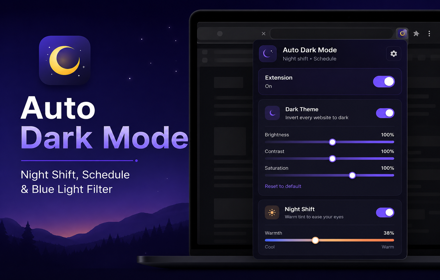
Auto Dark Mode — Night Shift, Schedule & Blue Light Filter
Auto dark theme for every site on a schedule. Night shift, blue light filter, brightness, contrast, saturation, shortcuts.
As of June 2026, Auto Dark Mode — Night Shift, Schedule & Blue Light Filter has 7 users in the Productivity category.
Usersno change0%
7
7
Ratingno change0%
—
— reviews
Reviewsno change0%
—
Version
1.0.0
Manifest V3
History
3 snapshotsTracking since May 27, 2026.
View as table
| Date | Users | Rating | Reviews | Version |
|---|---|---|---|---|
| May 27, 2026 | — | — | — | 1.0.0 |
| Jun 3, 2026 | — | — | — | 1.0.0 |
| Jun 8, 2026 | 6 | — | — | 1.0.0 |
| Now | 7 | — | — | 1.0.0 |
Permissions & access
- Permissions
- storagealarmstabs
- Host access
- <all_urls>
Screenshots

About
Auto Dark Mode helps make browsing more comfortable by applying a customizable dark theme and warm night-shift filter across websites.

Use the toolbar popup to turn the extension on or off, enable dark theme, enable night shift, adjust brightness, contrast, saturation, and warmth, or control the current website with per-site rules. The full settings page gives you deeper control over schedules, site rules, and keyboard shortcuts.

The extension is designed for users who want a simple way to reduce bright pages, improve late-night browsing comfort, and manage dark mode behavior across different websites.


Key Features:

• Apply dark mode across websites
• Night Shift mode with adjustable warm tint
• Brightness, contrast, and saturation controls
• Warmth control for blue-light reduction
• Master on/off switch
• Current-site controls: Always on, Auto, or Off here
• Schedule dark theme by start and end time
• Schedule night shift by start and end time
• Supports schedules that continue past midnight
• Keyboard shortcut to toggle dark theme
• Keyboard shortcut to toggle night shift
• Keyboard shortcut to toggle the current site
• Full settings page with General, Schedule, Sites, Shortcuts, and About sections
• Per-site rules for always-on or always-off behavior
• Reset filters and reset all settings options
• Runs locally in your browser
• No account required

Default Shortcuts:

• Alt+Shift+D: Toggle Dark Theme
• Alt+Shift+N: Toggle Night Shift
• Alt+Shift+L: Toggle the current site

How to Use:

1. Install Auto Dark Mode.
2. Open any supported website.
3. Click the extension icon in the Chrome toolbar.
4. Turn Dark Theme or Night Shift on or off.
5. Adjust brightness, contrast, saturation, or warmth as needed.
6. Use the current-site controls to keep dark mode always on, automatic, or off for that website.
7. Open Settings to create schedules and manage site rules.

Schedule Mode:

You can automatically turn dark theme and night shift on or off during selected time windows. For example, you can enable dark theme from 8:00 PM to 6:00 AM and use night shift during late-night browsing.

Per-Site Rules:

Some websites may already have their own dark mode or may not need visual changes. Use the Sites section to add rules for specific domains and choose whether dark mode should always run or stay off on those sites.

Privacy Friendly:

Auto Dark Mode runs locally in your browser. Based on the current extension files, it does not collect personal information, does not use analytics scripts, and does not send browsing data or page content to an external server.

Settings such as theme status, schedule times, filter values, warmth level, and site rules are saved locally using Chrome storage.

Auto Dark Mode is built for comfortable browsing, local settings, and simple control over how websites appear.
Technical
- Version
- 1.0.0
- Manifest
- V3
- Size
- 50.5KiB
- Min Chrome
- 108
- Languages
- 1
- Featured
- No
Metadata
- ID
- fcglibnhhlikmmlhleembjhjlmjfnnjc
- Developer ID
- uf4144008e4b3269022c91079dfdcb373
- Developer Email
- [email protected]
- Created
- May 26, 2026
- Last Updated (Store)
- May 26, 2026
- Last Scraped
- Jun 8, 2026
- Website
- —
- Support URL
- —
Data sourced from the Chrome Web Store · last verified Jun 8, 2026.