
Videozen: Screen and Camera Recorder
Webcam and Screen recording extension by Proshort Inc
As of May 2026, Videozen: Screen and Camera Recorder has 3,000 users and a 4.64/5 rating from 11 reviews in the Productivity category.
Usersno change0%
3.0K
3,000
Ratingno change0%
4.64
11 reviews
Reviewsno change0%
11
Version
0.0.0.37
Manifest V3
History
1 snapshotsTracking since Apr 26, 2026.
View as table
| Date | Users | Rating | Reviews | Version |
|---|---|---|---|---|
| Apr 26, 2026 | 3.0K | 4.64 | 11 | 0.0.0.37 |
| Now | 3.0K | 4.64 | 11 | 0.0.0.37 |
Permissions & access
- Permissions
- tabsstorageactiveTabscripting
- Host access
- <all_urls>, <all_urls>
Screenshots


About
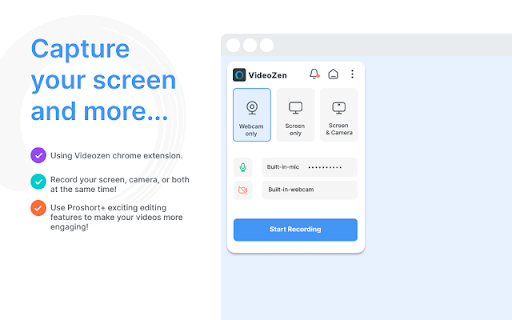
Record your screen and camera in custom mode(landscape, portrait and more) like never before! VideoZen’s screen and camera recording makes idea sharing or asynchronous communication/feedback easy and fun. With VideoZen you can record your screen and instantly get a link to share with anyone. It’s the fastest and easiest way to screen capture and stay connected with your team. Whether you’re screen recording your meetings, a product demo, giving feedback, or simply sharing your thoughts, VideoZen makes it simple to stay in the loop with async video. KEY FEATURES 🎥 Record ▸ Record your Desktop screen, current Tab or Camera only in HD resolution ▸ Include your voice in recording with Microphone option on or internal audio ▸ Record videos in any format/aspect ratio (portrait/landscape/square) 💾 Save ▸ Save recordings to local disk ▸ Save recordings to your online account ▸ Download recordings anytime in MP4 format 🚀 Share Recordings ▸ Automatically save videos to the cloud and share them instantly with a link ▸ Easily share a recording video to Jira, Slack, GitHub and what not! ✂️ Edit ▸ Edit your videos after recording with our inbuilt video editing capabilities KEY FEATURES 🕵️♂️ Remote Collaboration ▸ Record virtual meetings and discussions for future reference, ensuring no crucial details are missed 💼 Training Manuals ▸ Develop comprehensive training materials by blending screen recordings with camera explanations, facilitating employee onboarding 📣 Sales Pitches ▸ Create compelling sales pitches by combining screen recordings with personalized camera messages, enhancing client engagement 🛠️ Technical Support ▸ Record troubleshooting sessions to guide clients through complex software or technical issues effectively 🎨 Design Walkthroughs ▸ Record your creative process, unveiling design insights while showcasing your artistic journey ✨ Software Reviews ▸ Review applications and software by capturing real-time interactions, adding authenticity to your content 🌐 Website Tours ▸ Record guided tours of websites or apps, highlighting features and benefits for your audience ABOUT VIDEOZEN VideoZen is the most complete video creation and editing platform powered by generative AI and ChatGPT. Our key features are screen and camera recording, converting text, url or idea into video and automatically identifying relevant shorts from long videos. CONTACT US 📧If you have any questions, suggestions or feature requests, feel free to send a message to [email protected] anytime. Let us know your thoughts! Thank you.
Technical
- Version
- 0.0.0.37
- Manifest
- V3
- Size
- 270KiB
- Min Chrome
- 88
- Languages
- 1
- Featured
- Yes
Metadata
- ID
- fcekgnhgieggcbldnoicmempgknfolbc
- Developer ID
- u58ae78160a314b086404ce78ae9677df
- Developer Email
- [email protected]
- Created
- Mar 1, 2023
- Last Updated (Store)
- Mar 8, 2024
- Last Scraped
- May 23, 2026
- Website
- videozen.ai
- Support URL
- https://videozen.ai
- Privacy Policy
- https://videozen.ai/privacy-and-terms
Similar extensions
Alternatives to Videozen: Screen and Camera Recorder, ranked by description similarity.

Screen Recorder by ZenCapture — No Watermark, No Time Limit
Screen recorder with no watermark, no time limit, and 100% local privacy – all data stays on your device.
1.0K
★ 4.9

Zenious
Record and create professional, multilingual videos and technical docs in minutes without editing skills!
161
★ 5.0

Buzzcreen Screen Recorder
Record your screen with automatic zoom effects. One-click upload to Buzzcreen for instant editing and sharing.
51

Videco Video and Screen Recorder
Supercharge your sales pipeline with AI personalized videos
15
★ 5.0

Mazic
Create Studio-Quality product videos & tutorials under 60 seconds
310
★ 4.5

Zumie - Screen Recorder with Auto Zoom & Click Effects
Screen recorder with automatic zoom, webcam, click highlights & built-in editor. Record, edit, share.
2.0K
★ 3.9

Screen Recorder Studio - Unlimited, Zoom, Video & GIF
Stable screen recording with no time limits. Built-in editor to seamlessly zoom, trim, and export to high-quality MP4 or GIF.
114
★ 3.0

RecordPlus - Screen Recorder
Captures tabs, desktop, webcam, microphone, and system sound. Annotate with pencil tool and color picker.
97
Data sourced from the Chrome Web Store · last verified May 23, 2026.