
ScreenGrab AI
AI-powered screenshot capture and analysis tool. Extract and analyze text from any webpage.
As of June 2026, ScreenGrab AI has 15 users in the Productivity category.
Usersup 50.0 percent+50.0%
15
15
Ratingno change0%
—
— reviews
Reviewsno change0%
—
Version
3.1.0
Manifest V3
90-day change · In the last 90 days this extension 1 version update, changed permissions.
History
9 snapshotsTracking since Apr 1, 2026.
View as table
| Date | Users | Rating | Reviews | Version |
|---|---|---|---|---|
| Apr 1, 2026 | 10 | — | — | 2.1.0 |
| Apr 16, 2026 | 14 | — | — | 2.1.0 |
| Apr 24, 2026 | 16 | — | — | 2.1.0 |
| May 1, 2026 | 20 | — | — | 2.1.0 |
| May 7, 2026 | 21 | — | — | 2.1.0 |
| May 12, 2026 | 20 | — | — | 2.1.0 |
| May 17, 2026 | 21 | — | — | 3.1.0 |
| May 24, 2026 | — | — | — | 3.1.0 |
| Jun 6, 2026 | 16 | — | — | 3.1.0 |
| Now | 15 | — | — | 3.1.0 |
Changelog
- May 12, 2026description
ScreenGrab AI captures screenshots and analyzes them with AI. It's a Chrome
  extension that pulls text and insights from any webpage. You get three ways to
  capture: grab what's visible on screen, scroll through the entire page (it
  stitches everything together automatically), or draw a rectangle to select a
  specific area.

  What's cool is the privacy angle. Run AI models locally through Ollama and nothing
   leaves your computer helpful if you're handling patient records, legal docs, or
  anything confidential. Cloud options are there too if you need more power: Google
  Cloud Vision, OpenAI, Anthropic, and Google Gemini all work.

  There's a floating icon that shows up on every page for quick access, or you can
  use the popup with its progress indicator. Once you capture something, the AI
  works in two steps: first pulls text from the image (that's OCR), then analyzes
  what it found to give you actual insights. You can even ask follow-up questions
  about whatever you captured.
ScreenGrab AI captures screenshots and analyzes them with AI. It's a Chrome
extension that pulls text and insights from any webpage. You get three ways to  capture: grab what's visible on screen, scroll through the entire page (it stitches everything together automatically), or draw a rectangle to select a specific area.

What's cool is the privacy angle. Run AI models locally through Ollama and nothing leaves your computer helpful if you're handling patient records, legal docs, or  anything confidential. Cloud options are there too if you need more power: Google Cloud Vision, OpenAI, Grok, and Google Gemini all work.

There's a floating icon that shows up on every page for quick access, or you can use the popup with its progress indicator. Once you capture something, the AI works in two steps: first pulls text from the image (that's OCR), then analyzes what it found to give you actual insights. You can even ask follow-up questions about whatever you captured.
- May 12, 2026host_permissions
<all_urls>, https://vision.googleapis.com/*
<all_urls>
- May 12, 2026permissions
activeTab, scripting, storage, tabs, notifications, clipboardWrite
activeTab, alarms, scripting, storage, tabs, notifications, identity
Permissions & access
- Permissions
- activeTabalarmsscriptingstoragetabsnotificationsidentity
- Host access
- <all_urls>
Screenshots


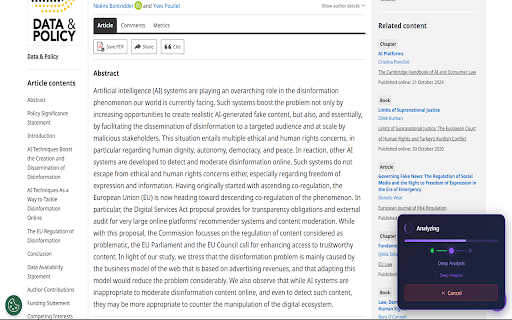

About
ScreenGrab AI captures screenshots and analyzes them with AI. It's a Chrome
extension that pulls text and insights from any webpage. You get three ways to  capture: grab what's visible on screen, scroll through the entire page (it stitches everything together automatically), or draw a rectangle to select a specific area.

What's cool is the privacy angle. Run AI models locally through Ollama and nothing leaves your computer helpful if you're handling patient records, legal docs, or  anything confidential. Cloud options are there too if you need more power: Google Cloud Vision, OpenAI, Grok, and Google Gemini all work.

There's a floating icon that shows up on every page for quick access, or you can use the popup with its progress indicator. Once you capture something, the AI works in two steps: first pulls text from the image (that's OCR), then analyzes what it found to give you actual insights. You can even ask follow-up questions about whatever you captured.
Technical
- Version
- 3.1.0
- Manifest
- V3
- Size
- 127KiB
- Min Chrome
- 88
- Languages
- 1
- Featured
- No
Metadata
- ID
- fcclbdinkbeigdbcjhbibkepjcmcjgih
- Developer ID
- u9cf726d968f01b4acbb471b2c7cbe3bf
- Developer Email
- [email protected]
- Created
- Feb 24, 2026
- Last Updated (Store)
- May 10, 2026
- Last Scraped
- Jun 6, 2026
- Website
- —
- Support URL
- —
- Privacy Policy
- https://screengrab-snowy.vercel.app/privacy
Similar extensions
Alternatives to ScreenGrab AI, ranked by description similarity.

Vision AI
Capture web screenshots and add prompts for instant AI-powered responses with Vision AI.
186
★ 5.0

QuickGrabAI
Instantly capture and analyze any image with AI - Get quick, accurate insights from screenshots
8

Screenshot to AI
Send screenshots to any AI (ChatGPT, Grok, Gemini, Claude, and more) with one click
165

Scan2AI
Scan2AI is a extension that allows you to capture a range of webpage resources and use them for AI
66

AI Vision - Screenshot & ask - free visual AI query tool with Gemini
Snap a screenshot and ask. Instant answers from Gemini. AI Insights, reading tool, summarize or explain pictures & paragraphs.
140
★ 5.0

Screen Chat With ChatGPT
Capture a specific part of a webpage and analyze it using ChatGPT.
90

Screenshot GPT
Take a screenshot of any area on a website and ask AI questions about it. Powered by OpenAI GPT models.
1.0K
★ 5.0

FullPage2Ai
Full page screen capture, full page capture & convert to markdown via AI
2
Data sourced from the Chrome Web Store · last verified Jun 6, 2026.