
Only Read
A feature Packed, customizable reader extension!
As of May 2026, Only Read has 243 users and a 5.00/5 rating from 1 reviews in the Social & Communication category.
Usersup 34.3 percent+34.3%
243
243
Ratingno change0%
5.00
1 reviews
Reviewsno change0%
1
Version
2.0.1
Manifest V3
History
3 snapshotsTracking since Apr 1, 2026.
View as table
| Date | Users | Rating | Reviews | Version |
|---|---|---|---|---|
| Apr 1, 2026 | 181 | 5.00 | 1 | 2.0.1 |
| Apr 30, 2026 | 187 | 5.00 | 1 | 2.0.1 |
| May 29, 2026 | 214 | 5.00 | 1 | 2.0.1 |
| Now | 243 | 5.00 | 1 | 2.0.1 |
Permissions & access
- Permissions
- storageactiveTabscriptingcontextMenus
- Host access
- None declared
Screenshots


About
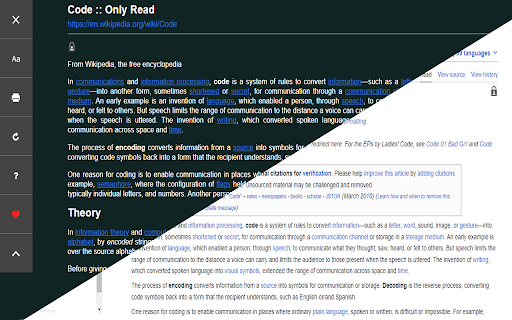
You can open any website or online document in a straightforward and uncluttered environment called Only Read thanks to the lightweight, multi-browser Only Read add-on. The Only Read UI can be accessed by simply clicking the toolbar button. A plain version of the current page (active tab) will be reloaded. When the Only Read UI is active, a toolbar can be seen in the upper left corner. The close button is the first button down from the top. This button will reload the page in the default view when you click it. To access the settings popup, select the second button from the top. For Only Read, three themes are available.

Features
+ Using the toolbar popup UI, access any website directly in reader view.
+ has a indigo, indRed, hotPink, teal, sepia, light, or dark mode.
+  has a font size, line height, or page width adjustment option.
+ Very lite and easy to use Extension.
Technical
- Version
- 2.0.1
- Manifest
- V3
- Size
- 78.21KiB
- Min Chrome
- 88
- Languages
- 6
- Featured
- No
Metadata
- ID
- fbbblgepbhmkagmjjfcjgpnganceebch
- Developer ID
- u7743718e95b9c8216d599d9d62a43ffe
- Developer Email
- [email protected]
- Created
- Feb 16, 2023
- Last Updated (Store)
- Feb 16, 2023
- Last Scraped
- May 29, 2026
- Privacy Policy
- https://www.downloadhub.cloud/p/privacy-policy.html
Similar extensions
Alternatives to Only Read, ranked by description similarity.

Reddit Next
read reddit post and comments side by side with next button. hide visited posts.
72
★ 1.0

Medium Free Filter
Add a toggle in Medium's navbar to filter free-to-read articles.
9

Nothing on the Internet
Remove all visible content from the web with a single click. Click again and everything is restored, just as it was.
450
★ 4.2

Margin
Annotate and highlight any webpage, with your notes saved to the decentralized AT Protocol.
—
★ 5.0

Reddit Bulk Link Opener
Open multiple unvisited Reddit posts in new tabs with a single click. Tracks visited posts to avoid duplicates.
19

Readup
The best way to read online.
571
★ 4.8

NewReads
Share what you're reading. Discover what to read next.
—

Reddit Anywhere
Automatically discover and display relevant Reddit discussions for any webpage you visit
11
★ 5.0
Data sourced from the Chrome Web Store · last verified May 29, 2026.