
Twishare to Misskey
Allow users to share to Misskey from Twitter share button.
As of May 2026, Twishare to Misskey has 500 users and a 4.50/5 rating from 4 reviews in the Social & Communication category.
Usersdown 1.0 percent−1.0%
500
500
Ratingno change0%
4.50
4 reviews
Reviewsno change0%
4
Version
0.4.5
Manifest V3
History
5 snapshotsTracking since Apr 1, 2026.
View as table
| Date | Users | Rating | Reviews | Version |
|---|---|---|---|---|
| Apr 1, 2026 | 505 | 4.50 | 4 | 0.4.5 |
| Apr 21, 2026 | 508 | 4.50 | 4 | 0.4.5 |
| May 6, 2026 | 540 | 4.50 | 4 | 0.4.5 |
| May 17, 2026 | 535 | 4.50 | 4 | 0.4.5 |
| May 31, 2026 | 533 | 4.50 | 4 | 0.4.5 |
| Now | 500 | 4.50 | 4 | 0.4.5 |
Permissions & access
- Permissions
- storage
- Host access
- None declared
Screenshots



About
There are many websites out there that have share buttons for Twitter, Facebook, LINE, and so on. However, Misskey users may be thinking, "Why can't I share to Misskey with those buttons? You may be thinking, "But that doesn't mean I can't share to Misskey!
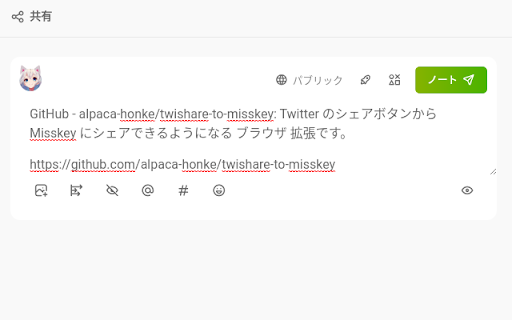
With this extension, you can share to Misskey using Twitter's share button!

Features:
- When you click the share button for Twitter, a confirmation screen appears and you can choose whether you want to share to Misskey (not Twitter) or not.
    - Of course, you can also share to Twitter if you cancel.
- If there's no Twitter share button, you can still share to Misskey by clicking the share button in the lower right corner.
    - Can be moved and moved out of the way
    - You can hide it.
    - It will be hidden when there are some full-screend something such as videos.
- A share button in the extension popup
- Almost all Misskey (v12 or later) and Firefish (formerly Calckey) are supported
- When sharing a tweet, the content of the tweet can be pasted as a quote in the note
- Remove unnecessary information attached to URLs on certain sites before sharing
    - YouTube: remove IDs that may be involved in tracking
    - Twitter: Delete 2 types of unnecessary information
- Avoid unexpected mention on shared post from Threads
- Secure because it does not store authentication information
- Distribute bookmarklets that have the same functionality as some of the extensions


Usage:
1. go to chrome://extensions and grant various permissions. (First time only)
2.Click the Twishare to Misskey for Firefox icon from the list of extensions in the upper left corner, and enter the server you want to share to. (If you are sharing via Misskey Hub or after the second time, you do not need to do this.)  Also, select the toggle switch below the icon.
3. When you click the "Share to Twitter" button and go to the next page, you will be asked if you want to share to Misskey.
If you turned on the toggle switch in step 2, a green button will appear in the lower right corner of the screen. Pressing this will allow you to share pages that do not have a Twitter share button.

Official Site: https://alpaca-honke.github.io/twishare-to-misskey/

FAQ: https://github.com/alpaca-honke/twishare-to-misskey/wiki/よくある質問

Repository: https://github.com/alpaca-honke/twishare-to-misskey
Please use the contact information listed in the URL above to ask questions or report problems.

Privacy Policy: https://alpaca-honke.github.io/twishare-to-misskey/privacy.html

This extension is distributed under MIT LICENSE.
Technical
- Version
- 0.4.5
- Manifest
- V3
- Size
- 73.57KiB
- Min Chrome
- 88
- Languages
- 2
- Featured
- No
Metadata
- ID
- fbaifpppndnlbbjcbjdfgbdkoibnipjb
- Developer ID
- u104d57fc54007c1153cd6f5ec97e6bfa
- Developer Email
- [email protected]
- Created
- May 4, 2023
- Last Updated (Store)
- Aug 16, 2025
- Last Scraped
- May 31, 2026
- Website
- —
- Support URL
- —
- Privacy Policy
- —
Similar extensions
Alternatives to Twishare to Misskey, ranked by description similarity.

はてなブックマーク to Activity Pub
はてなブックマークのエントリーページからブックマークした際に、同時にMisskeyやMastodonへの投稿ウインドウを表示します。
—

Twitter-Misskey Crosspost
Chrome extension for crossposting from Twitter (X) to Misskey
24
★ 5.0

MiShare
Share your watching page with others in Misskey
76
★ 5.0

Share to Mastodon
Share links to Mastodon in one click
938
★ 4.8

Redirect Twitter Share to Bluesky (Unofficial)
When clicking in a 'Post to Twitter/X' button, replaces the url to post in Bluesky
332
★ 4.4

Tap to Tweet
Quickly share highlighted text from any site to Twitter / X with a single click! Download Now! Refresh page after installing.
198
★ 5.0

ShareSwitch - Redirect Twitter share buttons to Bluesky, Mastodon, and more
Redirect X (Twitter) share buttons to your favorite microblogging platforms
314
★ 3.8

Share-it
Share or Copy web pages to anywhere by various format.
1.0K
★ 4.6
Data sourced from the Chrome Web Store · last verified May 31, 2026.