
Extension Development - Auto Reloader
Automatically reload unpacked extensions as source code changes during development via websocket's, Vite, and npm companion package.
As of May 2026, Extension Development - Auto Reloader has 160 users and a 5.00/5 rating from 2 reviews in the Developer Tools category.
Usersdown 1.8 percent−1.8%
160
160
Ratingno change0%
5.00
2 reviews
Reviewsno change0%
2
Version
1.3.2
Manifest V3
History
2 snapshotsTracking since Apr 30, 2026.
View as table
| Date | Users | Rating | Reviews | Version |
|---|---|---|---|---|
| Apr 30, 2026 | 163 | 5.00 | 2 | 1.3.2 |
| May 29, 2026 | 154 | 5.00 | 2 | 1.3.2 |
| Now | 160 | 5.00 | 2 | 1.3.2 |
Permissions & access
- Permissions
- managementstoragetabs
- Host access
- None declared
Screenshots

About
Extension Developers - Say hello to automatic extension updates as you develop!

No more manually reloading your unpacked extensions, or clicking buttons to reflect code updates during extension development.

✅ Instant Updates: Our tool watches for changes in your source code and automatically reloads your extension and the active browser tab, ensuring you always have your extension updated.
✅ Streamlined Workflow: By eliminating the manual work, you can maintain your development flow, making the process as smooth as working on a regular web development project.
✅ Simple Integration: Quick setup process for immediate use in your development routine.
✅ Advanced Compatibility: Designed with modern development practices in mind, our tool supports TypeScript and integrates seamlessly with Vite, accommodating your preferred tech stack and workflows.
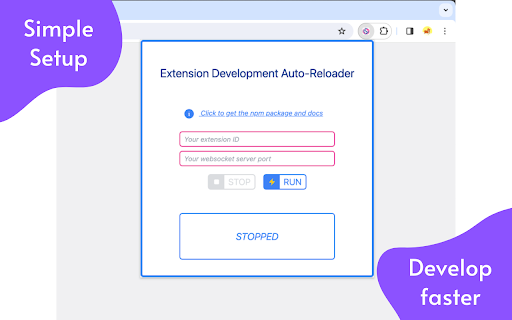
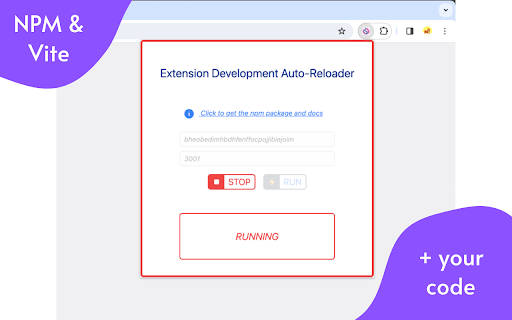
✅ Customizable and Flexible: Tailor the auto-reloader to fit your project's specific needs by customizing the WebSocket server port and adjusting the build configuration to include your service worker and content scripts.

This extensions companion NPM package is available at https://www.npmjs.com/package/vite-plugin-extension-reloader, but don't worry this information is also given to you when you run the extension.

The extension works by leveraging websocket communication to communicate your Vite build progress with this extension, which then reloads the target extension for you (the extension you are developing).

So developers - Don't let manual work slow down your extension development any longer.

Install "Extension Development - Auto Reloader" today and experience the only streamlined development workflow that makes you iterate faster, test more efficiently, and bring your innovative ideas to life with unprecedented ease.

Happy Developing 🏗️
Technical
- Version
- 1.3.2
- Manifest
- V3
- Size
- 66.16KiB
- Min Chrome
- 88
- Languages
- 1
- Featured
- No
Metadata
- ID
- falghmjeljhgmccbpffloemnfnmikked
- Developer ID
- uc61f4dfb219e536e554e48ecb92df3db
- Developer Email
- [email protected]
- Created
- Feb 3, 2024
- Last Updated (Store)
- Feb 4, 2024
- Last Scraped
- May 29, 2026
- Website
- —
- Support URL
- —
- Privacy Policy
- —
Similar extensions
Alternatives to Extension Development - Auto Reloader, ranked by description similarity.

Dev's Quick Reload: Extensions Reloader
A powerful multi-function reloader with keyboard shortcut support.
12
★ 5.0

Advanced Extension Reloader
Reload an unpacked extension with one click, a hotkey, or automatically (extension for developers).
1.0K
★ 5.0

browser-tab-reloader-browser-extension
Vscode Extension link: https://marketplace.visualstudio.com/items?itemName=tacu-stefan.browser-tab-reloader-vscode-extension/…
14

DevReloader
Instantly reload all unpacked extensions with one click. Developer productivity by AIO.com.ai
—

Extensions Auto Reloader
Reloads your browser extensions via a hotkey.
12

Page Reload
Boost your productivity with Page Reload, the must-have Chrome extension for automatic page refresh at your preferred intervals.
321
★ 5.0

Extensions Reloader
Reload all unpacked extensions using the extension's toolbar button or by browsing to "http://reload.extensions"
10.0K
★ 4.4

CRX Reload
Automatically reload your chrome extension during development with an http request
10
Data sourced from the Chrome Web Store · last verified May 29, 2026.