
SuperSurf
Browser automation for AI agents via MCP
As of June 2026, SuperSurf has 4 users in the Developer Tools category.
Usersno change0%
4
4
Ratingno change0%
—
— reviews
Reviewsno change0%
—
Version
3.0.2
Manifest V3
90-day change · In the last 90 days this extension 4 version updates, changed permissions.
History
10 snapshotsTracking since Apr 1, 2026.
View as table
| Date | Users | Rating | Reviews | Version |
|---|---|---|---|---|
| Apr 1, 2026 | — | — | — | 1.6.0 |
| Apr 10, 2026 | 1 | — | — | 1.6.0 |
| Apr 20, 2026 | 2 | — | — | 1.6.0 |
| Apr 25, 2026 | 2 | — | — | 1.6.0 |
| May 9, 2026 | — | — | — | 1.6.0 |
| May 14, 2026 | 1 | — | — | 1.9.2 |
| May 20, 2026 | — | — | — | 1.9.2 |
| May 26, 2026 | — | — | — | 2.0.0 |
| Jun 2, 2026 | — | — | — | 2.1.0 |
| Jun 8, 2026 | 2 | — | — | 2.1.0 |
| Now | 4 | — | — | 3.0.2 |
Changelog
- May 9, 2026permissions
alarms, debugger, activeTab, tabs, storage, management, webRequest, webNavigation, scripting, tabGroups, downloads
alarms, cookies, debugger, activeTab, tabs, storage, management, webRequest, webNavigation, scripting, tabGroups, downloads
Permissions & access
- Permissions
- alarmscookiesdebuggeractiveTabtabsstoragemanagementwebRequestwebNavigationscriptingtabGroupsdownloads
- Host access
- <all_urls>
Screenshots


About
SuperSurf gives AI coding agents direct control of your Chrome browser through the Model Context Protocol (MCP). Connect any MCP-compatible assistant — Claude, Cursor, Windsurf — and let it navigate pages, fill forms, capture screenshots, inspect network traffic, and run JavaScript, all through a secure localhost-only WebSocket. No data ever leaves your machine.

The extension pairs with a local Node.js server (supersurf-mcp on npm) that handles the MCP handshake and tool routing. Built for developers who want their AI to see and interact with the real web — real cookies, real sessions, real browser profiles. Open source under Apache-2.0.

WHY EXTENSION-BASED?

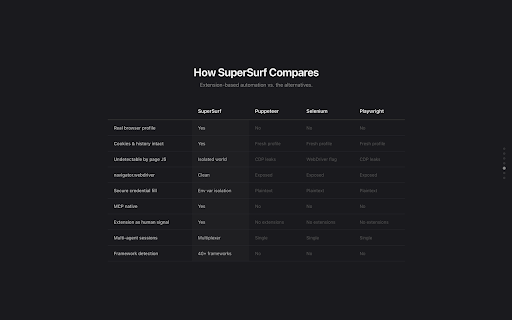
Unlike tools that spin up headless browsers, SuperSurf operates inside your real browser profile. Page interaction runs through Chrome's content script isolated world — invisible to page JavaScript. No CDP fingerprints, no VM script artifacts, no detectable automation flags. The extension itself is a human signal to anti-bot systems.

30+ TOOLS INCLUDED

- Navigation & tab management
- Click, type, hover, scroll, drag, key press
- Accessibility tree snapshots & element lookup
- Full-page and element screenshots
- PDF export
- Network request monitoring & inspection
- Console message capture
- Form filling & secure credential injection
- CSS style inspection
- JavaScript evaluation
- Performance metrics (FCP, LCP, CLS, TTFB)
- File downloads
- Multi-agent session multiplexing

SECURE BY DESIGN

- Localhost-only WebSocket — no external connections
- Credentials injected extension-side from environment variables — your AI agent never sees raw passwords
- Zero runtime dependencies in the extension — browser APIs only
- 100% open source — read every line at github.com/LiquidBuiltIt/Supersurf

PLATFORM SUPPORT

Currently supports macOS and Linux. Windows is not yet supported — if you'd like to see it, vote here: https://github.com/LiquidBuiltIt/Supersurf/issues/1

GETTING STARTED

1. Install this extension
2. Run: npx supersurf-mcp@latest (or add to your MCP client config)
3. Your AI agent now has a browser

Full docs and source: github.com/LiquidBuiltIt/Supersurf
Technical
- Version
- 3.0.2
- Manifest
- V3
- Size
- 977KiB
- Min Chrome
- 88
- Languages
- 1
- Featured
- No
Metadata
- ID
- falcdhojcinkkbffgnipppcdoaehgpek
- Developer ID
- u054178b50735d524967dde3c21172b2e
- Developer Email
- [email protected]
- Created
- Feb 25, 2026
- Last Updated (Store)
- Jun 8, 2026
- Last Scraped
- Jun 8, 2026
- Website
- —
- Support URL
- github.com/liquidbuiltit/supersurf/issues
Similar extensions
Alternatives to SuperSurf, ranked by description similarity.

Real Browser MCP
Let AI agents control your real browser - your tabs, your sessions, your logins
246
★ 5.0

Browser Agent Extension
AI Agent browser control extension - MCP + WebSocket
82

NavAgent
MCP browser navigation bridge. Pair with navagent-mcp (npm) to let your AI assistant control your browser.
11

MCP Chrome Extension - AI Browser Control
Turn Chrome into an MCP server. Let AI control your browser: navigate, click, fill forms, and take screenshots.
775

Browser Use for AI Agents
A local-only extension bridge for multiplexed browser MCP. Modified by [KnotFalse]; inspired by Blueprint MCP
120

Blueprint MCP for Chrome
Browser automation for Claude without token limits. Uses CSS selectors, not snapshots. Open source, zero telemetry.
1.0K
★ 5.0

WebMCP
WebMCP turns your browser into a programmable interface—letting AI navigate, click, and type on any website, exactly like you would.
133
★ 5.0

Crawlio for Chrome
Connect AI to your Browser. Let it navigate, click, take screenshots, inspect network traffic, and extract data.
21
Data sourced from the Chrome Web Store · last verified Jun 8, 2026.