
Get YouTube Transcript by CakeAI - Free
Get transcripts, captions and subtitles for YouTube videos and download them as CSV, SRT or text file. Unlimited and free of charge.
As of May 2026, Get YouTube Transcript by CakeAI - Free has 3,000 users and a 1.91/5 rating from 33 reviews in the Workflow & Planning category.
Usersno change0%
3.0K
3,000
Ratingno change0%
1.91
33 reviews
Reviewsno change0%
33
Version
0.3.0
Manifest V3
Permissions & access
- Permissions
- tabsstoragescriptingnotifications
- Host access
- https://*.youtube.com/*
Screenshots



About
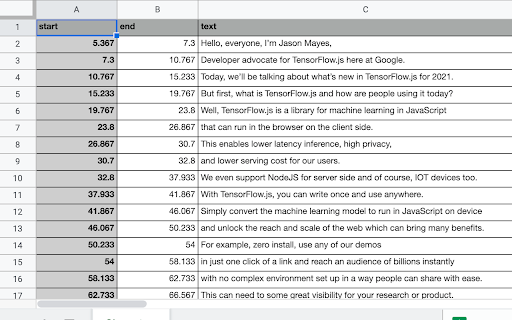
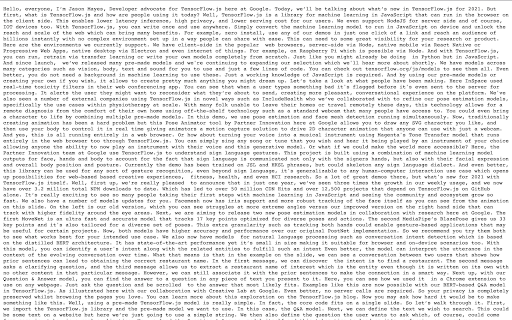
Download transcripts, captions and subtitles for YouTube videos and download them as a CSV, SRT or text file. Do you ever want to just get the text transcript of the video rather than watch the whole video. With this extension you can download the complete transcript of any YouTube video in text, CSV or SRT formats. See image for samples of transcripts in different file formats. ✨Features ✔️Fast, lightweight and private by default ✔️Download subtitles, captions and transcripts from YouTube 👨🏻💻️Use cases - Download a video's transcript and quickly search through transcript text to see if it contains the information you are looking for. Use CSV format to know exactly which part of the video you want to watch. - Download your own video's transcript and then use it as a starting point to make your video transcripts even better. - It will help you save time and improve comprehension. You can also use these transcripts to learn new languages - You can use the transcripts for educational or business purposes as well 🎁Pricing It's totally free for 1 video a day! You can donate to us at https://buy.stripe.com/bIY3et4Iw6lqeQgbII. For unlimited use, you can subscribe using https://buy.stripe.com/eVa02h7UIbFK6jK14f ❓How to use 1. Install the extension from Chrome Web Store. 2. Simply open a YouTube video and you will see the download transcript icon close to the video publish date. 3. Transcript will be downloaded Limitations - It doesn't work for livestream videos, yet. If you have any issues or have feedback for us, feel free to reach out to us on twitter at https://twitter.com/CakeAI_
Technical
- Version
- 0.3.0
- Manifest
- V3
- Size
- 56.37KiB
- Min Chrome
- 88
- Languages
- 1
- Featured
- No
Metadata
- ID
- faiaijnngjghehhhkabebphcllnejnin
- Developer ID
- u2e79618fa2af8346a281c98ed17025d1
- Developer Email
- [email protected]
- Created
- Feb 12, 2021
- Last Updated (Store)
- Aug 7, 2024
- Last Scraped
- May 29, 2026
- Website
- cakeai.app
- Support URL
- https://twitter.com/CakeAI_
- Privacy Policy
- https://www.cakeai.app/legal/privacy-policy
Similar extensions
Alternatives to Get YouTube Transcript by CakeAI - Free, ranked by description similarity.

Download YouTube Transcript
Quickly download YouTube transcript in any language and format. Transcribe a video to text and download subtitles for any workflow.
5.0K
★ 4.8

YouTube Text Tools - Video Transcript and Summary
YouTube to text: transcribe YouTube video to text, get accurate YouTube transcript with AI summary. Convert YouTube video to text…
10.0K
★ 4.5

Transcript YouTube
Use Transcript YouTube to transcribe video to text and download youtube subtitles! The transcript generator helps you get subtitles
6.0K
★ 4.6
YouTube Video Transcript
Transcribe youtube videos to text with YouTube Video Transcript. Extract, download, and convert online video transcripts easily.
20.0K
★ 4.5

YouTube To Text
Youtube to Text: transcribe youtube video to text, generate accurate youtube transcript. Simplify convert youtube video to text
200.0K
★ 4.6

Transcript YouTube
Use Transcript YouTube to download YouTube captions. Get YT transcript to transcribe youtube effortlessly
10.0K
★ 3.5

YouTube Subtitle Downloader
Youtube Subtitle Downloader: download subtitles from YouTube easily. Extract, copy or download with the youtube subtitle downloader
30.0K
★ 4.8

Youtube to Transcript
Get transcript from Youtube Video in a click with the YouTube to transcript converter and copy the text easily
20.0K
★ 4.6
Data sourced from the Chrome Web Store · last verified May 29, 2026.