
Ticket Scout
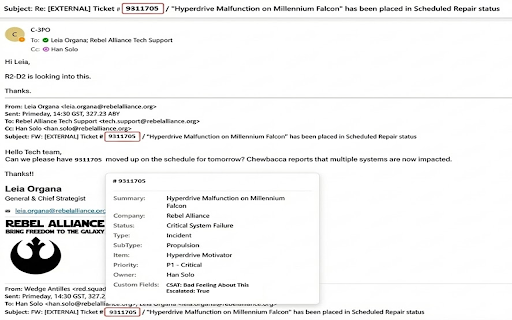
Hover over ticket IDs to see details instantly. Click for full info in Chrome's Side Panel. Currently supports ConnectWise PSA.
As of June 2026, Ticket Scout has 19 users in the Productivity category.
Usersup 72.7 percent+72.7%
19
19
Ratingno change0%
—
— reviews
Reviewsno change0%
—
Version
1.7.1
Manifest V3
90-day change · In the last 90 days this extension 4 version updates, changed permissions.
History
10 snapshotsTracking since Apr 1, 2026.
View as table
| Date | Users | Rating | Reviews | Version |
|---|---|---|---|---|
| Apr 1, 2026 | 11 | — | — | 1.3.2 |
| Apr 10, 2026 | 12 | — | — | 1.3.2 |
| Apr 20, 2026 | 19 | — | — | 1.4.0 |
| Apr 25, 2026 | 14 | — | — | 1.4.0 |
| May 2, 2026 | 20 | — | — | 1.5.0 |
| May 9, 2026 | 22 | — | — | 1.6.0 |
| May 20, 2026 | 16 | — | — | 1.6.0 |
| May 26, 2026 | 17 | — | — | 1.6.0 |
| Jun 2, 2026 | 17 | — | — | 1.7.1 |
| Jun 8, 2026 | 18 | — | — | 1.7.1 |
| Now | 19 | — | — | 1.7.1 |
Changelog
- May 26, 2026description
Ticket Scout detects PSA ticket IDs on web pages and gives you instant access to ticket details without leaving your current tab.

HOW IT WORKS

Ticket Scout highlights ticket IDs on supported websites. Hover to see a quick preview with key ticket information. Click to open the full details in Chrome's side panel, including related tickets for the same company.

Works out of the box on:
- ConnectWise platform sites
- Microsoft Teams
- Microsoft Outlook
- Huntress

Add custom detection patterns for other sites you use.

FEATURES

- Hover previews with customizable fields. Choose exactly which fields appear in tooltips.
- Side panel with full ticket details and related tickets
- Right-click any ticket ID for a native context menu to open in PSA or refresh
- Copy any ticket field value to clipboard with one click
- Recently viewed tickets for quick access with per-ticket refresh and remove
- Visual field selector. Drag to reorder which fields appear in tooltips and in the side panel, independently.
- Customizable highlighting styles. Control color, border, background, and opacity per section with live preview.
- Domain exclusions for sites where you don't want detection
- Smart caching with registry-driven field projection. Cache entries are 40-60% smaller.
- Cache viewer in settings. Grouped by company with a three-tab detail panel (formatted, raw fields, JSON) and per-entry refresh and remove.
- What's New banner after updates with a persistent changelog link
- Encrypted credential vault. API keys are never stored in plain text.
- Optional biometric security (Windows Hello / Touch ID) to lock vault per browser session

SETUP

1. Click the extension icon and select "Configure Extension"
2. Enter your PSA API credentials
3. Click "Test Connection" then "Save Settings"

PRIVACY

All credentials stay in your browser. API calls go directly to your PSA server. No data is collected, tracked, or sent to third parties.

REQUIREMENTS

- Chrome 128+ or Microsoft Edge 128+
- ConnectWise PSA API credentials
- Windows Hello or Touch ID required for biometric vault mode (optional)
Ticket Scout detects PSA ticket IDs on web pages and gives you instant access to ticket details without leaving your current tab.

HOW IT WORKS

Ticket Scout highlights ticket IDs on supported websites. Hover to see a quick preview with key ticket information. Click to open the full details in Chrome's side panel, including Company Tickets for the same account and Similar Tickets matched by keyword.

Works out of the box on:
- ConnectWise platform sites
- Asio (itsupport247.net)
- Microsoft Teams
- Microsoft Outlook
- Huntress

Add custom detection patterns for other sites you use.

FEATURES

- Hover previews with customizable fields. Choose exactly which fields appear in tooltips.
- Side panel with full ticket details. Company Tickets tab shows all tickets for the same account entered within your configured history window (open and closed). Similar Tickets tab surfaces tickets with matching keywords from the same company.
- Notes blade. Click the notes icon on any ticket to view every note, time entry, and meeting note in a chat-style conversation view. Sort oldest-to-newest or filter by note type.
- Right-click any ticket ID for a native context menu to open in PSA or refresh
- Copy any ticket field value to clipboard with one click
- Recently viewed tickets for quick access with per-ticket refresh and remove
- Visual field selector. Drag to reorder which fields appear in tooltips and in the side panel, independently.
- Customizable highlighting styles. Control color, border, background, and opacity per section with live preview.
- Domain exclusions for sites where you don't want detection
- Smart caching with registry-driven field projection. Cache entries are 40-60% smaller.
- Cache viewer in settings. Grouped by company with a three-tab detail panel (formatted, raw fields, JSON) and per-entry refresh and remove.
- What's New banner after updates with a persistent changelog link
- Encrypted credential vault. API credentials are AES-256-GCM encrypted on-device and never written to plain-text storage.
- Optional biometric security (Windows Hello / Touch ID) to lock vault per browser session

SETUP

1. Click the extension icon and select "Configure Extension"
2. Select your API region (North America, Europe, Australia, or On-Premises)
3. Enter your PSA API credentials (no Client ID required for most users)
4. Click "Test Connection" then "Save Settings"

PRIVACY

All credentials stay in your browser. API calls go directly to your PSA server. No data is collected, tracked, or sent to third parties.

REQUIREMENTS

- Chrome 128+ or Microsoft Edge 128+
- ConnectWise PSA API credentials

Optional features have additional requirements:
- Session Lock (biometric vault, one prompt per session): Windows 11, macOS 14+, Chrome 128+
- PRF-Enhanced (highest security vault mode): macOS 15+, Windows 11 25H2 with KB5077181 (February 2026 update), or a hardware security key; Chrome 147+ on Windows or Chrome 132+ on macOS
- May 26, 2026short_description
Hover over ticket IDs to see details instantly. Click for full info in Chrome's sidebar. Currently supports ConnectWise PSA.
Hover over ticket IDs to see details instantly. Click for full info in Chrome's Side Panel. Currently supports ConnectWise PSA.
- May 2, 2026description
Ticket Scout detects PSA ticket IDs on web pages and gives you instant access to ticket details without leaving your current tab.

HOW IT WORKS

Ticket Scout highlights ticket IDs on supported websites. Hover to see a quick preview with key ticket information. Click to open the full details in Chrome's side panel, including related tickets for the same company.

Works out of the box on:
- ConnectWise platform sites
- Microsoft Teams
- Microsoft Outlook
- Huntress

Add custom detection patterns for other sites you use.

FEATURES

- Hover previews with customizable fields
- Side panel with full ticket details and related tickets
- Right-click any ticket ID for native context menu — open in PSA or refresh
- Copy any ticket field value to clipboard with one click
- Recently viewed tickets for quick access with per-ticket refresh and remove
- Customizable highlighting styles
- Domain exclusions for sites where you don't want detection
- Smart caching for fast lookups
- Encrypted credential vault (AES-256-GCM) — API keys never stored in plain text
- Optional biometric security (Windows Hello / Touch ID) to lock vault per browser session

SETUP

1. Click the extension icon and select "Configure Extension"
2. Enter your PSA API credentials
3. Click "Test Connection" then "Save Settings"

PRIVACY

All credentials stay in your browser. API calls go directly to your PSA server. No data is collected, tracked, or sent to third parties.

REQUIREMENTS

- Chrome 128+ or Microsoft Edge 128+
- ConnectWise PSA API credentials
- Windows Hello or Touch ID required for biometric vault mode (optional)
Ticket Scout detects PSA ticket IDs on web pages and gives you instant access to ticket details without leaving your current tab.

HOW IT WORKS

Ticket Scout highlights ticket IDs on supported websites. Hover to see a quick preview with key ticket information. Click to open the full details in Chrome's side panel, including related tickets for the same company.

Works out of the box on:
- ConnectWise platform sites
- Microsoft Teams
- Microsoft Outlook
- Huntress

Add custom detection patterns for other sites you use.

FEATURES

- Hover previews with customizable fields. Choose exactly which fields appear in tooltips.
- Side panel with full ticket details and related tickets
- Right-click any ticket ID for a native context menu to open in PSA or refresh
- Copy any ticket field value to clipboard with one click
- Recently viewed tickets for quick access with per-ticket refresh and remove
- Visual field selector. Drag to reorder which fields appear in tooltips and in the side panel, independently.
- Customizable highlighting styles. Control color, border, background, and opacity per section with live preview.
- Domain exclusions for sites where you don't want detection
- Smart caching with registry-driven field projection. Cache entries are 40-60% smaller.
- Cache viewer in settings. Grouped by company with a three-tab detail panel (formatted, raw fields, JSON) and per-entry refresh and remove.
- What's New banner after updates with a persistent changelog link
- Encrypted credential vault. API keys are never stored in plain text.
- Optional biometric security (Windows Hello / Touch ID) to lock vault per browser session

SETUP

1. Click the extension icon and select "Configure Extension"
2. Enter your PSA API credentials
3. Click "Test Connection" then "Save Settings"

PRIVACY

All credentials stay in your browser. API calls go directly to your PSA server. No data is collected, tracked, or sent to third parties.

REQUIREMENTS

- Chrome 128+ or Microsoft Edge 128+
- ConnectWise PSA API credentials
- Windows Hello or Touch ID required for biometric vault mode (optional)
- Apr 10, 2026description
Ticket Scout detects PSA ticket IDs on web pages and gives you instant access to ticket details without leaving your current tab.

HOW IT WORKS

Ticket Scout highlights ticket IDs on supported websites. Hover to see a quick preview with key ticket information. Click to open the full details in Chrome's side panel, including related tickets for the same company.

Works out of the box on:
- ConnectWise platform sites
- Microsoft Teams
- Microsoft Outlook
- Huntress

Add custom detection patterns for other sites you use.

FEATURES

- Hover previews with customizable fields
- Side panel with full ticket details and related tickets
- Recently viewed tickets for quick access
- Customizable highlighting styles
- Domain exclusions for sites where you don't want detection
- Smart caching for fast lookups
- Encrypted credential vault (AES-256-GCM) — API keys never stored in plain text
- Optional biometric security (Windows Hello / Touch ID) to lock vault per browser session

SETUP

1. Click the extension icon and select "Configure Extension"
2. Enter your PSA API credentials
3. Click "Test Connection" then "Save Settings"

PRIVACY

All credentials stay in your browser. API calls go directly to your PSA server. No data is collected, tracked, or sent to third parties.

REQUIREMENTS

- Chrome 128+ or Microsoft Edge 128+
- ConnectWise PSA API credentials
- Windows Hello or Touch ID required for biometric vault mode (optional)
Ticket Scout detects PSA ticket IDs on web pages and gives you instant access to ticket details without leaving your current tab.

HOW IT WORKS

Ticket Scout highlights ticket IDs on supported websites. Hover to see a quick preview with key ticket information. Click to open the full details in Chrome's side panel, including related tickets for the same company.

Works out of the box on:
- ConnectWise platform sites
- Microsoft Teams
- Microsoft Outlook
- Huntress

Add custom detection patterns for other sites you use.

FEATURES

- Hover previews with customizable fields
- Side panel with full ticket details and related tickets
- Right-click any ticket ID for native context menu — open in PSA or refresh
- Copy any ticket field value to clipboard with one click
- Recently viewed tickets for quick access with per-ticket refresh and remove
- Customizable highlighting styles
- Domain exclusions for sites where you don't want detection
- Smart caching for fast lookups
- Encrypted credential vault (AES-256-GCM) — API keys never stored in plain text
- Optional biometric security (Windows Hello / Touch ID) to lock vault per browser session

SETUP

1. Click the extension icon and select "Configure Extension"
2. Enter your PSA API credentials
3. Click "Test Connection" then "Save Settings"

PRIVACY

All credentials stay in your browser. API calls go directly to your PSA server. No data is collected, tracked, or sent to third parties.

REQUIREMENTS

- Chrome 128+ or Microsoft Edge 128+
- ConnectWise PSA API credentials
- Windows Hello or Touch ID required for biometric vault mode (optional)
- Apr 10, 2026permissions
storage, sidePanel, alarms, idle
storage, sidePanel, alarms, idle, contextMenus
Permissions & access
- Permissions
- storagesidePanelalarmsidlecontextMenus
- Host access
- None declared
Screenshots


About
Ticket Scout detects PSA ticket IDs on web pages and gives you instant access to ticket details without leaving your current tab.

HOW IT WORKS

Ticket Scout highlights ticket IDs on supported websites. Hover to see a quick preview with key ticket information. Click to open the full details in Chrome's side panel, including Company Tickets for the same account and Similar Tickets matched by keyword.

Works out of the box on:
- ConnectWise platform sites
- Asio (itsupport247.net)
- Microsoft Teams
- Microsoft Outlook
- Huntress

Add custom detection patterns for other sites you use.

FEATURES

- Hover previews with customizable fields. Choose exactly which fields appear in tooltips.
- Side panel with full ticket details. Company Tickets tab shows all tickets for the same account entered within your configured history window (open and closed). Similar Tickets tab surfaces tickets with matching keywords from the same company.
- Notes blade. Click the notes icon on any ticket to view every note, time entry, and meeting note in a chat-style conversation view. Sort oldest-to-newest or filter by note type.
- Right-click any ticket ID for a native context menu to open in PSA or refresh
- Copy any ticket field value to clipboard with one click
- Recently viewed tickets for quick access with per-ticket refresh and remove
- Visual field selector. Drag to reorder which fields appear in tooltips and in the side panel, independently.
- Customizable highlighting styles. Control color, border, background, and opacity per section with live preview.
- Domain exclusions for sites where you don't want detection
- Smart caching with registry-driven field projection. Cache entries are 40-60% smaller.
- Cache viewer in settings. Grouped by company with a three-tab detail panel (formatted, raw fields, JSON) and per-entry refresh and remove.
- What's New banner after updates with a persistent changelog link
- Encrypted credential vault. API credentials are AES-256-GCM encrypted on-device and never written to plain-text storage.
- Optional biometric security (Windows Hello / Touch ID) to lock vault per browser session

SETUP

1. Click the extension icon and select "Configure Extension"
2. Select your API region (North America, Europe, Australia, or On-Premises)
3. Enter your PSA API credentials (no Client ID required for most users)
4. Click "Test Connection" then "Save Settings"

PRIVACY

All credentials stay in your browser. API calls go directly to your PSA server. No data is collected, tracked, or sent to third parties.

REQUIREMENTS

- Chrome 128+ or Microsoft Edge 128+
- ConnectWise PSA API credentials

Optional features have additional requirements:
- Session Lock (biometric vault, one prompt per session): Windows 11, macOS 14+, Chrome 128+
- PRF-Enhanced (highest security vault mode): macOS 15+, Windows 11 25H2 with KB5077181 (February 2026 update), or a hardware security key; Chrome 147+ on Windows or Chrome 132+ on macOS
Technical
- Version
- 1.7.1
- Manifest
- V3
- Size
- 159KiB
- Min Chrome
- 88
- Languages
- 1
- Featured
- No
Metadata
- ID
- fahhkmhmeljaepiiifgcgjopolamfndb
- Developer ID
- u2e3c66a0a272efb2e24425d358b93f6b
- Developer Email
- [email protected]
- Created
- Dec 22, 2025
- Last Updated (Store)
- May 26, 2026
- Last Scraped
- Jun 8, 2026
- Website
- —
- Support URL
- —
- Privacy Policy
- —
Similar extensions
Alternatives to Ticket Scout, ranked by description similarity.

TicketRabbit
Speed up for your Ticket Hunting
212
★ 3.0

Trouble Ticketing Management Utils
Quick access to ticket URL for following trouble ticketing systems: Service Now, JIRA and ClickUp.
4
★ 5.0

ScoutTab: Organize your tabs
Organize and Manage your Browser Tabs Effortlessly.
12
★ 5.0

SeatSnoop2U: Ticket2U Event Companion
Show the number of seats/tickets available for a Ticket2U event. This extension is not affiliated with Ticket2U.
—

Ticketmaster - Smart Queue Assistant
Ticketmaster, Skiddle, AXS and Live Nation Smart Queue Assistant.
405
★ 4.5

T-Tickets Scraper: Export Events, Tickets, Artists & More
Ticketmaster Scraper: Collect setlists, reviews, venue details & artist profiles. Export to CSV, JSON, XLSX.
112
★ 4.5

API Scout Professional
Advanced API discovery and analysis tool - Discover Hidden APIs in Real-Time
19

TIXHELP Queue Extension
Pass Queue
336
Data sourced from the Chrome Web Store · last verified Jun 8, 2026.