
Sitepad
Save important notes.
As of May 2026, Sitepad has 6 users and a 5.00/5 rating from 2 reviews in the Workflow & Planning category.
Usersdown 40.0 percent−40.0%
6
6
Ratingno change0%
5.00
2 reviews
Reviewsno change0%
2
Version
2.4.1
Manifest V3
History
3 snapshotsTracking since Apr 1, 2026.
View as table
| Date | Users | Rating | Reviews | Version |
|---|---|---|---|---|
| Apr 1, 2026 | 10 | 5.00 | 2 | 2.4.1 |
| Apr 30, 2026 | 11 | 5.00 | 2 | 2.4.1 |
| May 29, 2026 | 10 | 5.00 | 2 | 2.4.1 |
| Now | 6 | 5.00 | 2 | 2.4.1 |
Permissions & access
- Permissions
- storagedownloadsscriptingtabsactiveTab
- Host access
- <all_urls>
Screenshots

About
Sitepad is designed for efficient note-taking while browsing the web. It allows users to format text, upload images, and associate notes with specific URLs for easy retrieval. Features like drag-and-drop reordering, clipboard support, and export options (CSV and PDF) enhance usability. Notes are stored locally for security and persistence. The clean interface, visual feedback, and print functionality make it a user-friendly tool for capturing and organizing information seamlessly.

Features Include:
1. Rich Text Editing
Users can format their notes with options for bold, italic, underline, bullet lists, and numbered lists.
Text color and size adjustments are available for better customization.

2. Image Handling
Users can upload images directly into their notes via a file input or by pasting images from the clipboard.
Each image is contained within a dedicated container that includes a delete button for easy removal.

3. Note Management
Users can save notes associated with specific URLs, allowing for organized retrieval based on the website.
Notes can be edited, deleted, and reordered through drag-and-drop functionality.

4. Clipboard Support
The extension supports pasting both text and images, with automatic sanitization of HTML content to ensure security.

5. Storage and Retrieval
Notes are stored in Chrome's local storage, ensuring they persist across sessions.
Users can retrieve notes based on the current page, the entire domain, or all sites.

6. Export Options
Users can export their notes to a CSV file for easy sharing or backup.
Notes can also be saved as PDF files for printing or further editing.

7. User Interface
A clean and intuitive interface that includes a toggle for switching between note editing and viewing modes.
Visual feedback for actions like saving notes, deleting notes, and uploading images.

8. Accessibility
The extension is designed to be lightweight and responsive, making it accessible on various devices.

9. Drag-and-Drop Functionality
Users can reorder their notes easily by dragging and dropping them within the notes container.

10. Print Functionality
Users can print their notes directly from the extension, with a dedicated print layout for better formatting.

11. Enhanced Productivity
Rich text editing features allow users to create well-structured and visually appealing notes, improving readability and organization.

12. Convenience
The ability to upload images and paste content directly from the clipboard streamlines the note-taking process.

13. Organization
Associating notes with specific URLs helps users keep track of information relevant to their browsing activities.

14. Flexibility
Users can choose how they want to view and manage their notes, whether by the current page, domain, or all sites.

15. Data Security
The sanitization of pasted content helps protect users from potential security risks associated with untrusted HTML.

16. Easy Sharing and Backup
The export functionality allows users to easily share their notes or back them up for future reference.

17. User-Friendly Interface
The intuitive design and visual feedback mechanisms enhance the overall user experience, making it easy for anyone to use.

18. Customizability
Users can personalize their notes with different formatting options, making it easier to highlight important information.

19. Time-Saving
The drag-and-drop feature and quick access to formatting options save users time when organizing and editing their notes.

20. Cross-Platform Compatibility
As a Chrome extension, it can be used across different operating systems that support the Chrome browser, providing a consistent experience.

Conclusion
Sitepad is a powerful tool for anyone looking to enhance their note-taking capabilities while browsing the web, making it easier to capture, organize, and manage information effectively.
Technical
- Version
- 2.4.1
- Manifest
- V3
- Size
- 38.71KiB
- Min Chrome
- 88
- Languages
- 1
- Featured
- No
Metadata
- ID
- facghicmkeaaebiplfmhicalmpkcjdfp
- Developer ID
- uc142b332d3931ae4a79bf07952a397f1
- Developer Email
- [email protected]
- Created
- Oct 16, 2024
- Last Updated (Store)
- Feb 25, 2025
- Last Scraped
- May 29, 2026
- Website
- —
- Support URL
- —
- Privacy Policy
- —
Similar extensions
Alternatives to Sitepad, ranked by description similarity.

Notepapa
Smarter Notes for Smarter Decisions
24
★ 5.0

Notes Online
The in-page notepad for taking notes online directly on any web page. No login, autosave, 1-click install, and full privacy
5.0K
★ 4.3

Stick It
Stick It - create and save sticky notes that are unique to each website you visit. Whether you're researching, shopping, or working…
26
★ 5.0

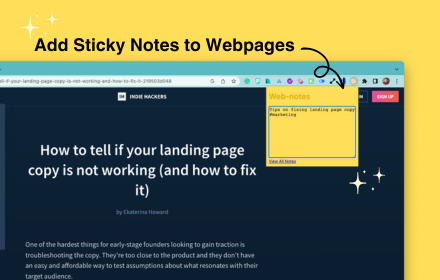
Web Notes
Add customizable sticky notes to any webpage!
21

Smart Sticky Notes
Enhance productivity with smart sticky notes! Save quick notes, access references effortlessly while you work.
34
★ 5.0
Web Sticky Notes
Quick notes that stick on web-pages to ease future reference
5.0K
★ 4.0

Webpage Notes
Add and manage notes for specific webpages with URL pattern matching
3

TopiNote
Convenient notes for work or study online
4
Data sourced from the Chrome Web Store · last verified May 29, 2026.