
Focus On Search
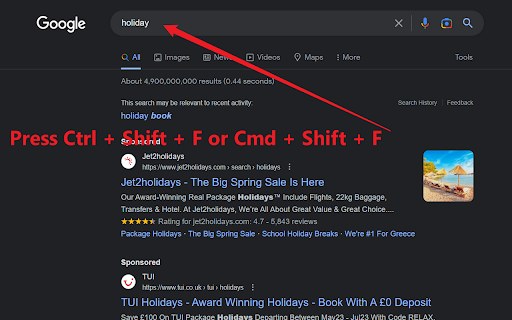
Press the hotkey (Ctrl+Shift+F or Command+Shift+F) to instantly focus on the search bar of a page and select its text.
As of May 2026, Focus On Search has 17 users in the Workflow & Planning category.
Usersdown 29.2 percent−29.2%
17
17
Ratingno change0%
—
— reviews
Reviewsno change0%
—
Version
1.0
Manifest V3
History
3 snapshotsTracking since Apr 1, 2026.
View as table
| Date | Users | Rating | Reviews | Version |
|---|---|---|---|---|
| Apr 1, 2026 | 24 | — | — | 1.0 |
| Apr 30, 2026 | 28 | — | — | 1.0 |
| May 29, 2026 | 25 | — | — | 1.0 |
| Now | 17 | — | — | 1.0 |
Permissions & access
- Permissions
- activeTabscripting
- Host access
- None declared
Screenshots

About
Focus On Search: Swiftly Cycle Through Search Fields with a Single Hotkey! (Ctrl + Shift + F)

Discover the ultimate productivity booster with Focus On Search, a lightweight Chrome extension that lets you seamlessly switch between Search fields on any webpage. Say goodbye to time-consuming manual navigation and let the magic of Input Navigator simplify your browsing experience.

Key Features:

🔍 Autofocus on the First Search Input Field: Just press the hotkey (Ctrl + Shift + F), and the extension will automatically focus on the first Search input field, making it easy for you to start typing right away.

🔄 Effortlessly Cycle Through Input Fields: With the same hotkey, you can quickly navigate between all input fields on a webpage in a loop, ensuring smooth and efficient browsing.

📝 Select Text in Input Fields: When focusing on an input field with pre-existing text, the app will select the entire text, allowing you to easily replace or edit the content.

Why Install Focus On Search?

🚀 Boost Productivity: Speed up your browsing and data entry tasks, saving you valuable time and energy.

✅ User-Friendly: No complicated setup or configuration required - just install and start using the hotkey immediately.

💼 Perfect for Work & Personal Use: Focus On Search is a versatile tool, ideal for everyday browsing, form-filling, data entry, or administrative tasks.

Get Focus On Search now and experience effortless navigation through input fields on any webpage!"
Technical
- Version
- 1.0
- Manifest
- V3
- Size
- 30.72KiB
- Min Chrome
- 88
- Languages
- 1
- Featured
- Yes
Metadata
- ID
- eppkodlcmahiccijhnbchhkabpaepfce
- Developer ID
- u29407dd7c56827b9a51a97a262d7a7d0
- Developer Email
- [email protected]
- Created
- Apr 3, 2023
- Last Updated (Store)
- Apr 3, 2023
- Last Scraped
- May 29, 2026
- Website
- —
- Support URL
- —
- Privacy Policy
- —
Similar extensions
Alternatives to Focus On Search, ranked by description similarity.

Search Box Focus
Press Tab to quickly access the main search bar or search field of any website. No need to use your mouse! Autofocus available!
1.0K
★ 4.9

Quick Tab Search
Quickly search and switch between open tabs
209
★ 5.0

Tab Search
Search and switch to a specific tab
18
★ 3.0

The Productive Homescreen
Replace your new tab with a productive dashboard featuring todos and quick links
9

Focus Dock
Lightning-fast universal launcher. Press ⌘. to instantly search tabs, bookmarks, history, or the web.
6

Focus Helper
Will help to complete a task by limiting the amount of distractions.
22
★ 5.0

All in One Context Menu: Paste From Context Menu, Context Menu Search
Paste from Context Menu, Context Menu Search, Context Menu Bookmarks, Enable Right Click etc. features are all in one extension.
175
★ 4.2

SearchSync - Custom Instant Search
Automates copying text to preset URLs with paste and submit.
7
★ 5.0
Data sourced from the Chrome Web Store · last verified May 29, 2026.