
Color Picker & Comparator
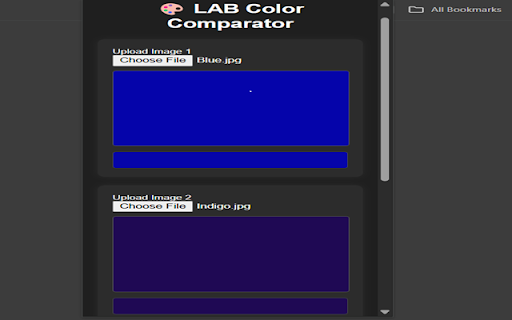
This Chrome Extension allows users to upload two images, click on any pixel in each, and compare the color values from both images
As of June 2026, Color Picker & Comparator has 20 users and a 5.00/5 rating from 2 reviews in the Productivity category.
Usersup 25.0 percent+25.0%
20
20
Ratingno change0%
5.00
2 reviews
Reviewsno change0%
2
Version
1.1
Manifest V3
History
3 snapshotsTracking since Apr 21, 2026.
View as table
| Date | Users | Rating | Reviews | Version |
|---|---|---|---|---|
| Apr 21, 2026 | 16 | 5.00 | 2 | 1.1 |
| May 11, 2026 | 15 | 5.00 | 2 | 1.1 |
| Jun 6, 2026 | 16 | 5.00 | 2 | 1.1 |
| Now | 20 | 5.00 | 2 | 1.1 |
Permissions & access
- Permissions
- storage
- Host access
- None declared
Screenshots

About
✅ Overview
This Chrome Extension allows users to upload two images, click on any pixel in each, and compare the color values from both images using:

LAB color space (used for perceptual color differences)

RGB values

Hex codes

ΔE (Delta E) – the perceived difference between the two selected colors

🧰 How it Works

Image Upload

Users can upload two different images from their computer.

Each image is rendered on a canvas element.

Pixel Color Selection

Users click anywhere on each canvas to select a specific pixel.

The selected pixel’s color is sampled using the getImageData() method from the canvas.

The sampled RGB is then:

Converted to Hex

Converted to LAB

Color Comparison

After both pixels are selected, the extension:

Displays the LAB values for both

Calculates the ΔE (difference in LAB) to show how different the colors are visually

Shows RGB and Hex codes

Live Visualization

Selected colors are previewed in colored boxes.

Color values and the ΔE difference are shown live.

Comparison History

Every time a pair is selected, it's added to a history log below.

The history shows:

Color 1 and Color 2 previews

LAB values

ΔE value

This helps in tracking multiple comparisons during a session.

Reset & Download

A Reset button clears all images, values, and history.

A Download History button saves the comparison history as a .json file.

📦 Features

Feature	Description

🎯 Pixel Picker	Click to pick exact pixels, not just image center
🎨 LAB/RGB/Hex Display	Shows all relevant color values
📊 ΔE Calculation	Perceptual color difference using CIE76
🕹 Modern UI	CSS-styled, responsive layout
🧠 Comparison History	Save, view, and download color comparison history
🧼 Reset Option	Start fresh at any time

🧠 Who Is It For?

This tool is ideal for:

UI/UX designers
Painters and digital artists
Engineers and color quality inspectors
Anyone who needs precise color comparison
Technical
- Version
- 1.1
- Manifest
- V3
- Size
- 17.89KiB
- Min Chrome
- 88
- Languages
- 1
- Featured
- No
Metadata
- ID
- epigdlgolildigbbmeadmopkfbebdnhk
- Developer ID
- u92570fd8df6f45af16ad3fe0ecb3134e
- Developer Email
- [email protected]
- Created
- Apr 4, 2025
- Last Updated (Store)
- Apr 7, 2025
- Last Scraped
- Jun 6, 2026
- Website
- —
- Support URL
- —
- Privacy Policy
- —
Similar extensions
Alternatives to Color Picker & Comparator, ranked by description similarity.

Eyedropper Tool - Color Chooser
Grab any pixel colour from any webpage and copy its HEX code instantly.
176

Pixel Picker
A color picker extension that allows you to select and copy colors from any webpage.
16

Free Color Picker Pro: EyeDropper & Palette
The #1 Free Color Picker. Instantly pick colors from any website, save history, and generate beautiful palettes.
32
★ 5.0

Image Color Picker
Color Picker for desktop.
6

ColorScout
Pick colours from any page and copy them to your clipboard. HEX & RGB with history and contrast hints.
24

ColorSnap - Color Picker for Web
ColorSnap: Advanced color picker extension. Extract colors from websites, images. RGB, HEX, RGBA support. Essential for web design.
299
★ 5.0

ColorPicker
Easily pick colors from your browser screen.
94
★ 4.8

Color Picker – Eye Dropper & Palette Generator
Pick colors, generate palettes, export to JSON/CSS/ASE.
—
Data sourced from the Chrome Web Store · last verified Jun 6, 2026.